
Choosing a compact keyboard for older adults learning computers involves balancing size, readability, and ease of use. The best options offer large print keys, quiet operation, and simple connectivity, but often trade off on features like extra keys or wireless flexibility. The Macally Large Print Keyboard stands out for its clarity, while the Logitech K250 offers affordability and wireless convenience. However, some models may compromise on key feel or compatibility. Keep reading for a detailed breakdown of the top choices and what makes each one unique.
Key Takeaways
- Large print keys significantly improve readability for older users, making some models more suitable than others.
- Wired options tend to be more reliable and straightforward, but wireless models add convenience and reduce clutter.
- Quiet, scissor switch keys benefit users sensitive to noise, favoring certain models over traditional membrane keyboards.
- Compatibility with both Mac and Windows can influence choice, especially for users with mixed devices.
- Price varies widely; the best value balances features with affordability, while premium options prioritize build quality and advanced features.
| Macally Large Print Keyboard for Mac (Dual USB-C & USB-A) – Backlit Small Wired Keyboard with Quiet Scissor Switch Keys |  | Best Overall for Visual Accessibility and Mac Users | Large print keys: Yes | Backlit keys: Yes, adjustable | Connection type: Wired (USB-C & USB-A) | VIEW ON AMAZON | See Our Full Breakdown |
| Large Print Backlit Keyboard, Wired USB for Seniors & Low Vision |  | Best for Low Vision and Ease of Use in Varied Lighting Conditions | Key size: Large | Backlight: White LED, adjustable | Connection: Wired USB | VIEW ON AMAZON | See Our Full Breakdown |
| Perixx PERIBOARD-432 Wired Mini USB Keyboard – X Type Scissor Keys – Big Print Keys – US English, Black |  | Best for Compact, Sleek Design with Quiet Typing | Key mechanism: Scissor | Key size: Large print | Layout: Mini | VIEW ON AMAZON | See Our Full Breakdown |
| Arteck 2.4G Wireless Keyboard – Ultra Slim and Compact with Media Hotkeys for Windows and Smart TV |  | Best Wireless Option with Media Hotkeys for Versatile Use | Connection: 2.4G Wireless | Dimensions: 11.12 x 4.7 x 0.2 inches | Weight: 7.65 oz | VIEW ON AMAZON | See Our Full Breakdown |
| Macally Small USB Wired Keyboard for Mac and Windows |  | Best Compact Keyboard for On-the-Go Use and Cross-Platform Compatibility | Number of Keys: 78 | Shortcut Keys: 13 | Cable Length: 4.7 feet | VIEW ON AMAZON | See Our Full Breakdown |
| Logitech K250 Compact Wireless Bluetooth Keyboard with Number Pad, Graphite |  | Best Overall for Ease and Eco-Friendliness | Connectivity: Bluetooth wireless | Design: Spill-resistant, compact layout with number pad | Battery Life: 12 months | VIEW ON AMAZON | See Our Full Breakdown |
| I Focus Mini 78-Key Wired Keyboard with Cover for Laptop, Mac, Windows |  | Best for Portability and Simplicity | Number of Keys: 78 | Connection: Wired | Line Length: 1.3 meters (51 inches) | VIEW ON AMAZON | See Our Full Breakdown |
| Perixx PERIBOARD-213U Wired Silent USB Scissor Keyboard |  | Best Quiet Typing and Hotkey Access | Connectivity: Wired USB | Switch Type: Scissor | Number of Keys: 96 | VIEW ON AMAZON | See Our Full Breakdown |
| Macally Small Wireless Keyboard and Mouse Combo – Compact 78-Key Mini Keyboard with 3 DPI Modes | 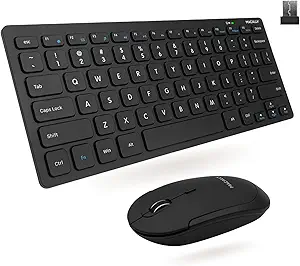 | Best Combo for Space-Saving Flexibility | Connectivity: 2.4GHz RF wireless | Range: 30 feet | Keyboard Layout: 78 keys | VIEW ON AMAZON | See Our Full Breakdown |
| Rii RK907 Ultra-Slim Compact USB Wired Keyboard for Mac and PC – Black |  | Best for Dual-Platform Use and Minimalist Design | Compatible Devices: Mac and PC | Connectivity Technology: USB-A | Additional Features: Water resistant | VIEW ON AMAZON | See Our Full Breakdown |
| Perixx PERIDUO-212 Wired Mini Keyboard and Mouse Set |  | Best Overall for Space-Conscious Use | Keyboard Dimensions: 11.46 × 5.43 × 0.77 inches | Mouse Dimensions: 4.09 × 2.44 × 1.33 inches | DPI: 1000 | VIEW ON AMAZON | See Our Full Breakdown |
| Mini Wired Keyboard with 78 Keys for PC and Laptop |  | Best for Portability and Multi-Device Use | Connectivity Technology: wired | Number of Keys: 78 | Layout: QWERTY | VIEW ON AMAZON | See Our Full Breakdown |
| compact keyboards for older adults learning computer | Compatibility |
|---|---|
| Macally Large Print Keyboard f | MacBook Air, MacBook Pro, iMac, Mac Mini |
| Large Print Backlit Keyboard | Windows, Mac OS |
| Perixx PERIBOARD-432 Wired Min | — |
| Arteck 2.4G Wireless Keyboard | Windows 11/10/8/7, Smart TV |
| Macally Small USB Wired Keyboa | Mac and Windows |
| Logitech K250 Compact Wireless | MacBook Neo laptops |
| I Focus Mini 78-Key Wired Keyb | Windows 10/8/7/Vista/XP, Mac, Chrome OS |
| Perixx PERIBOARD-213U Wired Si | — |
| Macally Small Wireless Keyboar | PC |
| Rii RK907 Ultra-Slim Compact U | — |
| Perixx PERIDUO-212 Wired Mini | Windows 7, 8, 10, 11 |
| Mini Wired Keyboard with 78 Ke | — |
More Details on Our Top Picks
Macally Large Print Keyboard for Mac (Dual USB-C & USB-A) – Backlit Small Wired Keyboard with Quiet Scissor Switch Keys
This keyboard stands out for its large, high-contrast print keys combined with adjustable backlighting, making it an excellent choice for older adults with visual impairments or those who need better visibility in low-light settings. Compared with the Large Print Backlit Keyboard, it offers Mac-specific shortcut keys, which streamline workflows for Mac users, but its wired connection limits portability. The compact size saves desk space, yet some users might find the smaller key travel less comfortable for extended typing sessions. Its dual USB-C and USB-A ports add versatility for various Apple devices, making setup straightforward. This pick makes the most sense for Mac-using seniors who prioritize visibility and lighting, but less so for those needing wireless flexibility or a more tactile feel.
Pros:- Large print, high-contrast keys improve visibility and reduce eye strain
- Adjustable backlit keys enhance usability in dark environments
- Compact design saves desk space and reduces clutter
- Dual USB-C & USB-A ports ensure broad device compatibility
Cons:- Wired connection limits mobility and ease of placement
- Small size might reduce key travel comfort during long typing sessions
Best for: Older adults who primarily use Mac devices and need enhanced visibility and lighting for low-light environments
Not ideal for: Users who prefer wireless setup or switch frequently between devices and need greater portability
- Large print keys:Yes
- Backlit keys:Yes, adjustable
- Connection type:Wired (USB-C & USB-A)
- Compatibility:MacBook Air, MacBook Pro, iMac, Mac Mini
- Keyboard size:Compact
- Key mechanism:Scissor switch
Our verdict“This keyboard is ideal for Mac users who need clear, illuminated keys and don’t mind wired connectivity for a static workspace.”
Large Print Backlit Keyboard, Wired USB for Seniors & Low Vision
This wired USB keyboard emphasizes large, easy-to-read keys with bright white LED backlighting, making it especially suitable for users with low vision or seniors who need clear cues. Compared with the Macally Large Print Keyboard, it offers a more traditional layout with a numeric keypad and ergonomic wrist rest, which can improve comfort during extended use. However, it lacks wireless convenience and has no backlight off option, which could be inconvenient when the computer is in standby. Its wide OS compatibility makes it a versatile choice for mixed environments. This keyboard makes the most sense for users seeking maximum visibility and durable design, though those preferring wireless or customizable lighting might look elsewhere.
Pros:- Large, easy-to-read keys improve visibility
- Bright white LED backlighting enhances usability in all lighting conditions
- Includes wrist rest and protective cover for durability and comfort
- Wide OS compatibility simplifies setup
Cons:- Backlight cannot be turned off when in standby mode
- No wireless option limits mobility
- Limited multimedia key compatibility with Mac OS
Best for: Seniors or visually impaired users who need bright, large keys and ergonomic features for comfortable typing
Not ideal for: People who prefer wireless setups or need a more compact design for portability
- Key size:Large
- Backlight:White LED, adjustable
- Connection:Wired USB
- Compatibility:Windows, Mac OS
- Wrist rest:Yes
- Dimensions:17.67 x 7.48 x 1 inches
Our verdict“This keyboard is best for those prioritizing visibility and ergonomic comfort in a wired, durable design, especially for low vision needs.”
Perixx PERIBOARD-432 Wired Mini USB Keyboard – X Type Scissor Keys – Big Print Keys – US English, Black
This minimalistic wired keyboard offers a space-saving profile with large print keys and quiet, responsive scissor keys, making it suitable for users who want a sleek, modern look that doesn’t compromise on visibility. Compared with the Macally Small USB Keyboard, the Perixx provides dedicated multimedia shortcuts and a slightly larger layout, which can benefit those who need quick access to media controls. Its compact design, however, limits key size and travel, which might reduce comfort for long typing sessions. The absence of backlit keys means it’s less suitable for dim environments. This model makes the most sense for users who want a space-efficient keyboard with straightforward functionality, but not for those needing lighting or extensive key travel for comfort.
Pros:- Compact, space-saving design fits small workspaces
- Large print keys improve visibility
- Quiet, responsive scissor keys enhance comfort
- Dedicated multimedia shortcuts add convenience
Cons:- No backlit keys limits use in dark settings
- Limited key travel may reduce comfort for extended typing
- Wired connection reduces portability
Best for: Users seeking a compact, modern keyboard with large print keys for occasional use or limited desk space
Not ideal for: People who work in poorly lit environments or require backlit keys for visibility
- Key mechanism:Scissor
- Key size:Large print
- Layout:Mini
- Connection:Wired USB
- Multimedia keys:Yes
- Color:Black
Our verdict“This keyboard is ideal for those wanting a sleek, space-efficient device with large print keys and quiet operation, but it’s less suited for low-light environments.”
Arteck 2.4G Wireless Keyboard – Ultra Slim and Compact with Media Hotkeys for Windows and Smart TV
This wireless keyboard emphasizes portability with its ultra-slim, compact profile, making it suitable for users who need flexibility across multiple devices, including smart TVs and laptops. Compared to the wired options like the Large Print Backlit Keyboard, it offers cordless convenience and longer range, although it sacrifices the backlit feature and has a shorter battery life span of up to 4 months. Its full-size keys with dedicated media hotkeys improve usability for multimedia tasks, but the need for batteries and the absence of backlit keys might be drawbacks for some. This pick makes the most sense for users seeking a lightweight, wireless solution that can be used across different settings, especially if portability is a priority.
Pros:- Wireless setup with easy plug-and-play via nano receiver
- Ultra slim and lightweight for portability
- Long battery life of up to 4 months
- Full-size keys with media hotkeys for easy multimedia control
Cons:- Requires two AAA batteries, adding ongoing cost
- No backlit keys limits use in dark environments
- Limited to Windows and compatible devices, not Mac
Best for: Older adults who want a wireless, portable keyboard compatible with Windows and smart TVs, and who value media controls
Not ideal for: Those who require backlit keys or extended battery life for heavy daily use
- Connection:2.4G Wireless
- Dimensions:11.12 x 4.7 x 0.2 inches
- Weight:7.65 oz
- Batteries:2 x AAA (included)
- Hotkeys:Media
- Compatibility:Windows 11/10/8/7, Smart TV
Our verdict“This wireless keyboard suits users seeking a lightweight, versatile device with media hotkeys, though it’s less ideal for low-light conditions or battery-conscious use.”
Macally Small USB Wired Keyboard for Mac and Windows
This small wired keyboard offers a portable solution with 78 scissor keys and 13 shortcut keys, making it a practical choice for users who need a space-efficient device for travel or limited desk space. Unlike the Perixx PERIBOARD-432, it lacks backlit keys but compensates with a broader compatibility range for both Mac and Windows systems, simplifying plug-and-play setup. Its small size may reduce key travel comfort, especially during extended typing, and it’s strictly wired, which might limit flexibility. Its hotkeys and durable build make it well-suited for users who want quick access to functions without extra bulk. This keyboard makes the most sense for users prioritizing portability and cross-platform use, but it’s less suited for environments requiring enhanced visibility or wireless freedom.
Pros:- Compact and lightweight for portability
- Easy plug-and-play setup with both Mac and Windows
- Includes multimedia shortcut keys for quick access
- Durable construction suitable for frequent use
Cons:- Small size reduces key travel and comfort for prolonged typing
- No backlit keys limits visibility in dim lighting
- Wired connection reduces mobility
Best for: Travelers or users with limited space who need a reliable, cross-platform wired keyboard
Not ideal for: Those needing backlit keys or wireless connectivity for increased flexibility
- Number of Keys:78
- Shortcut Keys:13
- Cable Length:4.7 feet
- Compatibility:Mac and Windows
- Color:Space Grey
- Connection:Wired USB
Our verdict“This keyboard is perfect for on-the-go users who need a compact, cross-platform wired option without bells and whistles.”
Logitech K250 Compact Wireless Bluetooth Keyboard with Number Pad, Graphite
The Logitech K250 stands out for its combination of durability, eco-conscious design, and user-friendly wireless connectivity. Its spill-resistant build and long-lasting keys make it ideal for older adults who prioritize reliability and minimal maintenance. Compared to the Perixx PERIBOARD-213U, it offers wireless convenience but sacrifices the wired simplicity some users prefer. Its compact layout with a full number pad ensures familiarity, though users who favor larger keys or wired setups may find it limiting. The Bluetooth connection simplifies setup without additional dongles, a major plus for less tech-savvy users. However, its reliance solely on Bluetooth may be a drawback for those with incompatible devices or who prefer wired stability. BestFor seniors seeking a durable, eco-friendly wireless option with full features. NotIdealFor those needing a wired connection or larger keys. Pros: Easy Bluetooth pairing; Spill-resistant design; Long battery life; Eco-friendly recycled materials. Cons: No wired option; Battery life varies with usage; Design may feel cramped for some.
Verdict: A smart choice for older adults who value wireless convenience and durability.Pros:- Easy Bluetooth connection without a dongle
- Long-lasting keys and spill-resistant design
- Compact layout with full number pad and shortcut keys
- Eco-friendly with recycled plastic parts
Cons:- Limited to Bluetooth devices, no wired option
- Battery life may vary with usage
- Design may not suit users preferring larger keys
Best for: Older adults who prefer a wireless keyboard with a familiar layout and eco-conscious features
Not ideal for: Users who need a wired connection or larger, more spaced-out keys
- Connectivity:Bluetooth wireless
- Design:Spill-resistant, compact layout with number pad
- Battery Life:12 months
- Material:Plastic with at least 64% recycled content
- Compatibility:MacBook Neo laptops
Our verdict“This keyboard suits seniors seeking a durable, eco-friendly wireless option with familiar features.”
I Focus Mini 78-Key Wired Keyboard with Cover for Laptop, Mac, Windows
The I Focus Mini 78-Key Wired Keyboard makes a strong case for users who need a straightforward, portable typing device. Its compact size and lightweight design favor those with limited desk space or who frequently move their setup, such as seniors who attend classes or community centers. Unlike the Perixx PERIBOARD-213U, which is slightly larger, this model emphasizes portability over extensive features. The wired connection guarantees stable input, but it limits flexibility in positioning, which might be a concern for some. The slim profile and environmentally friendly ABS material make it both durable and unobtrusive. However, its limited number of keys may restrict advanced commands, and the absence of wireless connectivity could frustrate those seeking a clutter-free workspace. BestFor older adults who value portability and simplicity in a wired format. NotIdealFor those needing wireless freedom or more extensive functions. Pros: Compact and lightweight design; Stable wired connection; Environmentally friendly materials; Easy to carry. Cons: No wireless option; Limited keys restrict some functions; Might feel cramped for extended typing.
Verdict: An excellent choice for seniors needing a portable, wired keyboard without extra bells and whistles.Pros:- Compact and portable design
- Stable signal transmission via wired connection
- Eco-friendly, durable ABS material
- Includes cover for protection
Cons:- Limited number of keys may restrict functionality
- No wireless connectivity
- Potentially cramped for prolonged use
Best for: Older adults who prioritize portability and wired reliability in a simple, compact keyboard
Not ideal for: Those looking for wireless flexibility or extensive key functions
- Number of Keys:78
- Connection:Wired
- Line Length:1.3 meters (51 inches)
- Material:ABS
- Compatibility:Windows 10/8/7/Vista/XP, Mac, Chrome OS
Our verdict“Ideal for seniors who need a straightforward, portable wired keyboard with minimal fuss.”
Perixx PERIBOARD-213U Wired Silent USB Scissor Keyboard
The Perixx PERIBOARD-213U excels in providing a quiet, comfortable typing experience, making it ideal for seniors who spend extended periods at the keyboard. Its slim profile and full-size layout with a built-in number pad resemble traditional keyboards, but with a focus on reducing noise, unlike bulkier mechanical options. The 13 hotkeys streamline access to media control, email, and browsing, boosting efficiency for everyday tasks. Compared to the Rii RK907, which offers multi-device wireless use, this model stays wired, appealing to users who prefer stable, lag-free input. Its compact design may feel cramped to those needing larger keys or more spacing, and it’s limited to Windows, restricting versatility. Nonetheless, its quiet operation and hotkeys make it suitable for quiet environments. BestFor seniors who want a quiet, full-sized wired keyboard with quick access to common functions. NotIdealFor users seeking wireless or multi-platform compatibility. Pros: Quiet scissor switches; Slim, space-saving design; Built-in hotkeys for media and browsing; Reliable wired connection. Cons: Limited to Windows; No wireless option; Compact size may feel restrictive for some.
Pros:- Quiet, comfortable scissor key switches
- Slim, space-efficient layout
- Includes 13 hotkeys for quick media and browsing
- Reliable USB wired connection
Cons:- Limited to Windows operating systems
- No wireless connectivity
- Design may be too compact for some users
Best for: Older adults who need a quiet, wired keyboard with hotkeys for everyday use
Not ideal for: Those wanting wireless functionality or multi-OS support
- Connectivity:Wired USB
- Switch Type:Scissor
- Number of Keys:96
- Keyboard Layout:QWERTY
- Dimensions:14.45 x 4.76 x 0.70 inches
- Compatible Devices:PC
Our verdict“A solid pick for seniors seeking a quiet, wired keyboard with convenient hotkeys.”
Macally Small Wireless Keyboard and Mouse Combo – Compact 78-Key Mini Keyboard with 3 DPI Modes
The Macally Small Wireless Keyboard and Mouse Combo offers a versatile, space-efficient setup for older adults who use PCs but want the convenience of wireless. Its 78-key layout balances compactness with essential functions, and the inclusion of a mouse adds to its appeal for those seeking a complete workspace. Unlike the wired options, this combo provides freedom of movement and less clutter, which can benefit seniors with limited desk space or mobility issues. The multiple DPI settings allow for personalized cursor control, enhancing ease of use. However, its small size may be less comfortable for users with larger hands or those who prefer full-sized keys. It’s limited to PC, excluding Mac users. The quiet keys and reliable 2.4GHz connection make it suitable for relaxed environments. BestFor older adults who need a wireless, space-saving combo with adjustable cursor control. NotIdealFor users requiring a wired setup or larger keys. Pros: Compact wireless design; Reliable 2.4GHz connection; Quiet click keys; Adjustable DPI for cursor control. Cons: Limited to PC compatibility; Small keys may hinder some users; No wired backup option.
Pros:- Space-saving wireless design
- Reliable 2.4GHz connection up to 30 feet
- Quiet key operation for comfortable use
- Multiple DPI settings for cursor precision
Cons:- Limited to PC compatibility
- Small keys may be less comfortable for some
- Lack of wired backup reduces flexibility
Best for: Older adults who want a compact, wireless keyboard-mouse combo with customizable cursor control
Not ideal for: Those needing a wired connection or larger, more traditional keys
- Connectivity:2.4GHz RF wireless
- Range:30 feet
- Keyboard Layout:78 keys
- DPI Modes:800/1200/1600
- Number of Shortcut Keys:12
- Compatibility:PC
Our verdict“A versatile, wireless combo suited for seniors who prefer a compact workspace with adjustable cursor control.”
Rii RK907 Ultra-Slim Compact USB Wired Keyboard for Mac and PC – Black
The Rii RK907 caters to users seeking a sleek, wired keyboard compatible with both Mac and PC. Its ultra-slim profile and low-profile keys promote comfortable, quiet typing, making it suitable for older adults who value simplicity and minimal desk clutter. Compared to the Logitech K250, which offers more features and a full-sized layout, the Rii RK907 emphasizes a clean, space-efficient design that fits well into limited spaces. Its splash resistance adds durability, but the wired connection restricts movement and flexibility, which may be a downside for some seniors. The low-profile keys may take some getting used to for those accustomed to traditional taller keys, and the lack of extra programmable functions means it’s best for straightforward typing tasks. BestFor seniors who need a simple, durable, dual-platform wired keyboard. NotIdealFor those seeking wireless or highly feature-rich options. Pros: Slim, minimalist design; Quiet, low-profile keys; Compatible with Mac and PC; Splash resistant. Cons: Wired only; Basic features without customization; Low-profile keys may feel unfamiliar.
Pros:- Quiet, comfortable low-profile keys
- Dual-platform compatibility (Mac and PC)
- Splash resistant for durability
- Plug-and-play USB connection
Cons:- Limited to wired connection
- No advanced customization or extra features
- Low-profile keys may not suit all users
Best for: Older adults who prefer a minimalist, durable wired keyboard compatible with both Mac and PC
Not ideal for: Those needing wireless connectivity or advanced programmable keys
- Compatible Devices:Mac and PC
- Connectivity Technology:USB-A
- Additional Features:Water resistant
- Button Quantity:104
- Dimensions:13.98″L x 4.42″W x 0.65″H
- Enclosure Material:Plastic
Our verdict“A sleek, reliable wired keyboard ideal for seniors who value simplicity and cross-platform compatibility.”
Perixx PERIDUO-212 Wired Mini Keyboard and Mouse Set
This combo stands out for offering a compact design that maximizes limited desk space, making it ideal for older adults with small work areas. Unlike the Mini Wired Keyboard with 78 Keys, which is more portable but less feature-rich, the PERIDUO-212 includes multimedia keys for easier access to common functions, which can reduce frustration for beginners. Its plug-and-play USB connectivity simplifies setup, especially for those less comfortable with technology, but its Windows-only compatibility may limit use in mixed-device environments. The durable build and stylish accents add to its appeal, though the basic feature set might fall short for more advanced users seeking customizable options.
Pros:- Space-saving compact design ideal for small desks
- Includes multimedia keys for easier navigation
- Plug-and-play USB connection simplifies setup
- Stylish red accents add a modern touch
Cons:- Limited to Windows compatibility, restricting cross-device use
- Basic feature set may not satisfy advanced or tech-savvy users
Best for: Older adults with limited desk space who prioritize simplicity and quick setup.
Not ideal for: Users with Macs or multiple operating systems, as this model is Windows-specific and lacks cross-platform support.
- Keyboard Dimensions:11.46 × 5.43 × 0.77 inches
- Mouse Dimensions:4.09 × 2.44 × 1.33 inches
- DPI:1000
- Cable Length:5.9 ft
- Connectivity:USB
- Compatibility:Windows 7, 8, 10, 11
Our verdict“This keyboard set is best suited for seniors who need a compact, easy-to-use solution for Windows-based desktops with limited space.”
Mini Wired Keyboard with 78 Keys for PC and Laptop
Compared with the Perixx PERIDUO-212, which offers a full set of multimedia keys, the Mini Wired Keyboard emphasizes portability and versatility, making it an excellent choice for users who switch between devices like laptops, gaming consoles, and desktops. Its slim, lightweight design facilitates easy transport, but the limited number of keys (78) and single-color backlighting might not satisfy those who need more clarity or backlit visibility in dim environments. The wired connection, while reliable, can restrict movement, a tradeoff for those who prefer wireless setups. Overall, this model suits tech-savvy seniors who value device compatibility and mobility over extensive features.
Pros:- Compact and lightweight for easy transport
- Multimedia keys for quick control
- Compatible with multiple devices including PCs, Macs, and consoles
Cons:- Limited backlighting options reduce visibility in low light
- Wired connection might restrict movement and workspace flexibility
- Not water resistant, risking damage if spilled
Best for: Older adults who frequently switch between computers and gaming consoles and need a portable, compatible keyboard.
Not ideal for: Users who prefer wireless convenience or need water resistance, as this model is wired and not water-resistant.
- Connectivity Technology:wired
- Number of Keys:78
- Layout:QWERTY
- Color:black
- Power Source:Corded Electric
- Compatible Devices:PC, Mac, PS3, Xbox360, Windows 8/7/XP/Vista
Our verdict“This keyboard is well-suited for older adults who prioritize portability and cross-device compatibility over extensive features and wireless freedom.”

How We Picked
The products were evaluated based on readability, ease of use, connectivity options, build quality, and value for older adults learning computers. Priority was given to large print keys, simple layouts, and reliable connectivity. We considered user-friendly features like quiet keys and compatibility with multiple operating systems. The ranking reflects a combination of these factors, favoring models that offer the best overall experience for beginners while also considering affordability and versatility.Factors to Consider When Choosing Compact Keyboards For Older Adults Learning Computers
When selecting a compact keyboard for older adults, it’s important to consider several key factors beyond just size and print. Comfort and ease of use are paramount, especially for users who may have limited dexterity or vision issues. Connectivity options matter too; wired keyboards eliminate pairing hassles, but wireless models reduce clutter. Compatibility with different devices should also influence your choice, along with build quality and durability. Finally, think about your budget and whether you prefer additional features like hotkeys or multimedia controls, which could either enhance or complicate use.Size and Layout
Compact keyboards should reduce clutter without sacrificing essential keys. Look for models with larger keys or increased spacing if readability is a concern. A layout that retains the full set of keys, including a number pad if needed, can be more versatile. Avoid overly cramped designs that might cause accidental keystrokes or strain during extended use. Balance size with accessibility to find a model that feels comfortable and functional for learning purposes.
Key Size and Feel
For older adults, larger print is helpful, but key feel is equally important. Scissor switch keys tend to be quieter and easier to press, reducing fatigue and noise. Some models use membrane keys, which are softer but may feel less precise. If possible, test the keyboard’s responsiveness — a good feel encourages confidence and reduces frustration. Prioritize models with tactile feedback that feels natural yet gentle to minimize hand strain.
Connectivity Options
Wired keyboards offer simplicity and reliability, making them ideal for beginners who may be less comfortable with Bluetooth pairing. Wireless models provide more freedom of movement and a cleaner desk setup, but often come with a higher price and potential connectivity issues. Check for compatibility with the user’s devices; some keyboards support both Windows and Mac, which broadens their usefulness. Consider the range and battery life if going wireless, to avoid interruptions during use.
Compatibility and Operating Systems
Older adults learning on different platforms need a keyboard that seamlessly supports their devices. Some models are Windows-only, while others work well with Mac, Chrome OS, or Linux. Dual compatibility can reduce the need for additional adapters or configurations. Compatibility issues can cause frustration, so verify that the keyboard’s drivers and layout suit your device before purchase. Also, look for features like customizable keys if advanced functions are needed later.
Additional Features & Budget
Extra features like hotkeys, multimedia controls, or backlit keys can enhance usability but might add complexity. For beginners, simplicity often trumps bells and whistles. Consider your budget carefully — a more affordable model may lack certain features but still meet essential needs. Conversely, investing in a higher-end model can improve durability and comfort, especially if the user plans to learn and use the computer regularly over time. Balance features with affordability for the best long-term value.
Frequently Asked Questions
Are wireless keyboards suitable for older adults learning computers?
Wireless keyboards can be very suitable, offering greater freedom of movement and reducing desk clutter. They eliminate cable tangles, which can be confusing or cumbersome for beginners. However, they require initial setup, including pairing and installing batteries or recharging. For those less comfortable with technology, a wired keyboard might be easier since it involves fewer steps and potential connection issues. Ultimately, the choice depends on the user’s comfort with technology and the environment where they’ll be using the keyboard.
What size should a compact keyboard be for older adults?
The ideal size balances portability with usability. Look for models that are noticeably smaller than full-sized keyboards but still retain essential keys like function keys and arrow keys if needed. Larger keys with high contrast print are more helpful for those with vision impairments. Some models feature bigger keycaps or increased spacing, which can make a significant difference in reducing errors and fatigue. The goal is to find a size that minimizes strain without sacrificing necessary functions.
Are backlit keyboards beneficial for older adults with vision problems?
Backlit keyboards can be a game-changer for users with low vision, improving key visibility in dim environments. The adjustable lighting allows users to customize brightness levels for comfort and clarity. However, some backlit models may be more expensive or less durable. Additionally, overly bright backlights might cause glare or distraction, so choosing a model with adjustable settings is advisable. For those with significant vision challenges, backlit options often justify the extra cost.
Should I prioritize wired or wireless keyboards for learning purposes?
Wired keyboards tend to be more straightforward, with fewer connectivity issues, making them ideal for beginners who prefer simplicity. They also typically have lower latency, which can enhance the typing experience. Wireless options provide convenience and reduce desk clutter, but they may require occasional re-pairing or battery replacements. If stability and ease of use are priorities, a wired keyboard might be better. For flexibility and cleaner setups, wireless models are worth considering, provided the user feels comfortable managing the connection.
How important is build quality for a beginner’s keyboard?
Build quality impacts durability and the overall feel of the keyboard, which can influence confidence and comfort for beginners. A well-made keyboard with sturdy keys and reliable connectivity can last years and withstand daily use. Cheaper models may be more fragile or have keys that wear out quickly, leading to frustration. Investing in a solidly built model ensures a smoother learning experience and less frequent replacements, especially when the user is just starting to develop their typing skills.
Conclusion
For those who want the best overall experience, the Macally Large Print Keyboard offers excellent readability and straightforward wired connection. Budget-conscious buyers might prefer the Logitech K250 for its affordability and wireless convenience. Beginners or those with vision challenges should consider models with large print and backlit features, like the Large Print Backlit Keyboard. For users seeking premium build quality and advanced features, higher-end models with customizable keys and wireless options are worth the investment. Ultimately, your choice depends on your specific needs, budget, and comfort with technology.