TL;DR

Get health and wellness essentials delivered free with Prime
- Fast, free delivery on millions of items
- Prime Video, Amazon Music and more included
- Member-only deals all year
Building your own AI workstation used to save money, but soaring component prices now often make prebuilt systems just as affordable or cheaper. Your choice depends on how much control, speed, and support you need, not just price. Consider your workload, timeline, and long-term plans carefully.
Imagine this: You need a powerful AI workstation, fast. You think building it yourself will save a few hundred dollars. But what if, in 2026, buying a prebuilt system costs just as much, or even less? The AI boom has flipped the script on the classic build-vs-buy debate.
This isn’t just about dollars anymore. It’s about time, control, support, and long-term flexibility. Whether you’re a researcher, developer, or enterprise, understanding the true tradeoffs can save you headaches — and cash. If you’re considering your options, you might find our guide on Build vs Buy a Prebuilt AI Workstation helpful.
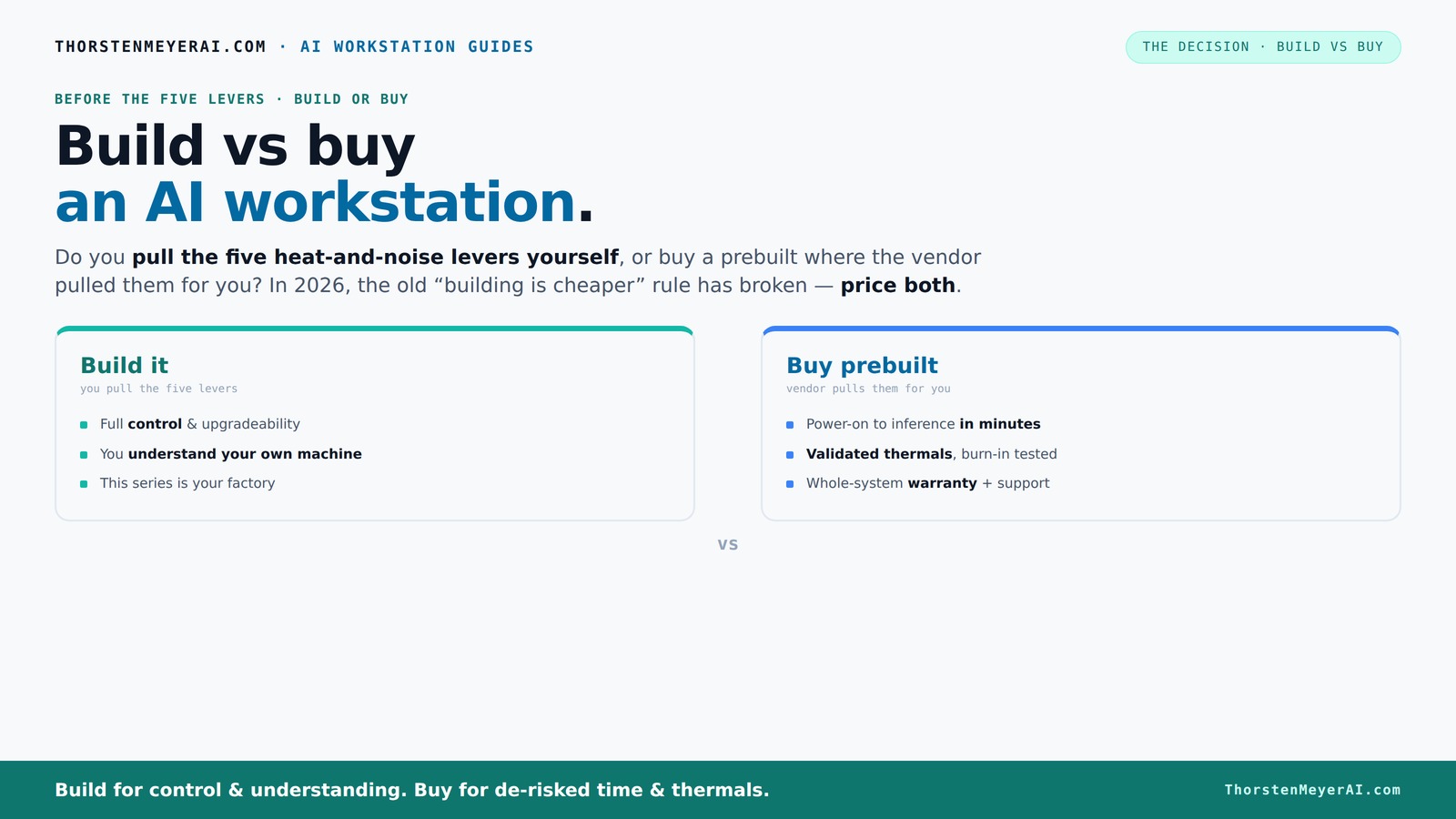
Build vs buy
an AI workstation.
The real question behind this whole series: do you pull the five heat-and-noise levers yourself, or buy a prebuilt where the vendor pulled them for you? And in 2026, the old “building is cheaper” rule has broken. Match your situation in Part 3.
Why the old rule—build cheaper—no longer applies in 2026
For years, building your own AI workstation was the clear money-saver. You sourced parts, assembled, and tweaked until it was perfect—and typically paid less than a prebuilt. Curious about the latest trends? Check out Build vs Buy a Prebuilt AI Workstation for more insights.
But now, component shortages and skyrocketing prices have changed the game. DDR5 RAM, high-end GPUs, and SSDs cost 20-40% more than just a year ago. Large builders bought in bulk before prices spiked, allowing them to offer systems at prices that beat DIY by a wide margin. What used to be a no-brainer—DIY saves money—has become a gamble.
So, instead of assuming DIY always wins, you need to compare actual prices today for your exact config. Sometimes, a prebuilt is the smarter, faster choice—especially if you want a system ready to run today.
As an affiliate, we earn on qualifying purchases.
The five levers: what makes a high-performance AI workstation run cool and quiet
Running an AI rig at full throttle is like a furnace. It heats up and gets loud—unless you tune it right. For tips on optimizing your setup, see our article on Build vs Buy a Prebuilt AI Workstation.
- Undervolt the GPU
- Choose the right cooler
- Optimize case airflow
- Set fan curves
- Position the system well
Buy a prebuilt, and the vendor has already pulled these levers—validated thermals, tested cooling, quiet operation. They even do burn-in testing, so your system is proven to handle long AI training sessions without throttling. For example, BIZON advertises systems with up to 30% lower noise and temperature, thanks to factory tuning.
Build it yourself, and you get to tune these settings personally. You choose a quiet GPU, pick a cooler, and set up airflow — but that’s a lot of work. It’s like tuning a race car; rewarding but time-consuming.
As an affiliate, we earn on qualifying purchases.
When to buy a prebuilt: speed, support, and reliability matter
If you want a system that’s ready to go, with minimal fuss, buying prebuilt makes sense. You get plug-and-play with all the software (CUDA, PyTorch, TensorFlow) preinstalled, so you can start training or inference in minutes. Learn more about your options at Build vs Buy a Prebuilt AI Workstation.
Support and warranty are big factors too. Vendors validate thermals, run extensive testing, and back their work with support plans. If your AI system crashes during a critical project, a vendor’s support team can troubleshoot faster than you can rebuild or tweak.
Multi-GPU setups are especially tricky to get right—power delivery, cooling, and compatibility are complex. Vendors like Lambda specialize in this, ensuring your system won’t throttle or overheat during long runs. Sometimes, a prebuilt system costs the same or less than sourcing parts, especially during shortages.
As an affiliate, we earn on qualifying purchases.
When to build your own: control, customization, and learning
If you enjoy hardware and want total control, building your own AI workstation remains a rewarding challenge. You pick the exact CPU, GPU, RAM, and storage—tailored to your workload. Want a quiet GPU or a custom cooling loop? You decide.
Building is also about learning. You understand every component, how they work together, and how to fix or upgrade your system later. If you're interested in the technical details, see our guide on Build vs Buy a Prebuilt AI Workstation.
However, be aware of hidden costs. Troubleshooting compatibility issues, sourcing hard-to-find parts during shortages, and doing extensive testing can eat up your time. It’s a labor of love, not just savings. Understanding these tradeoffs helps you decide if the control and customization are worth the extra effort and potential delays.
As an affiliate, we earn on qualifying purchases.
Comparison table: build vs buy in key areas
| Aspect | Build Your Own | Buy Prebuilt |
|---|---|---|
| Cost (initial) | Often cheaper, but depends on current component prices | Usually comparable or slightly higher, especially during shortages |
| Time to deployment | Weeks to months, depending on sourcing and assembly | Can be ready in days |
| Support & warranty | Limited; depends on parts & DIY skills | Full support, often multi-year warranty |
| Customization | Complete control over components and cooling | Limited to vendor configurations |
| Performance tuning | You tune thermal and power settings | Vendor validated, optimized at the factory |
| Upgradeability | Easy to upgrade, swap parts | Depends on the case and motherboard; often limited |
Choosing the right approach for your AI needs
Think about your workload. Are you running routine inference or training complex models? Do you need maximum control or quick deployment? For most hobbyists and startups, a prebuilt might be the best choice—saving time and reducing risk.
For researchers, enterprises, or those with specialized workflows, building offers customization and control. It’s a labor of love, but it pays off with tailored performance and deeper understanding.
And a hybrid approach? Buy a solid base system, then upgrade or customize key components like storage or GPU to match your evolving needs. For more on customizing your setup, visit healthdailyguide.com for related tips.
Key takeaways from building and buying in 2026
- Component prices have risen: prebuilt systems often cost less than DIY today due to bulk buying and shortages.
- Time matters: prebuilt systems can be deployed in days, building takes weeks or months.
- Support reduces risk: vendors validate thermals and offer warranties, minimizing downtime.
- Customization remains valuable: building lets you tune every detail, but at a cost of time and effort.
- Hybrid solutions are smart: buy a base system and upgrade critical components for tailored performance.
Frequently Asked Questions
Is it cheaper to build or buy a prebuilt AI workstation?
It depends on current component prices. In 2026, bulk buying and shortages often make prebuilt systems as affordable or cheaper than sourcing parts yourself. Always compare prices for your exact configuration before deciding. Beyond just initial cost, consider the time and effort involved in sourcing and assembling—sometimes, the hidden costs of building can outweigh savings, especially if delays or compatibility issues occur.
How much performance do I lose by buying prebuilt instead of building myself?
Most prebuilt systems are optimized for thermal and power efficiency, often matching or exceeding DIY setups. Vendors validate their systems under load, ensuring stable performance. This validation process can actually enhance reliability, leading to fewer crashes or thermal throttling. In some cases, prebuilt systems offer better cooling and quieter operation because they are tuned for maximum efficiency, reducing the risk of performance loss due to overheating or unstable power delivery. Therefore, the performance gap is often negligible or even in favor of prebuilt solutions, especially when considering long-term stability and maintenance.
Can I upgrade a prebuilt workstation later?
Yes, but the ease and extent of upgrades depend on the system’s design. Many prebuilt systems allow for upgrades to RAM, storage, and sometimes GPUs, provided the case and motherboard support these components. However, some compact or proprietary designs may limit expansion options, making future upgrades more challenging or costly. Always check with the manufacturer or vendor about upgrade paths before purchasing, especially if you anticipate evolving needs or future expansions. Planning ahead can save time and money later on.
What are the hidden costs of building my own workstation?
Beyond the initial purchase of parts, building your own system involves time spent sourcing components, troubleshooting compatibility issues, and performing extensive testing to ensure stability. During shortages, parts may be hard to find or inflated in price, increasing costs and delays. Additionally, you assume all support and warranty responsibilities, which can lead to additional expenses if components fail. The learning curve and potential for trial-and-error can also add to the overall cost—both in time and effort. Recognizing these hidden costs helps in making a balanced decision aligned with your skills and patience.
How do I compare total cost of ownership for build vs buy?
To accurately compare, consider not only the initial purchase price but also ongoing support, maintenance, potential downtime, and future upgrade costs. Prebuilt systems often include warranties and support plans that reduce the risk of costly repairs or troubleshooting. DIY builds may be cheaper upfront but can incur higher long-term costs if issues arise or if frequent upgrades are needed. Factor in the value of your time and expertise—building can be rewarding but also time-consuming. Weigh these factors based on your technical skill, workload demands, and long-term plans to determine which option offers the best total cost of ownership for your specific needs.
Conclusion
In 2026, the choice between building and buying your AI workstation isn’t just about dollars—it's about speed, support, and control. Consider what matters most: rapid deployment or full customization. Sometimes, the smartest move is to buy a prebuilt, especially when component shortages make DIY more expensive and time-consuming.
But if you crave mastery over your hardware and love the process, building remains a rewarding challenge. The key is knowing your workload, your budget, and how much risk you’re willing to take. Either way, your next AI adventure starts with a clear plan.
Halloween Picks
halloween
As an affiliate, we earn on qualifying purchases.