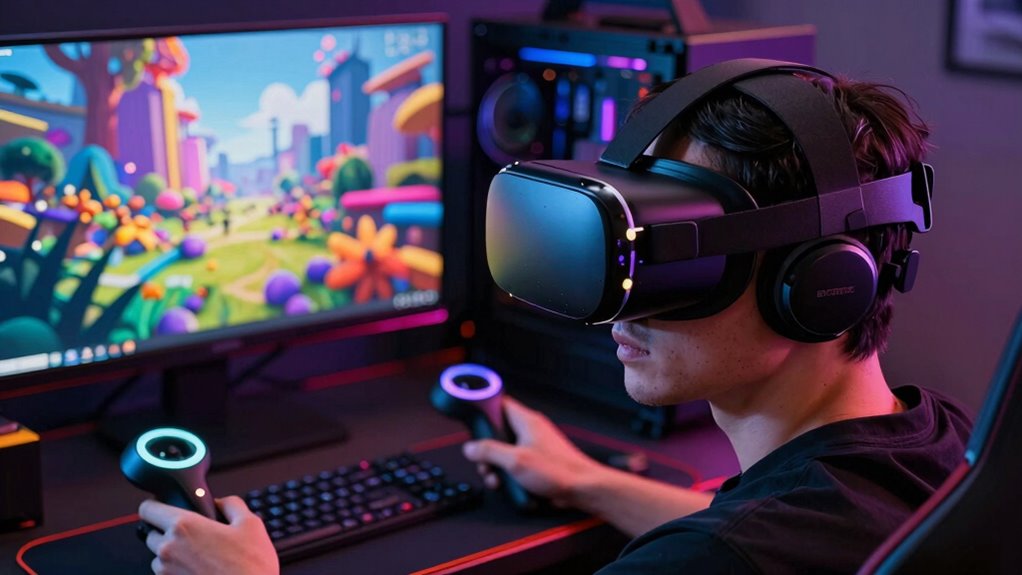
For most PC VR buyers, I’d start with the Meta Quest 3 512GB: it combines a versatile standalone headset with access to PC VR streaming, while the Pimax Crystal Light suits sim players who prioritize sharp visuals and the HTC Vive Focus Vision DisplayPort bundle offers a wired PC connection. The main choice is between wireless freedom and a direct cable, which can affect setup, latency, and room movement. Resolution, headset comfort, tracking, and the demands your PC can handle also separate these options. I compare all 10 models below by their strengths and tradeoffs, so keep reading for the pick that fits your setup.
Complete the kit



Key Takeaways
- Quest 3 models are the flexible picks: they support standalone use as well as PC VR streaming, while the Renewed Premium listings and bundles differ from the standard headset listing.
- Pimax is the visual-detail specialist: Crystal Super targets demanding users with very high per-eye resolution and a wide field of view; Crystal Light offers a lower-resolution alternative with local dimming.
- PC connection method can shape the experience: the Vive Focus Vision wired bundle includes DisplayPort PC streaming hardware, while wireless-capable options trade cable freedom for network dependence.
- Bundle contents matter: Gorilla Tag and subscription offers add included content or trial access, but they do not change the headset’s core fit, display, or PC connection capabilities.
- Premium features have practical costs: higher-resolution PC VR can call for stronger hardware, and mixed-reality features may be less relevant to someone who mainly plays PC VR games.
| Meta Quest 3S 128GB VR Headset (Renewed Premium) |  | Best Wireless Starter for PC VR | Platform: Meta Quest standalone | Processor: Snapdragon XR2 Gen 2 | RAM: 8GB | VIEW ON AMAZON | See Our Full Breakdown |
| HTC Vive Focus Vision Wired Bundle — XR Headset with DisplayPort PC VR Streaming Kit |  | Best for PC VR Connectivity | Resolution: 2448 × 2448 pixels per eye | Field of view: 120° | Refresh rate: 90Hz | VIEW ON AMAZON | See Our Full Breakdown |
| Meta Quest 3S (128 GB) – VR Headset – Gorilla Tag Bundle |  | Best for Wireless PC VR Beginners | Platform: Meta Horizon OS | Processor: Snapdragon XR2 Gen 2 | RAM: 8GB | VIEW ON AMAZON | See Our Full Breakdown |
| Pimax Crystal Super VR Headset, 3840×3840 per Eye, Ultrawide, 140° FOV, Eye-Tracking, PC Compatible |  | Best Premium Visuals for PC VR | Resolution: 3840 × 3840 pixels per eye | Field of view: 140° | Display technology: QLED and Mini-LED with local dimming | VIEW ON AMAZON | See Our Full Breakdown |
| Meta Quest 3 512GB VR Headset with Gorilla Tag Bundle and Meta Horizon+ Trial |  | Best Standalone-First PC VR Option | Storage: 512GB | Processor: Snapdragon XR2 Gen 2 | Memory: 8GB RAM | VIEW ON AMAZON | See Our Full Breakdown |
| Meta Quest Pro Headset with Virtual Reality Field Trips and 1-Month Subscription |  | Best for PC VR Productivity and Mixed Reality | Storage: 256 GB | RAM: 12 GB | Sensors: 10 VR/MR sensors | VIEW ON AMAZON | See Our Full Breakdown |
| HTC Vive Focus Vision — Mixed Reality and PC VR Headset + Controllers |  | Best for Expandable PC VR Tracking | Display resolution: 2448 × 2448 pixels per eye | Display type: LCD | Field of view: Up to 120° | VIEW ON AMAZON | See Our Full Breakdown |
| Meta Quest 3 512GB Virtual Reality Headset (Renewed Premium) |  | Best Standalone Headset for Occasional PC VR | Storage: 512 GB | Display resolution: 4K+ | Display type: OLED | VIEW ON AMAZON | See Our Full Breakdown |
| Pimax Crystal Light VR Headset for PC, 2880×2880 per Eye, 8K QLED Display with Local Dimming |  | Best for PC Flight and Racing Simulations | Resolution: 2880 × 2880 per eye | Display technology: QLED with local dimming and HDR | Refresh rate: Up to 120 Hz | VIEW ON AMAZON | See Our Full Breakdown |
| HTC Vive XR Elite with Deluxe Pack — Mixed Reality and PC VR Headset + Controllers | 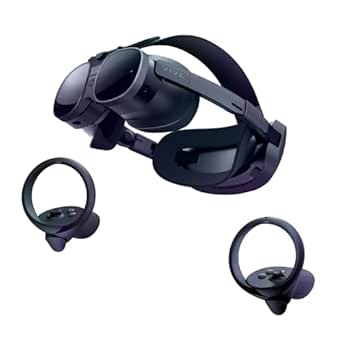 | Best Adjustable Fit for Standalone-to-PC Use | Display resolution: 3840 × 1920 combined | Display type: LCD | Field of view: 110° | VIEW ON AMAZON | See Our Full Breakdown |
| vr headsets for pc | Storage | Refresh rate | Field of view | Connectivity |
|---|---|---|---|---|
| Meta Quest 3S 128GB VR Headset | 128GB | 90Hz | 96° | — |
| HTC Vive Focus Vision Wired Bu | Expandable to 2TB via MicroSD | 90Hz | 120° | DisplayPort, USB, Wi-Fi |
| Meta Quest 3S | 128GB | 60Hz | 110° | USB-C, Wi-Fi, 3.5mm auxiliary jack |
| Pimax Crystal Super VR Headset | — | 90Hz and beyond | 140° | DisplayPort |
| Meta Quest 3 512GB VR Headset | 512GB | Up to 120Hz | — | Bluetooth, USB Type-C |
| Meta Quest Pro Headset with Vi | 256 GB | — | — | — |
| HTC Vive Focus Vision | 128 GB, expandable up to 2 TB via MicroSD | 90 Hz | Up to 120° | DisplayPort, USB, Wi-Fi |
| Meta Quest 3 512GB Virtual Rea | 512 GB | — | 110° | Wi-Fi |
| Pimax Crystal Light VR Headset | — | Up to 120 Hz | — | — |
| HTC Vive XR Elite with Deluxe | 128 GB | 90 Hz | 110° | USB Type-C |
More Details on Our Top Picks
Meta Quest 3S 128GB VR Headset (Renewed Premium)
I’d pick the Quest 3S for someone who wants to try PC VR without making a wired headset their only option. Its Snapdragon XR2 Gen 2 and 8GB of RAM power standalone play, while wireless streaming gives PC owners another way to use VR; the listing does not specify a PC streaming method or wired PC connection, so I would verify compatibility before buying specifically for PC use. Compared with the HTC Vive Focus Vision Wired Bundle, this is the simpler, more self-contained choice, but it lacks that bundle’s stated DisplayPort PC connection and higher per-eye resolution. The 128GB capacity is practical for a starter library, though less roomy than the Quest 3’s 512GB. A roughly three-hour battery and 515g weight also make long sessions less comfortable, and this renewed unit’s condition is a factor to check.
Pros:- Can be used wirelessly without a PC for standalone VR
- Snapdragon XR2 Gen 2 processor and 8GB RAM
- Dual RGB passthrough cameras support mixed-reality use
- 128GB storage provides room for a starter library
Cons:- PC streaming method and wired PC compatibility are not specified in the supplied details
- Battery life is about three hours
- At 515g, the headset may feel heavy during extended sessions
Best for: PC VR newcomers who also want a standalone headset for wireless play and do not need a large installed library.
Not ideal for: Buyers who need a clearly specified wired PC VR connection, long uninterrupted sessions, or the sharper per-eye displays of PC-focused models.
- Platform:Meta Quest standalone
- Processor:Snapdragon XR2 Gen 2
- RAM:8GB
- Storage:128GB
- Display resolution:2064 × 2208 pixels
- Refresh rate:90Hz
- Field of view:96°
- Battery life:About 3 hours
- Weight:515g
Our verdict“Choose this renewed Quest 3S if you want a standalone-first headset with a possible wireless PC VR role, but verify PC compatibility before purchase.”
HTC Vive Focus Vision Wired Bundle — XR Headset with DisplayPort PC VR Streaming Kit
The Vive Focus Vision Wired Bundle is the clearest fit here for buyers who want a stated DisplayPort route into PC VR rather than relying on wireless streaming. Its 2448 × 2448 pixels per eye and 120° field of view suit games and simulations where detailed scenery and peripheral view matter. Compared with the Pimax Crystal Super, it gives up resolution and field of view, but offers a hot-swappable battery and expandable MicroSD storage, useful for switching between PC and standalone use. That flexibility comes with setup demands: the bundle relies on a PC connection and multiple accessories, and the supplied information does not spell out battery runtime. I’d shortlist it for a PC-first setup with room for configuration, not for someone seeking plug-and-play simplicity.
Pros:- DisplayPort connection provides a specified path for PC VR
- 2448 × 2448 resolution per eye and 120° field of view
- Hot-swappable battery supports replacing a depleted pack
- MicroSD storage can expand up to 2TB
Cons:- PC VR streaming requires a DisplayPort connection
- Setup can involve multiple accessories and configuration steps
- Battery runtime is not specified
Best for: PC VR players who want DisplayPort connectivity, a wide field of view, and the option to use expandable storage or swap batteries.
Not ideal for: Buyers looking for a simple setup, a confirmed battery runtime, or the extreme per-eye sharpness of the Pimax Crystal Super.
- Resolution:2448 × 2448 pixels per eye
- Field of view:120°
- Refresh rate:90Hz
- Memory:12GB RAM
- Storage:Expandable to 2TB via MicroSD
- Connectivity:DisplayPort, USB, Wi-Fi
- Battery:Detachable and hot-swappable
- Tracking and sensors:Cameras, infrared sensors, depth sensors
- Audio:3D spatial audio with dual-driver speakers
Our verdict“Pick the Vive Focus Vision bundle if a direct PC connection and flexible battery setup matter more than maximum visual resolution or simplicity.”
Meta Quest 3S (128 GB) – VR Headset – Gorilla Tag Bundle
This Quest 3S Gorilla Tag bundle makes sense for a buyer who values untethered play and wants a ready-made standalone game bundle alongside possible PC streaming. Its Snapdragon XR2 Gen 2 and 8GB RAM support standalone performance, but the supplied details do not specify a wired PC connection or a particular streaming method. That makes it less certain as a dedicated PC headset than the Vive Focus Vision Wired Bundle, which explicitly includes DisplayPort PC connectivity. The Quest’s dual RGB cameras add mixed-reality functionality, and the 110° field of view is listed as wider than the other Quest 3S listing here. In exchange, its listed 60Hz refresh rate and roughly 2.5-hour battery life are limitations for PC sessions. I’d treat the Gorilla Tag items as a bonus, not the reason to choose it for PC VR.
Pros:- Standalone wireless use does not require a PC
- Snapdragon XR2 Gen 2 processor and 8GB RAM
- Dual RGB cameras support color passthrough
- Gorilla Tag bundle includes themed items
Cons:- PC connection and streaming details are not specified
- Listed refresh rate is 60Hz
- Average battery life is about 2.5 hours
Best for: New VR owners who want standalone wireless play, a bundled Gorilla Tag theme, and the option to explore PC streaming after checking compatibility.
Not ideal for: PC VR buyers who require a specified DisplayPort connection, a high refresh rate, or long sessions between charges.
- Platform:Meta Horizon OS
- Processor:Snapdragon XR2 Gen 2
- RAM:8GB
- Storage:128GB
- Display resolution:1832 × 1920 pixels per eye
- Refresh rate:60Hz
- Field of view:110°
- Battery life:About 2.5 hours
- Connectivity:USB-C, Wi-Fi, 3.5mm auxiliary jack
Our verdict“Choose this bundle for standalone-first fun and a possible wireless PC VR extension, not as a confirmed wired PC headset.”
Pimax Crystal Super VR Headset, 3840×3840 per Eye, Ultrawide, 140° FOV, Eye-Tracking, PC Compatible
For a PC with enough graphics headroom, the Pimax Crystal Super is the standout choice when image detail and peripheral coverage outrank convenience. Its 3840 × 3840 resolution per eye, QLED and Mini-LED display with local dimming, and 140° field of view target demanding simulations and visually rich PC games. Eye tracking and dynamic field-of-view optimization add specialized tools absent from the Vive Focus Vision Wired Bundle, whose listed resolution is lower but whose battery is hot-swappable. This Pimax model is a more focused PC headset: DisplayPort connectivity means it is not a standalone alternative to the Quest 3S options, and the high-resolution panels may call for a powerful PC. Setup and compatibility details are limited in the supplied information, so I’d check the graphics requirements and fit before committing.
Pros:- 3840 × 3840 resolution per eye for highly detailed PC VR visuals
- 140° field of view offers broad peripheral coverage
- QLED and Mini-LED display with local dimming
- Eye tracking and inside-out tracking are supported
Cons:- High resolution may require a powerful PC
- DisplayPort connection ties use to a wired PC setup
- Compatibility and setup details are limited in the supplied information
Best for: Simulation enthusiasts and PC VR players with a powerful computer who prioritize high visual detail, wide peripheral vision, and eye tracking.
Not ideal for: Buyers who want standalone or wireless play, a low-demand PC setup, or detailed compatibility and setup guidance before purchase.
- Resolution:3840 × 3840 pixels per eye
- Field of view:140°
- Display technology:QLED and Mini-LED with local dimming
- Refresh rate:90Hz and beyond
- Eye tracking:Yes
- Connectivity:DisplayPort
- Tracking:Inside-out
- Audio:3D spatial audio with noise-canceling microphone
Our verdict“Choose the Crystal Super for a high-end PC build focused on visual fidelity, and skip it if you need standalone flexibility.”
Meta Quest 3 512GB VR Headset with Gorilla Tag Bundle and Meta Horizon+ Trial
The Quest 3 512GB is the most flexible pick here for people who want a substantial standalone library and may also use PC VR. Its 512GB storage gives it a clear advantage over both 128GB Quest 3S bundles, while the Snapdragon XR2 Gen 2, 8GB RAM, and 120Hz refresh rate support a stronger spec sheet for fast-moving play. The listing describes wireless VR but does not specify a PC streaming method or wired PC connection, so I’d confirm how it works with your PC before treating it as a dedicated PC headset. Compared with the Vive Focus Vision Wired Bundle, it is less explicitly PC-focused but avoids a required DisplayPort link for standalone use. The tradeoffs are a 2.2-hour stated battery life and limited weight information.
Pros:- 512GB storage offers more room than the 128GB Quest 3S options
- 120Hz refresh rate is the highest listed among these products
- Standalone wireless use plus dual RGB passthrough cameras
- Snapdragon XR2 Gen 2 processor and 8GB RAM
Cons:- PC streaming method and wired PC compatibility are not specified
- Stated battery life is about 2.2 hours
- Weight is not provided in the product data
Best for: PC owners who also want standalone VR, a large headset library, 512GB of storage, and the option to investigate wireless PC play.
Not ideal for: Buyers who need a confirmed DisplayPort PC connection, long sessions without recharging, or a headset specified primarily for PC VR.
- Storage:512GB
- Processor:Snapdragon XR2 Gen 2
- Memory:8GB RAM
- Display resolution:2064 × 2208 pixels per eye
- Refresh rate:Up to 120Hz
- Display type:LCD
- Battery life:About 2.2 hours
- Cameras:Dual RGB color cameras
- Connectivity:Bluetooth, USB Type-C
Our verdict“Pick the Quest 3 512GB if standalone versatility and storage matter most, but verify its PC connection method before buying it for PC VR.”
Meta Quest Pro Headset with Virtual Reality Field Trips and 1-Month Subscription
The Meta Quest Pro is the most productivity-focused option here: its mixed-reality passthrough, multitasking with resizable screens, and 12 GB of RAM suit people who want to work in virtual spaces as well as play PC VR games. Its pancake lenses and quantum dot technology also set it apart from the more simulation-oriented Pimax Crystal Light, while the included Touch Pro Controllers add precise, haptic-rich interaction. For PC use, though, the supplied description does not specify a PC connection method, so buyers should verify their preferred setup before choosing it over the HTC Vive Focus Vision, which lists DisplayPort connectivity. The field-trip subscription is only included for one month, and the headset’s premium hardware may be more than a gaming-only buyer needs. I’d choose it for mixed work and learning, not as the clearest PC-first pick.
Pros:- Mixed-reality passthrough supports blending virtual content with the surrounding room
- Pancake lenses and quantum dot display technology provide advanced visual features
- Touch Pro Controllers include advanced haptics for more tactile interactions
- Resizable screens and 12 GB RAM support multitasking
Cons:- The product details do not specify a PC connection method, making PC-first setup less clear than on the Vive Focus Vision
- The included VR field-trip subscription lasts only one month
- High-end features may be unnecessary for buyers focused on basic PC gaming
Best for: PC VR users who also want mixed-reality productivity, virtual field trips, and advanced controller interaction
Not ideal for: Buyers seeking a clearly documented wired PC VR setup or a headset mainly for gaming, since the PC connection details are unspecified and the field-trip subscription is limited
- Storage:256 GB
- RAM:12 GB
- Sensors:10 VR/MR sensors
- Display technology:Pancake lenses and quantum dot technology
- Mixed reality:Passthrough
- Controllers:Touch Pro Controllers
- Audio:Spatial audio
Our verdict“Choose the Quest Pro if mixed-reality work and learning matter as much as PC VR, but verify PC connectivity before buying.”
HTC Vive Focus Vision — Mixed Reality and PC VR Headset + Controllers
The HTC Vive Focus Vision is the most flexible PC-focused tracking choice in this group. Its listed DisplayPort connectivity gives PC users a direct route to wired VR, while built-in eye and hand tracking and support for VIVE Ultimate Trackers let the setup grow toward full-body tracking. That makes it a stronger fit for simulation, social VR, and tracking-heavy applications than the more standalone-oriented HTC Vive XR Elite. The 2448 × 2448-per-eye LCD display and up-to-120-degree field of view are geared toward an expansive view, and MicroSD support adds room for standalone content. The tradeoff is setup complexity: full-body tracking needs extra trackers, and the product calls for a Windows PC for full functionality. Its detachable battery is practical, but limited runtime can still interrupt long sessions.
Pros:- DisplayPort connectivity supports a direct wired PC VR setup
- Built-in eye and hand tracking expand interaction options
- Supports VIVE Ultimate Trackers for added full-body tracking
- MicroSD expansion supports storage growth up to 2 TB
Cons:- Full functionality requires a Windows PC
- Full-body tracking requires additional VIVE Ultimate Trackers
- Battery life may limit uninterrupted extended sessions
Best for: Windows PC VR users who want DisplayPort connectivity, eye and hand tracking, and the option to add full-body trackers
Not ideal for: Buyers who want a simple, low-setup headset or extended sessions without managing battery swaps and optional tracking accessories
- Display resolution:2448 × 2448 pixels per eye
- Display type:LCD
- Field of view:Up to 120°
- Refresh rate:90 Hz
- Storage:128 GB, expandable up to 2 TB via MicroSD
- Connectivity:DisplayPort, USB, Wi-Fi
- Tracking:Built-in eye and hand tracking; supports VIVE Ultimate Trackers
- Audio:3D spatial audio with dual-driver speakers
Our verdict“Pick the Vive Focus Vision if you want a wired PC VR headset with tracking options that can grow beyond the included setup.”
Meta Quest 3 512GB Virtual Reality Headset (Renewed Premium)
The Meta Quest 3 512GB makes the most sense for buyers who want a capable standalone headset first and PC VR as an option, rather than a dedicated wired PC system. Its wireless design and large storage capacity make it convenient for building an onboard game library, while the Snapdragon XR2 Gen 2 and 8 GB of RAM support its standalone use. Compared with the Pimax Crystal Light, it gives up the latter’s stated per-eye resolution and high refresh-rate focus, but avoids making a compatible gaming PC and SteamVR setup the center of the experience. The listed battery life is about 2.2 hours, so longer sessions call for charging breaks. This is also a Renewed Premium unit, which may show minor cosmetic wear; buyers who want a new-condition purchase should look elsewhere.
Pros:- 512 GB storage provides room for a large standalone app and game library
- Wireless design allows untethered movement
- Snapdragon XR2 Gen 2 processor supports standalone operation
- 4K+ display resolution is specified for immersive visuals
Cons:- Listed battery life is approximately 2.2 hours
- Renewed condition may include minor cosmetic wear
- Wi-Fi is needed for full functionality
Best for: Buyers who want a high-capacity standalone headset for everyday use and occasional wireless PC VR
Not ideal for: PC simulation players who prioritize maximum per-eye resolution, high refresh rates, or a dedicated wired headset; also skip it if you require new-condition hardware
- Storage:512 GB
- Display resolution:4K+
- Display type:OLED
- Field of view:110°
- Processor:Snapdragon XR2 Gen 2
- Memory:8 GB RAM
- Battery life:Approximately 2.2 hours
- Connectivity:Wi-Fi
- Operating system:Meta Horizon OS
Our verdict“Choose this renewed Quest 3 if standalone convenience and storage matter more than a PC-first display specification.”
Pimax Crystal Light VR Headset for PC, 2880×2880 per Eye, 8K QLED Display with Local Dimming
For PC sim players who put visual detail ahead of standalone flexibility, the Pimax Crystal Light is the most purpose-built choice in this set. Its 2880 × 2880 resolution per eye, QLED panel, HDR, and local dimming target the fine cockpit details and contrast that make flight and racing simulations easier to read. It also reaches up to 120 Hz, while the Meta Quest 3 512GB is the more versatile option for untethered play and standalone apps. The Pimax instead expects a compatible PC and SteamVR setup, so it is not the pick for casual, cable-free use. Its 815-gram weight is also a real comfort consideration for long sessions, despite the ergonomic design claim. I’d rank it highest for dedicated PC simulation, not general-purpose VR.
Pros:- 2880 × 2880 resolution per eye supports detailed PC VR imagery
- QLED display with HDR and local dimming targets richer contrast
- Refresh rate reaches up to 120 Hz
- Compatible with SteamVR and controllers such as Valve Index Knuckles or HTC VIVE
Cons:- Requires a compatible PC and SteamVR setup
- At 815 grams, it may feel heavy during long sessions
- The PC-focused feature set is less suited to untethered standalone use
Best for: PC flight and racing simulation enthusiasts with a compatible gaming PC who prioritize high per-eye resolution and contrast
Not ideal for: People seeking an untethered standalone headset, a lightweight option for long sessions, or a plug-and-play setup without SteamVR
- Resolution:2880 × 2880 per eye
- Display technology:QLED with local dimming and HDR
- Refresh rate:Up to 120 Hz
- Weight:815 g
- Tracking:Inside-out camera tracking
- Compatibility:SteamVR; supports controllers such as Valve Index Knuckles or HTC VIVE
- Lens:Glass aspheric lens
Our verdict“Pick the Pimax Crystal Light for high-detail PC simulations, and choose the Quest 3 instead if wireless standalone use matters more.”
HTC Vive XR Elite with Deluxe Pack — Mixed Reality and PC VR Headset + Controllers
The HTC Vive XR Elite suits buyers who want one headset for standalone mixed reality and PC VR, with a fit they can tune rather than a setup centered on high-end simulation specs. Its stepless IPD and diopter adjustments make it a useful choice for users who need to fine-tune lens alignment or clarity, and the Deluxe Pack adds a face gasket, strap, temple clips, and mixed-reality gasket. Unlike the PC-first Pimax Crystal Light, this model works as a standalone headset and does not require base stations. Its combined 3840 × 1920 LCD resolution and 90 Hz refresh rate are less compelling for buyers chasing the Pimax’s per-eye resolution and up-to-120-Hz ceiling. Runtime is listed at about two hours, so long PC sessions may need a charging plan.
Pros:- Supports both standalone mixed reality and PC VR
- Stepless IPD and diopter adjustments allow lens fit and clarity tuning
- Inside-out optical sensors avoid the need for base stations
- Deluxe Pack includes multiple fit and mixed-reality accessories
Cons:- Listed battery life is approximately two hours
- The 90 Hz refresh rate and combined resolution are less PC-sim-focused than the Pimax Crystal Light’s stated specifications
- Hand tracking support depends on the VR title
Best for: Users who want a standalone mixed-reality headset that can also connect to a Windows PC, especially those who value adjustable lens fit and included comfort accessories
Not ideal for: Dedicated PC sim players seeking the highest stated per-eye resolution or refresh rate, or anyone who needs long sessions without recharging
- Display resolution:3840 × 1920 combined
- Display type:LCD
- Field of view:110°
- Refresh rate:90 Hz
- Connectivity:USB Type-C
- Platform:Windows
- Storage:128 GB
- Battery life:Up to 2 hours
- Adjustments:Stepless IPD and diopter adjustments
Our verdict“Choose the Vive XR Elite if adjustable fit and standalone-to-PC flexibility matter more than maximum PC simulation resolution.”

How We Picked
I ranked these VR headsets for PC by how well they serve PC gaming first: connection options, display clarity, tracking potential, comfort, and the amount of setup required. I also weighed flexibility for users who want standalone or mixed-reality use, since those features can add value beyond a PC-only setup. A headset with striking display specifications does not automatically rank first if it demands more from the PC or offers a narrower use case.
The order reflects useful balance over headline specifications. Quest 3 takes the leading position for its combination of PC access and standalone versatility; Pimax options rise for visual-focused PC play, while Vive models appeal to buyers prioritizing wired streaming or mixed reality. Renewed listings and content bundles are treated as distinct purchase configurations, not as proof of different underlying headset performance. I also account for tradeoffs such as wireless network reliance, PC demands, and features that may go unused.
| vr headsets for pc | Battery life | Connectivity |
|---|---|---|
| Meta Quest 3S 128GB VR Headset | About 3 hours | — |
| HTC Vive Focus Vision Wired Bu | — | DisplayPort, USB, Wi-Fi |
| Meta Quest 3S | About 2.5 hours | USB-C, Wi-Fi, 3.5mm auxiliary jack |
| Pimax Crystal Super VR Headset | — | DisplayPort |
| Meta Quest 3 512GB VR Headset | About 2.2 hours | Bluetooth, USB Type-C |
| Meta Quest Pro Headset with Vi | — | — |
| HTC Vive Focus Vision | — | DisplayPort, USB, Wi-Fi |
| Meta Quest 3 512GB Virtual Rea | Approximately 2.2 hours | Wi-Fi |
| Pimax Crystal Light VR Headset | — | — |
| HTC Vive XR Elite with Deluxe | Up to 2 hours | USB Type-C |
Factors to Consider When Choosing Vr Headsets For Pc
Before choosing a headset, match it to the games you play, your PC, and the way you want to connect. These broader checks can prevent a common mismatch: buying for a compelling specification that does not improve your actual setup.
Choose Wired or Wireless Based on Your Play Space
A cable can provide a direct connection and avoid relying on home Wi-Fi, which is useful for long sessions or a crowded network. Wireless PC VR lets you turn and move without a tether, but it depends on network quality, headset battery, and correct configuration. A wireless headset may still need careful router placement or a dedicated network setup for consistent results. Before buying, check whether the specific package includes the wired streaming equipment you want; the Vive Focus Vision DisplayPort bundle is distinct from the headset listing without that bundle. Pick the connection style that fits your room and tolerance for setup, not just the one that sounds more convenient.
Match Display Demands to Your PC
High per-eye resolution can make cockpit labels and distant detail easier to read, but it also asks more of your graphics card. A headset’s maximum display specification is only useful if your PC can render games at a suitable frame rate and resolution. Sim players with a capable system may value the Pimax Crystal Super’s visual focus, while a less demanding setup may benefit more from a headset with broader everyday flexibility. Check recommended game requirements and available performance settings before choosing a high-resolution model. Do not assume that buying a sharper headset will automatically make every game look sharper; the PC has to deliver the frames.
Decide Whether Standalone Use Has Real Value for You
Standalone play can be handy when you want VR without starting a PC, and it gives a headset more uses around the home. If nearly all your time will be spent in PC VR, standalone capability may matter less than connection reliability, comfort, and image quality. Mixed-reality features can also expand how a headset is used, but they do not necessarily improve a PC VR game session. Think about how often you would use those extra modes before paying for them. A flexible headset is a better fit for households with varied use; a PC-focused headset can make more sense for a dedicated gaming station.
Prioritize Fit and Session Comfort
Display specifications cannot tell you whether a headset will sit comfortably on your face for a long session. Weight distribution, facial interface, strap adjustment, and whether you wear glasses all affect fit. If possible, check the return policy and accessory compatibility before buying, especially for a headset intended for extended sim or seated play. A comfortable headset can be a better everyday choice than one with a more impressive display that feels tiring to wear. Also check whether a bundle changes the included strap or other fit-related parts rather than assuming every listing contains the same accessories.
Read Renewed and Bundle Listings Carefully
Renewed Premium listings and new headset bundles should not be compared as though their contents and condition are identical. Confirm what is included, which accessories are present, and what return or warranty terms apply to the specific listing. A Gorilla Tag bundle or subscription trial adds access to content, but it should not outweigh a better fit for your PC connection or preferred games. The renewed Quest 3 and Quest 3S listings in this roundup are alternatives to the corresponding headset configurations, not separate display categories. Make the headset itself your priority, then treat included content as a secondary benefit.
Check Tracking and Game Compatibility Before You Commit
PC VR games can depend on different control and tracking needs, so make sure the headset’s controllers and tracking approach fit the titles you plan to play. Room-scale action games place different demands on tracking than seated flight or racing simulators. Headset compatibility also depends on the software and connection method used to reach your PC, so confirm support for your preferred games and apps rather than relying on a general PC VR label. If you already own accessories, check whether they work with the headset you are considering. This homework matters most when moving between ecosystems or buying a headset with a specialized PC connection.
Frequently Asked Questions
Can I use a Meta Quest 3 or Quest 3S for PC VR?
Yes, both Quest 3 and Quest 3S can be used for PC VR through supported wired or wireless connection methods. Wireless play depends on a capable network and suitable setup, while a cable can provide a more direct link and avoid Wi-Fi variability. The right choice depends on your room, network, and whether you mind being tethered. Check that your PC meets the requirements for the games you want to play. The Gorilla Tag and subscription offers do not change the headset’s PC connection options.
Should I choose a Pimax headset or a Meta Quest for PC gaming?
Choose based on whether visual detail or flexibility matters more to you. The Pimax Crystal Super and Crystal Light are aimed at PC users who prioritize display characteristics, with the Super positioned for especially demanding visual-focused play. Quest 3 models add standalone use and wireless PC VR, which can suit mixed gaming habits or shared use. A Pimax headset’s resolution goals may also place greater demands on your PC. Compare the games you play, your computer’s graphics capability, and your preferred connection before deciding.
Is a DisplayPort PC VR headset better than wireless streaming?
Neither connection is best for every setup. DisplayPort can provide a direct wired path that avoids dependence on wireless network conditions, making it attractive for fixed play spaces and buyers who prefer a cable connection. Wireless streaming gives you more freedom to move but depends on network quality and adds battery and setup considerations. The Vive Focus Vision wired bundle is the listing in this group specifically presented with DisplayPort streaming equipment. If you move around often, wireless may be worth the tradeoff; if consistency is your priority, compare wired options closely.
Is a renewed VR headset a sensible choice for PC VR?
A renewed headset can be a reasonable option if the listing’s condition, included accessories, and return terms suit you. Those details matter because a missing cable or changed accessory set can affect how easily you connect and wear the headset. Compare the renewed Quest listings with the standard or bundled configurations rather than assuming every package is equivalent. Check coverage and the seller’s handling of faults before purchasing. If you want the clearest path to a complete setup, prioritize a listing that spells out its contents and support terms.
Do I need a powerful PC for a high-resolution VR headset?
High-resolution headsets generally ask a PC to render more pixels, so a stronger graphics card can help maintain smooth performance. The exact requirement varies by game, headset settings, and the resolution you choose to run. Pimax Crystal models are likely to appeal most to buyers whose PCs can support visually demanding play, especially in simulation games. You can often reduce render settings, but doing so may limit the detail you bought the headset to gain. Check the requirements for your favorite games and compare them with your PC before choosing a display-focused headset.
Conclusion
For the best overall balance, I recommend the Meta Quest 3 512GB: it pairs PC VR access with standalone flexibility. The best value direction is the Quest 3S if you want a more accessible entry into both standalone and PC VR, though its Renewed Premium and Gorilla Tag bundle listings should be judged by their included items and terms. For best premium visual focus, choose the Pimax Crystal Super if your PC can handle demanding rendering; the Crystal Light is a more restrained PC-focused alternative. Beginners who want an adaptable headset should start with a Quest 3 or Quest 3S rather than a specialist system. For a wired PC setup, look at the Vive Focus Vision DisplayPort bundle; for mixed-reality features, compare the Vive Focus Vision and Vive XR Elite against how often you will use those modes. The right pick is the one whose connection, PC demands, and comfort match the way you actually play.