
Premium whole-home mesh Wi-Fi systems trade the reach and consistency of multiple access points against the cost and complexity of faster hardware. My best overall pick is the NETGEAR Orbi 770 Series, which balances Wi-Fi 7 capability with a more practical footprint than the flagship Orbi 970. The TP-Link Deco BE77 Pro stands out for households seeking a capable Wi-Fi 7 mesh, while the eero Pro 7 suits buyers who put simple setup and management first. The biggest choice is whether you need top-end multi-gig performance, broad coverage, or a system that keeps everyday setup and upkeep straightforward. Read on for the full breakdown, ranking logic, and advice on choosing the right fit for your home.

Get health and wellness essentials delivered free with Prime
- Fast, free delivery on millions of items
- Prime Video, Amazon Music and more included
- Member-only deals all year
Key Takeaways
- Orbi 770 is the balanced pick: it brings Wi-Fi 7 to the shortlist without the extreme capacity and hardware footprint of the Orbi 970.
- The Orbi 970 and eero Max 7 target unusually demanding homes: their high-capacity designs make more sense for large spaces, multi-gig internet, or many simultaneous users than for ordinary broadband plans.
- Wi-Fi 7 is not the only route to reliable whole-home coverage: Wi-Fi 6 options such as the Deco X55 and Orbi Pro SXK80 may fit homes that value established mesh coverage or business-oriented controls over the newest wireless standard.
- Dual-band systems have a placement tradeoff: models such as eero 7 and Deco BE23 can be appealing for simpler households, but node-to-node traffic may compete with client devices for wireless capacity.
- Port needs and management preferences separate contenders: wired backhaul and multi-gig Ethernet can matter more than headline wireless speeds, while eero and Google Nest emphasize accessible app-led management.
| TP-Link Deco BE77 Pro Wi-Fi 7 Whole Home Mesh System (3-Pack) |  | Best for High-Capacity, Large Homes | Wi-Fi standard: Wi-Fi 7 | Bands: Tri-band: 2.4 GHz, 5 GHz, and 6 GHz | Coverage: Up to 8,500 sq. ft. | VIEW ON AMAZON | See Our Full Breakdown |
| NETGEAR Orbi 370 Series WiFi 7 Mesh System (3-Pack) |  | Best for Straightforward Wi-Fi 7 Coverage | Wi-Fi standard: Wi-Fi 7 | Bands: Dual-band | Coverage: Up to 6,000 sq. ft. | VIEW ON AMAZON | See Our Full Breakdown |
| NETGEAR Orbi 770 Series WiFi 7 Mesh System, 3 Pack |  | Best for Larger Homes Wanting Orbi Expansion | Wi-Fi technology: Wi-Fi 7 | Coverage: Up to 8,000 sq. ft. | Device capacity: Up to 100 devices | VIEW ON AMAZON | See Our Full Breakdown |
| TP-Link Deco X55 AX3000 WiFi 6 Mesh System (3-Pack) |  | Best Value for Wi-Fi 6 Homes | Wi-Fi standard: Wi-Fi 6 (AX3000) | Pack size: 3 units | Coverage: Up to 6,500 sq. ft. | VIEW ON AMAZON | See Our Full Breakdown |
| eero 7 Dual-Band Mesh Wi-Fi 7 Router (3-Pack) |  | Best for Simple Wi-Fi 7 Upgrades | Wi-Fi standard: Wi-Fi 7 | Bands: Dual-band | Maximum internet speed: Up to 2.5 Gbps | VIEW ON AMAZON | See Our Full Breakdown |
| TP-Link Deco 7 BE23 Dual-Band BE3600 WiFi 7 Mesh System (3-Pack) |  | Best Wide-Coverage Dual-Band Pick | Wi-Fi standard: Wi-Fi 7 (BE3600) | Bands: Dual-band: 2.4 GHz and 5 GHz | Maximum listed speed: 3.6 Gbps | VIEW ON AMAZON | See Our Full Breakdown |
| NETGEAR Orbi 970 Series Quad-Band WiFi 7 Mesh System (RBE973S) – Router + 2 Satellite Extenders |  | Best for Maximum Coverage and Backhaul | Wi-Fi standard: Wi-Fi 7, quad-band | Maximum listed speed: Up to 27 Gbps | Coverage: Up to 10,000 sq. ft. | VIEW ON AMAZON | See Our Full Breakdown |
| NETGEAR Orbi Pro WiFi 6 Tri-Band Mesh System (SXK80B4) – Router + 3 Satellites |  | Best for Home Offices and Small Businesses | Model: SXK80B4 | Wireless standard: Wi-Fi 6 (802.11ax) | Bands: Tri-band | VIEW ON AMAZON | See Our Full Breakdown |
| Deco 7 Pro Tri-Band Wi-Fi 7 Whole Home Mesh System (6-Stream, 10 Gbps) |  | Best Tri-Band Wi-Fi 7 Balance | Wireless standard: Tri-band Wi-Fi 7 | Maximum listed wireless speeds: 5,188 Mbps on 6 GHz, 4,324 Mbps on 5 GHz, and 574 Mbps on 2.4 GHz | Coverage: Up to 7,600 sq. ft. | VIEW ON AMAZON | See Our Full Breakdown |
| eero Max 7 Mesh WiFi System – Supports up to 10 Gbps, 7,500 sq. ft. coverage, 750+ devices (3-pack) |  | Best for Smart-Home Device Density | Wi-Fi standard: Wi-Fi 7 | Wireless speed: Up to 4.3 Gbps | Wired speed: Up to 9.4 Gbps | VIEW ON AMAZON | See Our Full Breakdown |
| NETGEAR Orbi 870 Series WiFi 7 Mesh System (3-Pack) |  | Best for Large, Device-Heavy Homes | Wi-Fi standard: Wi-Fi 7 | Maximum stated speed: Up to 21 Gbps | Coverage: Up to 9,000 sq ft | VIEW ON AMAZON | See Our Full Breakdown |
| eero Pro 7 Tri-Band Mesh Wi-Fi 7 Router (3-Pack) |  | Best for Busy, Connected Homes | Wi-Fi standard: Wi-Fi 7 | Bands: Tri-band | Maximum internet plan support: Up to 5 Gbps | VIEW ON AMAZON | See Our Full Breakdown |
| NETGEAR Orbi 970 Series WiFi 7 Mesh System (3-Pack) | 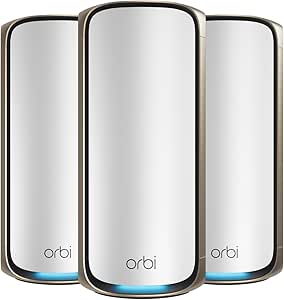 | Best Ultra-Premium Performance | Wi-Fi standard: Wi-Fi 7 | Maximum stated speed: Up to 27 Gbps | Coverage: Up to 10,000 sq ft | VIEW ON AMAZON | See Our Full Breakdown |
| eero Pro 6E Mesh Wi-Fi System (3-Pack) |  | Best Wi-Fi 6E Upgrade | Wi-Fi standard: Wi-Fi 6E | Maximum internet plan support: Up to 2.5 Gbps | Maximum wireless speed: Up to 1.6 Gbps | VIEW ON AMAZON | See Our Full Breakdown |
| Google Nest Wifi Pro (Wi-Fi 6E) – 3-Pack Mesh Router, Snow |  | Best for Google Home Households | Wi-Fi standard: Wi-Fi 6E | Bands: 2.4 GHz, 5 GHz, and 6 GHz | Coverage: Up to 6,600 sq ft | VIEW ON AMAZON | See Our Full Breakdown |
| premium wholehome mesh wifi system | Coverage | Device capacity | Wi-Fi standard | Pack size |
|---|---|---|---|---|
| TP-Link Deco BE77 Pro Wi-Fi 7 | Up to 8,500 sq. ft. | Up to 200 devices | Wi-Fi 7 | 3 Deco units |
| NETGEAR Orbi 370 Series WiFi 7 | Up to 6,000 sq. ft. | Up to 70 devices | Wi-Fi 7 | — |
| NETGEAR Orbi 770 Series WiFi 7 | Up to 8,000 sq. ft. | Up to 100 devices | — | 3 units |
| TP-Link Deco X55 AX3000 WiFi 6 | Up to 6,500 sq. ft. | Up to 150 devices | Wi-Fi 6 (AX3000) | 3 units |
| eero 7 Dual-Band Mesh Wi-Fi 7 | Up to 6,000 sq. ft. | 120+ devices | Wi-Fi 7 | 3 units |
| TP-Link Deco 7 BE23 Dual-Band | Up to 6,500 sq. ft. | Up to 150 devices | Wi-Fi 7 (BE3600) | 3-pack |
| NETGEAR Orbi 970 Series Quad-B | Up to 10,000 sq. ft. | Up to 200 devices | Wi-Fi 7, quad-band | — |
| NETGEAR Orbi Pro WiFi 6 Tri-Ba | Up to 12,000 sq. ft. | Up to 100 devices | — | — |
| Deco 7 Pro Tri-Band Wi-Fi 7 Wh | Up to 7,600 sq. ft. | Over 200 devices | — | 3-pack |
| eero Max 7 Mesh WiFi System | Up to 7,500 sq. ft. | 750+ devices | Wi-Fi 7 | 3-pack |
| NETGEAR Orbi 870 Series WiFi 7 | Up to 9,000 sq ft | Up to 150 devices | Wi-Fi 7 | — |
| eero Pro 7 Tri-Band Mesh Wi-Fi | Up to 6,000 sq ft | 600+ devices | Wi-Fi 7 | 3-pack |
| NETGEAR Orbi 970 Series WiFi 7 | Up to 10,000 sq ft | Up to 200 devices | Wi-Fi 7 | — |
| eero Pro 6E Mesh Wi-Fi System | Up to 6,000 sq ft | 100+ devices | Wi-Fi 6E | 3 units |
| Google Nest Wifi Pro | Up to 6,600 sq ft | — | Wi-Fi 6E | 3 routers |
More Details on Our Top Picks
TP-Link Deco BE77 Pro Wi-Fi 7 Whole Home Mesh System (3-Pack)
The Deco BE77 Pro is the strongest fit here for a large, busy home that can benefit from both extensive coverage and a high-speed wired connection. Its claimed reach of up to 8,500 square feet exceeds the Orbi 770 Series’ 8,000-square-foot figure, while the 10G WAN/LAN port gives it more headroom for multi-gig internet and wired equipment than the eero 7. Tri-band Wi-Fi 7 and Multi-Link Operation are intended to help keep compatible devices moving smoothly across bands, though actual performance depends on placement, walls, and client hardware. The tradeoff is that this is more system than many households need: it requires a separate modem, and its premium hardware makes most sense when you can use its extra capacity. Buyers seeking simpler Wi-Fi 7 coverage may prefer the dual-band eero 7.
Pros:- Three-unit system is rated for coverage up to 8,500 square feet.
- Tri-band Wi-Fi 7 with Multi-Link Operation supports compatible newer devices.
- 10G WAN/LAN port and 2.5G LAN port allow faster wired connections than standard Gigabit ports.
- HomeShield includes security and parental-control features.
Cons:- Requires a separate modem for internet service.
- Its advanced hardware can be excessive for homes with ordinary broadband needs.
- Coverage and speed can fall when walls, layout, or node placement interfere with the signal.
Best for: Owners of large, multi-floor homes with a multi-gig internet plan, wired devices, and many simultaneous users.
Not ideal for: Households with modest internet service or a smaller floor plan that would not benefit from the BE77 Pro’s 10G port, tri-band design, or broad coverage.
- Wi-Fi standard:Wi-Fi 7
- Bands:Tri-band: 2.4 GHz, 5 GHz, and 6 GHz
- Coverage:Up to 8,500 sq. ft.
- Device capacity:Up to 200 devices
- Ports per unit:1x 10G WAN/LAN, 1x 2.5G LAN, 1x 1G LAN, and 1x USB 3.0
- Pack size:3 Deco units
- Unit dimensions:4.65 x 4.65 x 7.80 inches
Our verdict“Choose the Deco BE77 Pro if your large home and multi-gig connections can make use of its tri-band Wi-Fi 7 and 10G port.”
NETGEAR Orbi 370 Series WiFi 7 Mesh System (3-Pack)
The Orbi 370 Series brings Wi-Fi 7 to a three-unit system without the larger coverage and capacity claims of the Orbi 770 Series. Rated for up to 6,000 square feet and 70 devices, it suits homes that want newer wireless technology for streaming, gaming, and smart-home connections but do not need a network sized for 100 or more clients. The app-based setup is a simpler route than choosing the more feature-heavy Deco BE77 Pro, whose 10G port and tri-band design cater to higher-end demands. In exchange, the Orbi 370 is dual-band and has a lower stated speed ceiling of 5 Gbps, so it offers less room for heavy simultaneous use than the Orbi 770. NETGEAR Armor includes a 30-day trial; continuing the full security service requires a subscription. This model is designed for use in the US.
Pros:- Three-piece system is rated to cover up to 6,000 square feet.
- Wi-Fi 7 and up to 5 Gbps rated speed support modern streaming and gaming needs.
- Orbi app provides setup and network management.
- Compatible with cable and fiber internet service from any ISP.
Cons:- Dual-band design has less wireless capacity than the tri-band Deco BE77 Pro and Orbi 770 Series.
- NETGEAR Armor requires a subscription after its 30-day trial for continued full security service.
- Designed for use in the US only.
Best for: US households moving to Wi-Fi 7 that want app-guided setup and coverage for a medium-to-large home, without a very high device count.
Not ideal for: Homes with more than 70 connected devices, demanding multi-gig wired needs, or buyers who want to avoid a recurring security subscription.
- Wi-Fi standard:Wi-Fi 7
- Bands:Dual-band
- Coverage:Up to 6,000 sq. ft.
- Device capacity:Up to 70 devices
- Pack configuration:3-pack: 1 router and 2 satellites
- Security:NETGEAR Armor, with a 30-day trial included
- ISP compatibility:Cable and fiber; works with any ISP
Our verdict“Pick the Orbi 370 if you want an app-managed Wi-Fi 7 three-pack for a home that fits its 6,000-square-foot and 70-device limits.”
NETGEAR Orbi 770 Series WiFi 7 Mesh System, 3 Pack
The Orbi 770 Series takes a middle position between the more modest Orbi 370 and the high-capacity Deco BE77 Pro. Its stated 11 Gbps speed and 8,000-square-foot coverage make it a better match than the Orbi 370 for larger homes, while its support for up to 100 devices suits households with a heavier mix of phones, computers, and connected appliances. NETGEAR also says the system can be expanded with satellites, which gives buyers a way to extend coverage if the original three units do not reach every area. The Deco BE77 Pro claims slightly wider coverage and adds a 10G port, so it is a stronger fit for buyers who prioritize those capabilities. Orbi 770’s tradeoffs include variable real-world performance and a full NETGEAR Armor security suite that requires a subscription after its trial.
Pros:- Three-pack is rated for coverage up to 8,000 square feet.
- Up to 11 Gbps rated speed and Wi-Fi 7 suit high-bandwidth household use.
- Supports up to 100 devices, more than the Orbi 370 Series.
- Can be expanded with additional satellites for larger coverage needs.
Cons:- NETGEAR Armor’s full security suite requires a subscription after its trial.
- The Deco BE77 Pro offers a higher stated coverage area and specifies a 10G WAN/LAN port.
- Actual speed depends on internet service, device capability, placement, and home construction.
Best for: Families in large or multi-storey homes who want Wi-Fi 7, room for up to 100 devices, and the option to add coverage with satellites.
Not ideal for: Buyers who need a 10G wired port or want full-featured security without an ongoing subscription.
- Wi-Fi technology:Wi-Fi 7
- Coverage:Up to 8,000 sq. ft.
- Device capacity:Up to 100 devices
- Pack size:3 units
- Additional satellite coverage:Up to 2,750 sq. ft.
- ISP compatibility:Works with any internet provider
- Security:Security features included; NETGEAR Armor has a free trial
Our verdict“Choose the Orbi 770 if you need broad Wi-Fi 7 coverage and satellite expansion but do not require the Deco BE77 Pro’s specified 10G port.”
TP-Link Deco X55 AX3000 WiFi 6 Mesh System (3-Pack)
The Deco X55 is the practical pick for buyers who value coverage and wired flexibility more than having the newest Wi-Fi standard. Its three units are rated for up to 6,500 square feet, and its 150-device capacity is higher than the Wi-Fi 7 Orbi 370’s stated 70-device limit. Each Deco X55 unit also has three Gigabit Ethernet ports, making it useful for wiring stationary equipment or supporting Ethernet backhaul. That does not give it the wireless headroom of the tri-band Wi-Fi 7 Deco BE77 Pro, and it lacks Wi-Fi 7’s newer features. For a household with existing Wi-Fi 6 devices and no immediate need for multi-gig speeds, those omissions may matter less than coverage across three nodes. It requires a separate modem, and advanced HomeShield features may call for a subscription.
Pros:- Coverage is rated for up to 6,500 square feet.
- Supports up to 150 devices, exceeding the Orbi 370 Series’ stated capacity.
- Three Gigabit Ethernet ports per unit support wired devices and Ethernet backhaul.
- Includes HomeShield features such as parental controls and quality-of-service management.
Cons:- Wi-Fi 6 lacks the newer capabilities of the Wi-Fi 7 systems in this roundup.
- Requires a separate modem for most internet service providers.
- Some advanced HomeShield security features may require a subscription.
Best for: Households with many connected devices, existing Wi-Fi 6 equipment, and a need for broad coverage or wired Ethernet backhaul.
Not ideal for: Buyers upgrading for Wi-Fi 7, multi-gig wireless capacity, or a 10G wired connection.
- Wi-Fi standard:Wi-Fi 6 (AX3000)
- Pack size:3 units
- Coverage:Up to 6,500 sq. ft.
- Device capacity:Up to 150 devices
- Ethernet ports:3 Gigabit ports per unit
- Backhaul:Wired Ethernet backhaul supported
- Security:TP-Link HomeShield
- ISP compatibility:Works with major ISPs; modem required
Our verdict“Choose the Deco X55 if coverage, device capacity, and multiple Gigabit ports matter more to you than moving up to Wi-Fi 7.”
eero 7 Dual-Band Mesh Wi-Fi 7 Router (3-Pack)
The eero 7 suits buyers who want Wi-Fi 7 coverage through a straightforward three-unit system rather than the extra radio capacity of a premium tri-band mesh. It is rated for 6,000 square feet and more than 120 devices, while two auto-sensing 2.5 GbE ports on each unit provide faster wired connections than the Deco X55’s Gigabit ports. Its TrueMesh software is designed to manage traffic between units, and compatibility with earlier eero generations gives existing eero households a more flexible upgrade path. The tradeoff is its dual-band design: the tri-band Deco BE77 Pro has more wireless bandwidth and a higher stated coverage figure, making it a better fit for demanding large homes. The eero 7’s maximum internet speed is rated at 2.5 Gbps, and advanced security features require an optional eero Plus subscription.
Pros:- Three units are rated to cover up to 6,000 square feet.
- Two auto-sensing 2.5 GbE ports per unit offer faster wired options than the Deco X55’s Gigabit ports.
- TrueMesh software is designed to maintain reliable connections across the mesh.
- Compatible with earlier eero generations and Amazon Echo devices.
Cons:- Dual-band design has less wireless capacity than the tri-band Deco BE77 Pro.
- Maximum internet speed is rated at 2.5 Gbps, below the stated ceilings of the Orbi 770 and Deco BE77 Pro.
- Advanced security features require an optional eero Plus subscription.
Best for: Existing eero owners or households seeking an easy-to-manage Wi-Fi 7 mesh with 2.5 GbE ports and coverage for a medium-to-large home.
Not ideal for: Homes with intensive simultaneous wireless traffic that would benefit from tri-band capacity, or buyers seeking included advanced security features.
- Wi-Fi standard:Wi-Fi 7
- Bands:Dual-band
- Maximum internet speed:Up to 2.5 Gbps
- Maximum wireless speed:Up to 1.8 Gbps
- Coverage:Up to 6,000 sq. ft.
- Device capacity:120+ devices
- Ports:Two auto-sensing 2.5 GbE ports per unit
- Warranty:3 years
- Pack size:3 units
Our verdict“Pick the eero 7 for a manageable Wi-Fi 7 upgrade with 2.5 GbE ports, but choose a tri-band system for heavier wireless demands.”
TP-Link Deco 7 BE23 Dual-Band BE3600 WiFi 7 Mesh System (3-Pack)
I’d choose the Deco 7 BE23 when broad coverage matters more than having every Wi-Fi 7 band. Its three nodes are rated to cover up to 6,500 sq. ft., while two 2.5 Gbps ports on each unit give wired devices a faster connection than basic gigabit-only mesh. Wi-Fi 7 features such as Multi-Link Operation add newer connectivity options, but this is still a dual-band system without 6 GHz. That separates it from the tri-band Deco 7 Pro, which offers a dedicated 6 GHz band and faster listed wireless rates. HomeShield, WPA3, and IoT network isolation add useful household controls, though most internet setups still need a separate modem. I’d pick the BE23 for a large home seeking a straightforward Wi-Fi 7 upgrade, not for buyers chasing the highest wireless throughput.
Pros:- Three-node system rated for coverage up to 6,500 sq. ft.
- Two 2.5 Gbps WAN/LAN ports per node support fast wired connections.
- Wi-Fi 7 features include Multi-Link Operation and 4K-QAM.
- HomeShield, WPA3, parental controls, and IoT isolation add network-management options.
Cons:- Dual-band design does not include the 6 GHz band available on the Deco 7 Pro.
- A separate modem is needed for most internet service providers.
Best for: Households in larger homes that want Wi-Fi 7, broad mesh coverage, and multi-gig wired ports without prioritizing 6 GHz.
Not ideal for: Buyers with 6 GHz-capable devices or demanding wireless backhaul needs; the dual-band design lacks 6 GHz and a separate modem is generally required.
- Wi-Fi standard:Wi-Fi 7 (BE3600)
- Bands:Dual-band: 2.4 GHz and 5 GHz
- Maximum listed speed:3.6 Gbps
- Coverage:Up to 6,500 sq. ft.
- Device capacity:Up to 150 devices
- Ports:2 × 2.5 Gbps WAN/LAN ports per unit
- Pack size:3-pack
- Security:HomeShield, WPA3, and CISA Secure-by-Design
Our verdict“Choose the Deco 7 BE23 for broad coverage and multi-gig wired connections; choose the Deco 7 Pro if 6 GHz wireless performance matters more.”
NETGEAR Orbi 970 Series Quad-Band WiFi 7 Mesh System (RBE973S) – Router + 2 Satellite Extenders
For a very large home with heavy simultaneous traffic, I’d put the Orbi 970 Series ahead of the other systems here for its combination of quad-band Wi-Fi 7, dedicated enhanced backhaul, and coverage rated up to 10,000 sq. ft. The extra band is intended to help satellites communicate with the router while serving household devices, a different approach from the dual-band Deco 7 BE23. Its 10-Gigabit Ethernet port also gives fast wired internet a clear place in the setup. The tradeoff is scale: a router plus two satellites may be more system than a typical home needs, and setup can be less approachable for nontechnical buyers. NETGEAR also lists this model for the U.S. market only. I’d reserve it for buyers whose floor plan and connected-device load can make use of its headroom.
Pros:- Quad-band Wi-Fi 7 architecture includes an enhanced dedicated backhaul.
- Coverage is rated up to 10,000 sq. ft.
- Supports up to 200 devices.
- Includes a 10-Gigabit Ethernet port, advanced router protection, and automatic firmware updates.
Cons:- The router-and-two-satellite system may be excessive for smaller homes.
- Setup may be challenging for buyers who are not comfortable configuring network equipment.
- Designed for the U.S. market only.
Best for: Owners of very large U.S. homes with many active devices, a fast internet connection, and a need for strong satellite backhaul.
Not ideal for: Residents of smaller homes or buyers who want a simple, low-complexity setup; its broad coverage and advanced architecture may be unnecessary, and it is designed for the U.S. market.
- Wi-Fi standard:Wi-Fi 7, quad-band
- Maximum listed speed:Up to 27 Gbps
- Coverage:Up to 10,000 sq. ft.
- Device capacity:Up to 200 devices
- Included hardware:1 router and 2 satellite extenders
- Ethernet:10-Gigabit Ethernet port
- Security:Advanced Router Protection and automatic firmware updates
- Market:Designed for the U.S. market
Our verdict“Pick the Orbi 970 when a large home needs quad-band Wi-Fi 7 coverage and backhaul; skip it if a simpler, smaller mesh system fits your space.”
NETGEAR Orbi Pro WiFi 6 Tri-Band Mesh System (SXK80B4) – Router + 3 Satellites
The Orbi Pro SXK80B4 is the business-oriented choice in this group: its router and three satellites are rated to cover up to 12,000 sq. ft., and VLAN and QoS features give network managers more control than the household-focused Deco 7 BE23. That makes it a better fit for a home office, studio, or small workplace with separate traffic needs than a buyer simply seeking the newest Wi-Fi generation. Its Wi-Fi 6 tri-band design and listed 6 Gbps data rate remain capable, but it lacks the Wi-Fi 7 features of the Orbi 970 and Deco 7 Pro. Four included wall mounts can help place satellites where coverage needs them. I’d choose it for management tools and expansive premises, not for a compact home or someone set on Wi-Fi 7.
Pros:- Router and three satellites are rated for coverage up to 12,000 sq. ft.
- VLAN and QoS features support more deliberate network management.
- Tri-band Wi-Fi 6 with a listed maximum data rate of 6 Gbps.
- Includes four wall mounts and lists a five-year warranty.
Cons:- Wi-Fi 6 does not offer the newer Wi-Fi 7 features found in the Orbi 970 and Deco 7 Pro.
- Four units and extensive coverage can be unnecessary for a small household.
- Business-focused management may add complexity for buyers who want a basic home mesh setup.
Best for: Small-business owners and home-office operators who need broad coverage, multiple satellites, and VLAN or QoS network controls.
Not ideal for: Buyers in apartments or modest homes, or anyone prioritizing Wi-Fi 7; this four-unit Wi-Fi 6 system may be excessive and is an older wireless generation than the Orbi 970.
- Model:SXK80B4
- Wireless standard:Wi-Fi 6 (802.11ax)
- Bands:Tri-band
- Maximum data rate:6 Gbps
- Coverage:Up to 12,000 sq. ft.
- Device capacity:Up to 100 devices
- Included hardware:1 router, 3 satellites, and 4 wall mounts
- Security protocols:WPA2 and WPA3
- Warranty:5 years
Our verdict“Choose the Orbi Pro SXK80B4 for a large home office or small business that can use VLAN and QoS controls, rather than for a Wi-Fi 7-focused household.”
Deco 7 Pro Tri-Band Wi-Fi 7 Whole Home Mesh System (6-Stream, 10 Gbps)
The Deco 7 Pro strikes a useful middle ground between the dual-band Deco 7 BE23 and the much larger Orbi 970: it adds a 6 GHz band and is rated for up to 7,600 sq. ft., without leaning on the Orbi’s 10,000-square-foot footprint. Its three-band Wi-Fi 7 design, 2.5 Gbps ports, and stated 10 Gbps Ethernet backhaul support give demanding homes room for fast wired links and newer wireless clients. Support for over 200 devices is also a stronger fit for crowded smart homes than the BE23’s listed 150-device capacity. HomeShield, parental controls, IoT protection, and a built-in VPN client broaden its management options. The tradeoff is that a separate modem is required, and wired backhaul performance depends on connecting at least two Deco units. I’d pick it for a busy home that can use 6 GHz, not for a basic setup.
Pros:- Tri-band Wi-Fi 7 includes a 6 GHz band for compatible devices.
- Three-pack coverage is rated up to 7,600 sq. ft. and supports over 200 devices.
- Four 2.5 Gbps ports per unit and listed 10 Gbps Ethernet backhaul support fast wired links.
- Adds a built-in VPN client alongside HomeShield and IoT protection.
Cons:- Requires a separate modem.
- The stated backhaul performance depends on having at least two Deco units connected.
- Its 6 GHz capabilities offer less benefit to households without compatible devices.
Best for: Households with Wi-Fi 7 and 6 GHz devices, heavy smart-home use, and a need for tri-band mesh across a large home.
Not ideal for: Buyers with mostly older 2.4 GHz and 5 GHz devices or homes that need only basic coverage; the separate modem requirement and multi-unit backhaul setup add extra equipment and planning.
- Wireless standard:Tri-band Wi-Fi 7
- Maximum listed wireless speeds:5,188 Mbps on 6 GHz, 4,324 Mbps on 5 GHz, and 574 Mbps on 2.4 GHz
- Coverage:Up to 7,600 sq. ft.
- Device capacity:Over 200 devices
- Ports:Four 2.5 Gbps WAN/LAN ports and USB 3.0
- Pack size:3-pack
- Backhaul:Tri-band Wi-Fi 7 and 10 Gbps Ethernet
- Security and VPN:HomeShield, parental controls, IoT protection, and built-in VPN client
Our verdict“Choose the Deco 7 Pro for tri-band Wi-Fi 7 and 6 GHz coverage in a busy home; the Deco 7 BE23 is a better fit if dual-band coverage is enough.”
eero Max 7 Mesh WiFi System – Supports up to 10 Gbps, 7,500 sq. ft. coverage, 750+ devices (3-pack)
I’d favor the eero Max 7 for a connected home where easy network management and smart-home compatibility matter alongside Wi-Fi 7. Its rated capacity of 750+ devices is well above the Deco 7 Pro’s stated support for over 200, while built-in Thread, Matter, Zigbee, and Bluetooth LE hub support can reduce the need for separate smart-home bridges. Four Ethernet ports per unit, including two 10 GbE ports, also make it a strong match for multi-gig wired equipment. The tradeoff is that the headline capacity is less useful to most households than the Deco 7 Pro’s tri-band Wi-Fi and 6 GHz support may be. Advanced security features require an optional eero Plus subscription, and the three-pack can be excessive for smaller homes. I’d choose it for device-heavy smart homes that value a consolidated setup.
Pros:- Rated for more than 750 connected devices and coverage up to 7,500 sq. ft.
- Two 10 GbE and two 2.5 GbE ports per unit support fast wired connections.
- Built-in hub supports Thread, Matter, Zigbee, and Bluetooth LE.
- TrueMesh software and app-based setup support straightforward network management.
Cons:- Advanced security features require an optional eero Plus subscription.
- The three-pack and high device capacity can be more than smaller homes need.
- The supplied maximum wireless speed is lower than the Deco 7 Pro’s listed 6 GHz and 5 GHz rates.
Best for: Smart-home households with many connected devices that want Wi-Fi 7 mesh, multi-gig Ethernet, and an integrated Thread, Matter, and Zigbee hub.
Not ideal for: Small homes or buyers who want all advanced security features included without an optional subscription; the system’s capacity and scale may exceed their needs.
- Wi-Fi standard:Wi-Fi 7
- Wireless speed:Up to 4.3 Gbps
- Wired speed:Up to 9.4 Gbps
- Coverage:Up to 7,500 sq. ft.
- Device capacity:750+ devices
- Ethernet ports:2 × 10 GbE and 2 × 2.5 GbE, auto-sensing
- Smart-home hub:Thread, Matter, Zigbee, and Bluetooth LE 5.0
- Pack size:3-pack
- Warranty:3-year limited warranty
Our verdict“Pick the eero Max 7 for a device-dense smart home that benefits from its built-in hub and 10 GbE ports, but choose the Deco 7 Pro if tri-band Wi-Fi performance is the priority.”
NETGEAR Orbi 870 Series WiFi 7 Mesh System (3-Pack)
I’d shortlist the Orbi 870 for a large home where many people and devices compete for bandwidth. Its stated 9,000-square-foot coverage and capacity for up to 150 devices make it a stronger fit for sprawling households than the eero Pro 6E, which covers a similar area but lists support for 100+ devices. The 10 Gig internet port and 2.5 Gig LAN ports also give wired gaming PCs, storage, or a fast broadband connection room to make use of higher-speed links.
The tradeoff is that its headline 21 Gbps Wi-Fi 7 speed is a system maximum, not a guarantee for every client or internet plan. NETGEAR Armor requires a subscription after its 30-day trial, and this model is limited to the US. I’d choose the Orbi 970 instead for its greater stated coverage and device capacity, but the 870 offers plenty of headroom for a large household without aiming at the lineup’s most extreme figures.
Pros:- Rated for coverage up to 9,000 square feet
- Supports up to 150 connected devices
- 10 Gig internet and 2.5 Gig LAN ports support fast wired connections
- Wi-Fi 7 provides room for newer compatible devices
Cons:- NETGEAR Armor requires a subscription after the 30-day trial
- Listed for use in the US only
- The 21 Gbps maximum is not the speed an individual device or internet plan will necessarily reach
Best for: US households with a large floor plan, many simultaneously connected devices, and multi-gig internet or wired equipment to connect.
Not ideal for: Buyers outside the US, smaller homes that cannot use its coverage capacity, or shoppers who want ongoing security features without a separate subscription.
- Wi-Fi standard:Wi-Fi 7
- Maximum stated speed:Up to 21 Gbps
- Coverage:Up to 9,000 sq ft
- Device capacity:Up to 150 devices
- Ports:1 × 10 Gig internet; 2.5 Gig LAN ports
- Pack configuration:3 units: 1 router and 2 satellites
- Region:US only
Our verdict“Choose the Orbi 870 if you need broad coverage, high device capacity, and fast wired ports in a US home.”
eero Pro 7 Tri-Band Mesh Wi-Fi 7 Router (3-Pack)
The eero Pro 7 is my pick for a home with an unusually large number of connected devices, rather than one chasing the biggest coverage figure. It supports 600+ devices across a stated 6,000 square feet and accepts internet plans up to 5 Gbps. Compared with the NETGEAR Orbi 870, it lists a much higher device capacity but less coverage and a lower Wi-Fi speed ceiling. Its two 5 GbE auto-sensing ports also provide useful wired flexibility without requiring a separate switch for every high-speed connection.
TrueMesh routing and compatibility with earlier eero generations make it a more natural fit for households already using eero equipment. The compromises are a 3.9 Gbps maximum wireless speed and optional eero Plus for advanced security. I’d favor the Orbi 970 for a bigger property or more demanding coverage needs; the Pro 7 makes more sense when managing a crowded network and keeping setup straightforward matter more.
Pros:- Supports more than 600 connected devices
- Tri-band Wi-Fi 7 with TrueMesh routing
- Two 5 GbE auto-sensing ports per unit
- Works with previous eero generations
Cons:- Coverage is rated up to 6,000 square feet, less than the Orbi 870 and Orbi 970
- Maximum wireless speed is listed at 3.9 Gbps
- Advanced security features require an optional eero Plus subscription
Best for: Households or small businesses with hundreds of connected devices, an internet plan up to 5 Gbps, and existing eero equipment.
Not ideal for: Owners of very large properties who need more than 6,000 square feet of stated coverage, or buyers seeking advanced security features without an optional subscription.
- Wi-Fi standard:Wi-Fi 7
- Bands:Tri-band
- Maximum internet plan support:Up to 5 Gbps
- Maximum wireless speed:Up to 3.9 Gbps
- Coverage:Up to 6,000 sq ft
- Device capacity:600+ devices
- Ports:2 × 5 GbE auto-sensing ports
- Warranty:3 years
- Pack size:3-pack
Our verdict“Pick the eero Pro 7 for a device-packed home that values eero compatibility and high connection capacity over maximum range.”
NETGEAR Orbi 970 Series WiFi 7 Mesh System (3-Pack)
For a very large home with demanding network use, the Orbi 970 makes the strongest case for the most ambitious hardware in this group. Its stated reach of up to 10,000 square feet, capacity for 200 devices, and quad-band design with dedicated backhaul are aimed at keeping mesh connections responsive while clients handle gaming, 8K streaming, or VR. Compared with the Orbi 870, it claims more coverage, more device capacity, and a higher maximum speed of 27 Gbps.
That extra headroom comes with limits: speed depends on the broadband plan, client devices, and satellite placement, and the system is listed for the US only. NETGEAR Armor also requires a subscription. The eero Pro 7 supports far more devices on paper, but its coverage and maximum speed claims are lower; I’d choose the Orbi 970 when property size and high-performance backhaul matter more than sheer device count. For less demanding homes, these headline capacities may be unnecessary.
Pros:- Stated coverage reaches up to 10,000 square feet
- Quad-band design includes dedicated backhaul
- Supports up to 200 devices
- 10 GbE WAN and LAN ports plus a 2.5 GbE LAN port per unit
Cons:- NETGEAR Armor requires a separate subscription
- Listed as available only in the US
- Actual performance depends on internet service, client devices, and placement
Best for: US households with very large floor plans, multi-gig broadband, and demanding gaming, streaming, or VR use across multiple areas.
Not ideal for: Buyers with modest broadband or a smaller home, shoppers outside the US, and anyone unwilling to pay separately for NETGEAR Armor.
- Wi-Fi standard:Wi-Fi 7
- Maximum stated speed:Up to 27 Gbps
- Coverage:Up to 10,000 sq ft
- Device capacity:Up to 200 devices
- Bands:Quad-band with dedicated backhaul
- Ports per unit:1 × 10 GbE WAN, 1 × 10 GbE LAN, 1 × 2.5 GbE LAN
- Pack configuration:3 units: 1 router and 2 satellites
Our verdict“Choose the Orbi 970 when you want the lineup’s broadest stated coverage and quad-band backhaul for a demanding large home.”
eero Pro 6E Mesh Wi-Fi System (3-Pack)
The eero Pro 6E suits buyers who want a 6 GHz band and broad mesh coverage but do not need to pay for Wi-Fi 7. It covers up to 6,000 square feet, supports 100+ devices, and accepts internet plans up to 2.5 Gbps. That makes it a sensible step up from basic mesh hardware, especially when compatible Wi-Fi 6E phones and laptops can use the additional band. Compared with the eero Pro 7, it offers a lower speed ceiling and capacity, but it can be enough for a household with a more typical number of clients.
The main catch is that Wi-Fi 6E benefits depend on compatible devices; older clients will not use the 6 GHz band. Listed wireless speeds reach 1.6 Gbps, and wired speeds reach 1 Gbps, so this is not the best match for buyers seeking faster wired networking or high-end Wi-Fi 7 performance. Advanced security also requires a subscription. I’d pick the Pro 6E for a substantial home that wants 6E coverage without the Pro 7’s higher capability ceiling.
Pros:- Wi-Fi 6E adds a 6 GHz band for compatible devices
- Coverage is rated up to 6,000 square feet
- Supports more than 100 connected devices
- App-based setup and management
Cons:- 6 GHz benefits require compatible client devices
- Listed wired speeds reach 1 Gbps, below the eero Pro 7’s 5 GbE ports
- Advanced security features require an additional subscription
Best for: Households with Wi-Fi 6E phones or computers, a home up to 6,000 square feet, and an internet plan no faster than 2.5 Gbps.
Not ideal for: Buyers with mostly older Wi-Fi devices, a need for multi-gig wired speeds, or plans to prioritize Wi-Fi 7 and very high device capacity.
- Wi-Fi standard:Wi-Fi 6E
- Maximum internet plan support:Up to 2.5 Gbps
- Maximum wireless speed:Up to 1.6 Gbps
- Maximum wired speed:Up to 1 Gbps
- Coverage:Up to 6,000 sq ft
- Device capacity:100+ devices
- Ethernet port:2.5 Gb
- Pack size:3 units
Our verdict“Choose the eero Pro 6E if you want broad Wi-Fi 6E mesh coverage but do not need the eero Pro 7’s Wi-Fi 7 capacity.”
Google Nest Wifi Pro (Wi-Fi 6E) – 3-Pack Mesh Router, Snow
I’d give the Nest Wifi Pro the nod for buyers who value simple whole-home management and built-in network upkeep more than high-end wired connectivity. Its three units are rated to cover up to 6,600 square feet, and the system includes automatic performance optimization, self-diagnostics, guest networking, secure boot, and automatic software updates. That feature mix makes it a straightforward fit for video calls and everyday browsing. It also claims more coverage than the eero Pro 6E, though the provided specifications do not state a comparable device limit or a specific maximum speed.
This is a Wi-Fi 6E system, not Wi-Fi 7 like the eero Pro 7 or Orbi 870, so buyers seeking the newest standard should look elsewhere. Its most direct drawback is that it does not work with earlier Google Wifi or Nest Wifi devices, which can make an existing mesh setup less useful. I’d favor it for a fresh Google-centered setup, but not for people who need to extend older Google mesh hardware or want listed multi-gig port specifications.
Pros:- Three-unit system rated to cover up to 6,600 square feet
- Automatic optimization and self-diagnostics simplify network upkeep
- Built-in guest networking and security features
- Wi-Fi 6E includes 2.4 GHz, 5 GHz, and 6 GHz bands
Cons:- Not compatible with previous Google Wifi or Nest Wifi devices
- Uses Wi-Fi 6E rather than Wi-Fi 7, unlike the eero Pro 7 and Orbi 870
- Provided specifications do not state a device capacity or Ethernet port details
Best for: Google Home households setting up a new mesh network that want automatic updates, guest networking, and coverage for a home up to 6,600 square feet.
Not ideal for: Owners of earlier Google Wifi or Nest Wifi systems who want to reuse them, or buyers seeking Wi-Fi 7 and specified high-speed Ethernet ports.
- Wi-Fi standard:Wi-Fi 6E
- Bands:2.4 GHz, 5 GHz, and 6 GHz
- Coverage:Up to 6,600 sq ft
- Pack size:3 routers
- Speed claim:Up to 2× faster than Wi-Fi 6
- Security features:Secure boot and automatic software updates
- Network features:Automatic optimization, self-diagnostics, and guest networking
- Compatibility:Not compatible with previous Google Wifi or Nest Wifi devices
Our verdict“Choose the Nest Wifi Pro for a new Google-centered home network where easy management and built-in upkeep matter more than Wi-Fi 7.”

How We Picked
I ranked these systems by how well their hardware and features solve real whole-home networking needs, rather than by generation name or maximum advertised speed alone. I weighed wireless capacity and band configuration against node count, stated coverage, Ethernet options, wired-backhaul potential, device support, and the practical value of the included router-and-satellite setup. I also considered how approachable each system is to install and manage, and whether its design makes sense for a typical home, a large property, a multi-gig connection, or a small business.
The order favors systems that balance useful performance with a clear audience and manageable tradeoffs. The Orbi 770 leads as a capable Wi-Fi 7 middle ground; the Deco BE77 Pro and eero Pro 7 follow for different priorities around hardware flexibility and ease of use. More specialized flagship systems rank lower for most buyers because their high capacity can exceed everyday needs, while older Wi-Fi 6 and 6E picks remain relevant when coverage, budget discipline, or a specific management preference matters more than having the newest standard. Product names and advertised specifications identify the models being compared; actual performance depends on the home layout, node placement, client devices, and internet service.
| premium wholehome mesh wifi system | Wi-Fi standard |
|---|---|
| TP-Link Deco BE77 Pro Wi-Fi 7 | Wi-Fi 7 |
| NETGEAR Orbi 370 Series WiFi 7 | Wi-Fi 7 |
| NETGEAR Orbi 770 Series WiFi 7 | — |
| TP-Link Deco X55 AX3000 WiFi 6 | Wi-Fi 6 (AX3000) |
| eero 7 Dual-Band Mesh Wi-Fi 7 | Wi-Fi 7 |
| TP-Link Deco 7 BE23 Dual-Band | Wi-Fi 7 (BE3600) |
| NETGEAR Orbi 970 Series Quad-B | Wi-Fi 7, quad-band |
| NETGEAR Orbi Pro WiFi 6 Tri-Ba | — |
| Deco 7 Pro Tri-Band Wi-Fi 7 Wh | — |
| eero Max 7 Mesh WiFi System | Wi-Fi 7 |
| NETGEAR Orbi 870 Series WiFi 7 | Wi-Fi 7 |
| eero Pro 7 Tri-Band Mesh Wi-Fi | Wi-Fi 7 |
| NETGEAR Orbi 970 Series WiFi 7 | Wi-Fi 7 |
| eero Pro 6E Mesh Wi-Fi System | Wi-Fi 6E |
| Google Nest Wifi Pro | Wi-Fi 6E |
Factors to Consider When Choosing Premium Wholehome Mesh Wifi Systems
A premium mesh kit is a system decision, not just a router upgrade. I would match the kit to the home’s layout, wired options, internet plan, and the number of busy devices before paying for the highest specification. These broader checks can help avoid buying more wireless capacity than the home can use—or choosing a fast kit that cannot reach the rooms that need it.
Match the Wi-Fi generation to your devices and internet plan
Wi-Fi 7 can bring higher capacity and newer wireless features, but devices need compatible radios to use those advantages. If most phones, laptops, and smart-home gear are older, a premium Wi-Fi 6 or 6E mesh may deliver a more noticeable improvement through better placement and consistent coverage than a generational upgrade. Also compare the router’s WAN port with the speed tier from your provider; a multi-gig wireless system cannot make a slower internet connection faster. Local transfers between a wired storage device and a computer may still benefit from faster LAN links even when internet service is modest. I would pay for the newest standard when a meaningful share of your devices can use it, or when you expect to keep the system through future upgrades.
Plan node placement before choosing a kit size
Coverage figures are estimates, not promises for every floor plan. Dense walls, concrete, foil-backed insulation, and long hallways can weaken a mesh link even in a home that falls within a model’s stated coverage. More nodes are not automatically better: placing them too close can add cost without reaching a weak room, while placing them too far apart can leave each satellite with a poor connection to the router. Sketch the areas that need reliable service and identify open, elevated locations between them before choosing a two- or three-node arrangement. If the property has detached spaces, a long narrow layout, or several floor changes, a wired connection between nodes may matter more than a larger coverage claim.
Check whether wired backhaul and Ethernet ports fit your home
Wireless mesh nodes share radio capacity to communicate, so Ethernet backhaul can free wireless airtime for phones, laptops, and televisions. That advantage is most useful when a home already has Ethernet cabling or when a renovation makes new runs practical. Check each node’s port count and speed, not only the main router’s, because a satellite with limited Ethernet can restrict a wired office or entertainment setup. Multi-gig ports are valuable for compatible switches, storage, and internet plans, but they add little if every device connects through standard gigabit Ethernet. I would treat wiring as a way to improve consistency, not as a requirement for every household.
Decide how much setup control you actually want
App-managed systems can make installation and everyday troubleshooting simpler, but their convenience may come with fewer advanced controls than a network-focused buyer expects. Before buying, check whether the system supports the settings you rely on, such as guest access, device scheduling, parental controls, VPN options, or separate network names for smart-home equipment. Some features may require an account, an ongoing service, or a particular app workflow, so review the current feature terms rather than assuming every capability is included. A small-business network may need policies and administration tools that a household mesh does not provide. Choose the management style you will be comfortable maintaining after setup, not just the one with the shortest installation process.
Buy capacity for actual traffic, not the largest headline
High device counts do not mean every connected device is sending heavy traffic at once. Smart plugs and sensors use little bandwidth, while video calls, game downloads, cloud backups, and multiple high-resolution streams can create real contention. Tri-band and quad-band designs can give a mesh more room to distribute traffic, but results still depend on node links, interference, and placement. A large household with frequent simultaneous high-bandwidth use has a stronger case for premium multi-band hardware than a smaller household with a fast but lightly used connection. When comparing flagship kits, ask which bottleneck you are solving—coverage, wireless capacity, wired speeds, or stability—before paying for surplus capacity.
Account for long-term upkeep and expansion
A mesh system stays in the home longer than many client devices, so software support and expansion options deserve attention alongside launch specifications. Check how the maker handles security updates, feature changes, and compatibility between different generations of its mesh products. Mixing models may work only within certain product families or may limit performance, so verify compatibility before planning to add a node later. Also consider where the equipment will sit: compact, unobtrusive units can be easier to place well than bulky hardware, while ventilation and access to ports remain important. A system that is easy to update, troubleshoot, and expand can be a better long-term buy than one chosen solely for its maximum throughput claim.
Frequently Asked Questions
Should I choose Wi-Fi 7 if most of my devices are still Wi-Fi 6?
Not automatically. Wi-Fi 7 mesh hardware can still serve older devices, but those devices will not gain Wi-Fi 7-specific capabilities. The upgrade can make sense if you want a system to keep through upcoming device refreshes, need its Ethernet options, or have a high-demand home where added capacity has value. If your current devices and internet plan are modest, a well-placed Wi-Fi 6 or 6E system may solve the real problem for less complexity. I would prioritize coverage and node links over the generation label when most of your gear cannot use the newer standard.
Is a tri-band or quad-band system worth choosing over a dual-band mesh?
It can be, especially when multiple people stream, game, work on video calls, or move large files at the same time. Extra bands can give the mesh more capacity to divide between connected devices and communication among nodes, although the exact benefit depends on the system’s design and placement. Dual-band kits may be enough for smaller or less demanding homes, particularly when nodes connect over Ethernet. Do not treat band count as a guarantee of better coverage or speed in every room. I would pay for extra bands when traffic is the limitation, not when the main issue is a weak signal through walls.
Will a three-pack cover a large or multi-story home?
A three-pack is a useful starting point, but the number of units alone cannot predict coverage. Floor materials, wall density, node spacing, and the route between the main router and satellites all affect the result. A three-node system may work well across open floors and struggle in a home with masonry walls or a separate structure. If possible, place nodes where they still receive a strong connection rather than directly inside the dead zone. Homes with Ethernet between floors have more flexibility, since wired backhaul can reduce reliance on a clean wireless path.
When should I choose a flagship system like the Orbi 970 or eero Max 7?
These flagship options make the strongest case in large or high-traffic homes with multi-gig internet, demanding local network use, or many people active at once. Their extra capacity is less compelling if the internet plan is modest and most connected devices perform light tasks. Check the Ethernet ports on the specific kit against your modem, switch, computers, and storage, since those connections can determine whether premium hardware fits your setup. Also plan for node placement and any wired backhaul before committing to a high-capacity system. If your primary problem is a single weak room, a flagship mesh may be more equipment than the problem calls for.
Can I mix mesh nodes from different brands or product generations?
In general, you should plan to expand within a maker’s supported ecosystem, not combine unrelated brands and expect one coordinated mesh. Even products from the same maker may have limits on cross-generation compatibility or may lose features when mixed. Confirm that the specific router and satellite models can join the same network and check whether adding an older node will reduce the capabilities of the whole system. If you already own mesh hardware, that compatibility check may matter more than switching to a newer standard. For a new purchase, choosing a kit with enough nodes for the initial layout can avoid relying on uncertain expansion later.
Conclusion
For most buyers seeking a premium whole-home upgrade, I would start with the NETGEAR Orbi 770 Series as the best overall balance of Wi-Fi 7 capability and a less extreme position than the Orbi 970. The TP-Link Deco X55 is the best value direction for households that want a capable three-node mesh without making Wi-Fi 7 the priority, while the eero 7 is my best for beginners pick for people who prefer straightforward app-led setup. For a large home, multi-gig connections, or heavier simultaneous traffic, consider a premium flagship such as the Orbi 970 or eero Max 7—but only if your ports, devices, and layout can use that capacity. For small-business administration, the Orbi Pro SXK80 has a more specific role than the consumer-focused kits. Choose by the problem you need to solve: ordinary whole-home consistency, easier management, business controls, or unusually high network demand.
Halloween Picks
halloween
As an affiliate, we earn on qualifying purchases.