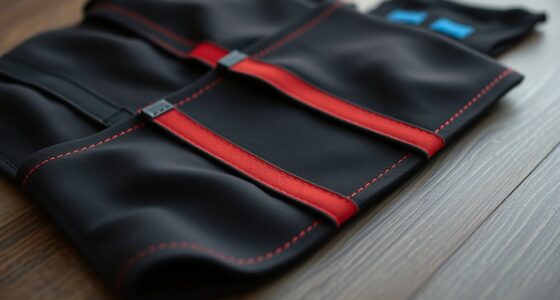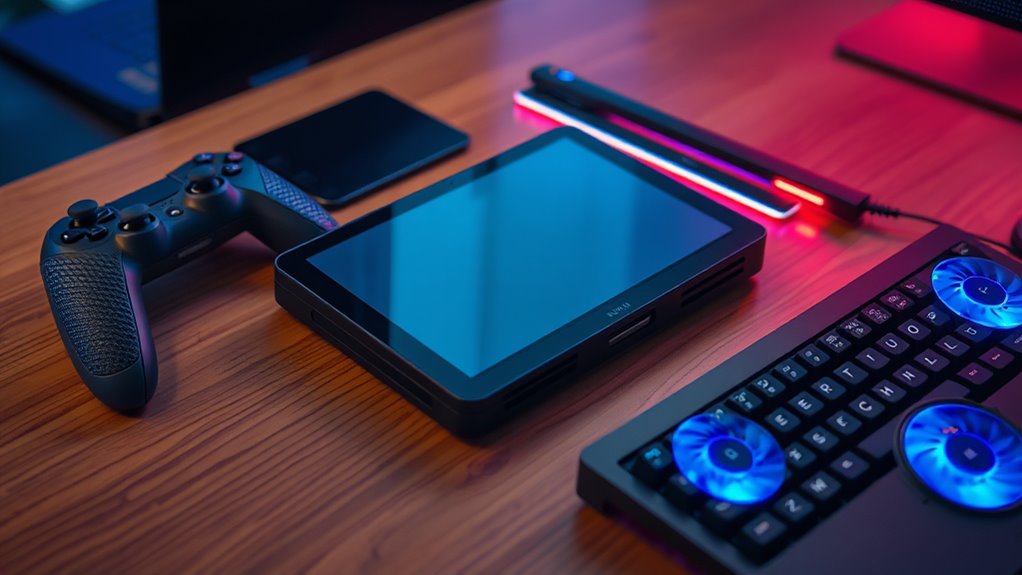

The best handheld gaming PC accessories solve a specific problem: more comfortable play, a cleaner TV setup, easier charging, or safer travel. My best overall pick is the JSAUX 6-in-1 Docking Station, which offers a broad connection hub for compatible handhelds; the PowerA Sling Bag stands out for carrying protection, while the Ergo Comfort Grips Case targets a more comfortable ROG Ally hold. The main tradeoffs are compatibility, how much space an accessory adds, and whether you need portability or a home setup. A dock can expand connections but takes up room, while a controller or grip can improve handling without solving every setup need. Read on for the full breakdown and guidance on choosing accessories that fit your device and play style.

Get health and wellness essentials delivered free with Prime
- Fast, free delivery on millions of items
- Prime Video, Amazon Music and more included
- Member-only deals all year
Key Takeaways
Dock choice depends on ports and setup. The JSAUX 6-in-1 and 4-in-1 docks serve different connection needs, while Razer’s 100W Handheld Dock Chroma adds a more feature-rich hub approach.
Comfort accessories are device-specific. The Ergo Comfort Grips Case is made for ASUS ROG Ally Z1 models, while the desktop stand is aimed at ROG Xbox Ally and Ally X users.
Controllers add flexibility, not guaranteed compatibility. The XPT, AceGamer Aurora II, and ManbaOne offer different control approaches, so platform support and connection method matter before choosing.
Travel protection is a separate need from desk storage. The PowerA Sling Bag is designed to carry a handheld and accessories, while a stand or dock is better suited to stationary play.
Specialized power accessories can limit flexibility. Lenovo’s Legion Go Charging Connector with Battery has a focused role, while broadly compatible docks may suit households using more than one handheld.
| XPT Portable Mini Controller for Switch, PC, iOS, Android, Steam Deck |  | Best Compact Controller | Connectivity: Bluetooth 5.0 and USB | Compatible devices: Android, iOS, Nintendo Switch 1/2, PC, and Steam Deck | Controller type: Gamepad and joystick | VIEW ON AMAZON | See Our Full Breakdown |
| JSAUX 6-in-1 Docking Station for Steam Deck, ROG Ally X, Legion Go |  | Best Overall Dock for Desk Play | Compatible devices: Steam Deck OLED/LCD, ROG Ally/Ally X, Legion Go/Go S, and MSI Claw/8 AI+ | Port count: 6 | USB ports: 4 | VIEW ON AMAZON | See Our Full Breakdown |
| Ergo Comfort Grips Case for ASUS ROG Ally Z1 & Z1 Extreme |  | Best for Longer ROG Ally Sessions | Compatible devices: ASUS ROG Ally Z1 and Z1 Extreme | Form factor: Case | Material: Hard shell | VIEW ON AMAZON | See Our Full Breakdown |
| Desktop Stand Compatible with ASUS ROG Xbox Ally/Ally X |  | Best Simple Stand for ROG Xbox Ally | Compatibility: ASUS ROG Xbox Ally and Ally X | Accessory type: Desktop stand | Charging: Integrated charging dock | VIEW ON AMAZON | See Our Full Breakdown |
| Razer Handheld Dock Chroma, Charging Hub & Expand Connectivity, 100W |  | Best Premium Travel Dock | Compatible devices: Legion Go, Nintendo Switch, ROG Ally, Samsung Galaxy S24, Steam Deck, and iPhone 15 | Port count: 6 | USB ports: 3 | VIEW ON AMAZON | See Our Full Breakdown |
| JSAUX 4-in-1 Docking Station for ROG Xbox Ally X, Steam Deck, Legion Go |  | Best for Multi-Device Compatibility | Video output: 1 HDMI port; 4K output stated | USB ports: 2 USB 2.0 Type-A | Charging wattage: 100 watts | VIEW ON AMAZON | See Our Full Breakdown |
| AceGamer Aurora II Wireless Bluetooth Controller for PC, Android, Switch, iOS, Steam Deck | 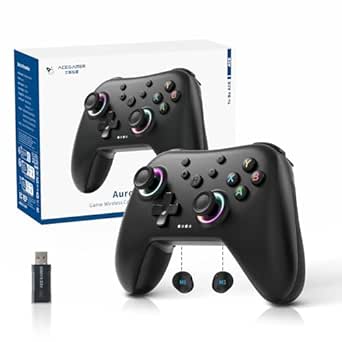 | Best Value for Cross-Platform Play | Connectivity: 2.4G wireless and Bluetooth | Compatible devices: PC, Android, Switch, iOS, Steam Deck | Controller type: Gamepad | VIEW ON AMAZON | See Our Full Breakdown |
| ManbaOne Interactive Screen Wireless Gaming Controller (Black) | 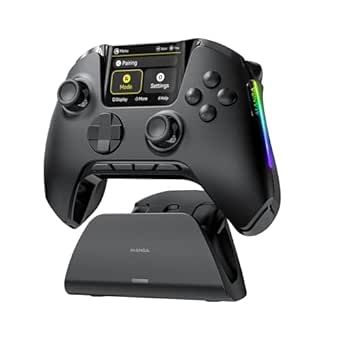 | Best for On-Controller Customization | Supported platforms: Switch, Switch 2, iOS, Android, Windows PC | Connection modes: Wired, Bluetooth, wireless dongle | Display: 2-inch interactive screen | VIEW ON AMAZON | See Our Full Breakdown |
| PowerA Sling Bag for PC Handheld Gaming, Fits Steam Deck OLED, ASUS Rog Ally X, Legion Go, MSI Claw, Padded Protection, 4-Compartments, Adjustable Strap, Cable Pass-Through |  | Best for Carrying a Handheld Setup | Compartments: 4 | Compatible devices listed: Steam Deck OLED, ASUS ROG Ally X, Legion Go, MSI Claw | Material: Polyester | VIEW ON AMAZON | See Our Full Breakdown |
| Lenovo Legion Go Charging Connector with Battery |  | Best Legion Go Controller Add-On | Compatibility: Legion Go controllers | Battery capacity: 2850mAh | Charging method: USB-C | VIEW ON AMAZON | See Our Full Breakdown |
| Razer Handheld Dock Chroma: Charging Hub & Expand Connectivity for Mobile Gaming & Tablets – USB C, USB A (3), HDMI, GbE – 100W Power (Renewed) |  | Best for Wired Play and Connectivity | Hardware interface: USB | Compatible devices: ROG Ally, Steam Deck, Switch, iPhone 16 | Total USB ports: 4 | VIEW ON AMAZON | See Our Full Breakdown |
| handheld gaming pc accessorie | Compatible devices |
|---|---|
| XPT Portable Mini Controller f | Android, iOS, Nintendo Switch 1/2, PC, and Steam Deck |
| JSAUX 6-in-1 Docking Station f | Steam Deck OLED/LCD, ROG Ally/Ally X, Legion Go/Go S, and MSI Claw/8 AI+ |
| Ergo Comfort Grips Case for AS | ASUS ROG Ally Z1 and Z1 Extreme |
| Desktop Stand Compatible with | — |
| Razer Handheld Dock Chroma | Legion Go, Nintendo Switch, ROG Ally, Samsung Galaxy S24, Steam Deck, and iPhone 15 |
| JSAUX 4-in-1 Docking Station f | — |
| AceGamer Aurora II Wireless Bl | PC, Android, Switch, iOS, Steam Deck |
| ManbaOne Interactive Screen Wi | — |
| PowerA Sling Bag for PC Handhe | — |
| Lenovo Legion Go Charging Conn | — |
| Razer Handheld Dock Chroma: Ch | ROG Ally, Steam Deck, Switch, iPhone 16 |
More Details on Our Top Picks
XPT Portable Mini Controller for Switch, PC, iOS, Android, Steam Deck
The XPT Mini Controller adds separate controls for handheld PC gaming without taking up much bag space. Its pocket-sized body and Bluetooth 5.0 or USB-C connectivity make it useful when you want a second controller for a Steam Deck or a phone, while the gyroscope, rumble, and turbo functions offer more options than a basic travel pad. Compared with the JSAUX 6-in-1 Docking Station, which turns a handheld into a desk setup, this is a personal-play accessory built for portability. The tradeoff is its small grip: players with larger hands may find it less comfortable for long sessions than the handheld’s built-in controls. Battery-life details are not provided, and wireless pairing may add a setup step. I’d choose it for compactness, not as a full-size controller replacement.
Pros:- Compact dimensions make it easy to pack alongside a handheld
- Bluetooth 5.0 and USB-C provide wireless and wired connection options
- Gyroscope, dual rumble motors, and turbo functions add control features
Cons:- Small body may be uncomfortable for extended play, especially for larger hands
- Battery-life details are not specified
- Bluetooth pairing can add setup friction or encounter connection issues
Best for: Steam Deck and other handheld PC owners who want a small spare controller for travel, multiplayer, or phone gaming
Not ideal for: Players with larger hands or anyone seeking a full-size controller for long gaming sessions; battery-life information is also limited
- Connectivity:Bluetooth 5.0 and USB
- Compatible devices:Android, iOS, Nintendo Switch 1/2, PC, and Steam Deck
- Controller type:Gamepad and joystick
- Features:Gyroscope, turbo function, ergonomic design, and wireless operation
- Power source:Battery powered
- Dimensions:4.72 x 2.76 x 0.79 inches
Our verdict“Choose the XPT if you want a pocketable second controller, but skip it if comfort in a full-size grip matters most.”
JSAUX 6-in-1 Docking Station for Steam Deck, ROG Ally X, Legion Go
The JSAUX 6-in-1 Dock earns the broadest desk-use role here because it combines display output, wired networking, USB expansion, and charging in one hub. Its 4K at 120Hz HDMI output suits players connecting a supported display, while gigabit Ethernet offers a steadier connection than relying on wireless for online play. The four USB ports also give a handheld room for peripherals, making this a more complete stationary setup than the Desktop Stand for ASUS ROG Xbox Ally/Ally X, which focuses on holding and charging one specific device. The JSAUX dock is not universal, though: its listed compatibility excludes the ROG Xbox Ally models, and reaching its stated charging capability requires a suitable 100W charger. I’d rank it ahead of a simple stand for buyers who want a multi-device desk hub, but not for those who need a dock for the Xbox Ally line.
Pros:- HDMI output supports resolutions and refresh rates up to 4K at 120Hz
- Gigabit Ethernet provides a wired networking option
- Four USB ports accommodate multiple peripherals
- 100W power delivery supports charging when paired with a suitable charger
Cons:- Not compatible with ROG Xbox Ally or Xbox Ally X
- A separate 100W charger is needed for the stated Turbo Mode performance
- More hub than stand-alone charging accessory for players who do not need display or peripheral connections
Best for: Steam Deck, ROG Ally, Legion Go, or MSI Claw owners building a desk setup with an external display, wired network, and USB peripherals
Not ideal for: ROG Xbox Ally or Xbox Ally X owners, and buyers who want a stand without needing several connection ports
- Compatible devices:Steam Deck OLED/LCD, ROG Ally/Ally X, Legion Go/Go S, and MSI Claw/8 AI+
- Port count:6
- USB ports:4
- HDMI ports:1
- HDMI output:Up to 4K at 120Hz
- Power delivery:100W
- Network interface:Gigabit Ethernet
- Weight:170 g
Our verdict“Pick this dock for a compatible handheld that regularly moves between portable play and a fully connected desk setup.”
Ergo Comfort Grips Case for ASUS ROG Ally Z1 & Z1 Extreme
This Ergo Comfort Grips Case is aimed at players who want a more substantial hold on the ASUS ROG Ally Z1 or Z1 Extreme without adding a separate controller. Its textured shell is designed to improve grip, while the built-in kickstand lets the handheld rest on a surface for viewing or supported play. Airflow cutouts are a useful design choice on a device that needs to shed heat, and the listed 100 g weight keeps the accessory relatively light. Compared with the Desktop Stand for ASUS ROG Xbox Ally/Ally X, this case stays attached and changes how the handheld feels in the hands; the stand is better for hands-free desk use. The narrow compatibility is the main limitation, and fit or durability may disappoint. I’d avoid it if you need a case that works across handheld models.
Pros:- Textured anti-slip surfaces are designed to improve grip
- Kickstand supports tabletop viewing or hands-free positioning
- Airflow cutouts leave cooling areas exposed
- Hard-shell construction is listed as scratch resistant and shockproof
Cons:- Compatibility is limited to ASUS ROG Ally Z1 and Z1 Extreme
- Fit and durability satisfaction may vary
- No customization options are specified
Best for: ROG Ally Z1 and Z1 Extreme owners who want extra grip for handheld sessions and a built-in way to prop up the device
Not ideal for: Owners of other handheld models or buyers who need a carry-focused case with verified fit and durability
- Compatible devices:ASUS ROG Ally Z1 and Z1 Extreme
- Form factor:Case
- Material:Hard shell
- Weight:100 g
- Features:Anti-slip, lightweight, scratch resistant, and shockproof
- Water resistance:Water resistant
- Stand:Built-in kickstand
Our verdict“Choose this case if you own a listed ROG Ally model and want added grip more than broad compatibility or a dedicated desk dock.”
Desktop Stand Compatible with ASUS ROG Xbox Ally/Ally X
This Desktop Stand keeps its job focused: it holds the ASUS ROG Xbox Ally or Ally X upright and includes an integrated charging dock. A non-slip base helps keep the handheld steady on a desk, making it a straightforward choice for charging between sessions or setting the screen at a fixed position. Unlike the JSAUX 6-in-1 Dock, it is not presented as a way to add Ethernet, HDMI, or a bank of USB ports; its appeal is a simpler stand-and-charge setup for the specific ROG Xbox Ally models. The listing gives no adjustable angle or height, so buyers cannot judge how well its position suits different desks or seating. Cable management and extra ports are also unspecified. I’d favor it over a broad dock only when a stable resting place and charging are the main needs.
Pros:- Designed specifically for ASUS ROG Xbox Ally and Ally X
- Integrated charging dock reduces the need for a separate charging stand
- Non-slip base is intended to keep the handheld stable
- Simple stand-focused setup avoids unnecessary hub features
Cons:- Compatibility is limited to two ROG Xbox Ally models
- No adjustable angle or height is specified
- Cable management and additional ports are not described
Best for: ROG Xbox Ally and Ally X owners who want a dedicated desktop resting place with charging built in
Not ideal for: Players with other handhelds or anyone who needs adjustable positioning, Ethernet, HDMI, or USB expansion
- Compatibility:ASUS ROG Xbox Ally and Ally X
- Accessory type:Desktop stand
- Charging:Integrated charging dock
- Base:Non-slip
- Construction:Durable construction
Our verdict“Pick this stand for a fixed charging spot for a ROG Xbox Ally, but choose a multiport dock if you want desk connectivity too.”
Razer Handheld Dock Chroma, Charging Hub & Expand Connectivity, 100W
The Razer Handheld Dock Chroma combines charging and connectivity with an adjustable hinge, giving it a more flexible role than a fixed stand such as the Desktop Stand for ASUS ROG Xbox Ally/Ally X. Its six-port layout includes USB and HDMI, while Ethernet support and 100W power suit players who want a handheld connected to a network, display, or accessories. The adjustable display angle can help adapt a setup to different surfaces, and customizable RGB lighting adds a distinct visual touch. This is a heavier travel accessory than its “portable” positioning might suggest at 500 g, and 100W charging requires an external power source. The broad listed device range is useful, but buyers should verify their specific hardware and connection needs. I’d choose it for a flexible multi-device dock, not for a bare-bones stand.
Pros:- Six-port design combines charging and connection expansion
- HDMI and Ethernet support desk or travel gaming setups
- Adjustable hinge allows different display angles
- Listed compatibility spans several handhelds, phones, and tablets
Cons:- At 500 g, it is heavier than a minimal stand or small travel adapter
- External power is required for 100W charging
- Setup may be more involved than using a basic stand
Best for: Handheld owners who travel between desks and want one dock for charging, display output, wired networking, and USB accessories
Not ideal for: Buyers prioritizing the lightest possible travel kit, or those who only need a simple stand and do not want external power or extra setup
- Compatible devices:Legion Go, Nintendo Switch, ROG Ally, Samsung Galaxy S24, Steam Deck, and iPhone 15
- Port count:6
- USB ports:3
- HDMI ports:1
- Power:100W
- Weight:500 g
- Features:Adjustable hinge and customizable RGB lighting
- Warranty:2 years
Our verdict“Choose the Razer dock if you want an adjustable, feature-rich hub for multiple devices and can accommodate its weight and external power needs.”
JSAUX 4-in-1 Docking Station for ROG Xbox Ally X, Steam Deck, Legion Go
I’d choose this dock when one setup needs to serve several handheld PCs. Its stated compatibility spans Steam Deck models, ROG Ally systems, Legion Go devices, and other handhelds, so it is a more flexible pick than the Lenovo Legion Go Charging Connector with Battery, which only works with Legion Go controllers. The 4K HDMI output handles connection to a larger screen, while two USB-A ports accommodate basic peripherals and 100W charging supports powered play when paired with a suitable charger. The tradeoff is a lean selection of connections: USB 2.0 is less suited to buyers who want faster data transfers or several accessories, and there is no alternative video output listed. I’d skip it for Nintendo Switch 2 use, which is explicitly unsupported.
Pros:- Listed compatibility covers a broad range of handheld gaming PCs.
- 4K HDMI output supports big-screen play.
- Two USB-A ports allow connection of basic peripherals.
- 100W charging supports powered handheld use with a compatible charger.
Cons:- USB 2.0 ports limit data-transfer speed and peripheral flexibility.
- Maximum charging performance requires a 100W charger.
- Not compatible with Nintendo Switch 2.
Best for: Players who own or regularly switch between several supported handheld gaming PCs and want one compact dock for a TV or monitor.
Not ideal for: Nintendo Switch 2 owners and players who need faster USB ports, more connections, or a dock that works at full capacity without a 100W charger.
- Video output:1 HDMI port; 4K output stated
- USB ports:2 USB 2.0 Type-A
- Charging wattage:100 watts
- Listed compatibility:ROG Xbox Ally / X, Steam Deck LCD / OLED, Legion Go / Go S / Go 2, Acer Predator Atlas 8, MSI Claw / 8 AI+, OneXPlayer
- Hardware interface:HDMI, USB 2.0 Type-A
- Dimensions:2.04 × 4.72 × 3.54 inches
- Minimum operating system:Windows 10
Our verdict“Choose this dock if you want one straightforward TV-and-peripheral hub for several supported handheld PCs; skip it if you need more ports or Switch 2 support.”
AceGamer Aurora II Wireless Bluetooth Controller for PC, Android, Switch, iOS, Steam Deck
The AceGamer Aurora II makes sense for handheld owners who also want a controller for a PC, phone, or Switch. Its 2.4G wireless and Bluetooth connections offer more ways to pair than the ManbaOne’s three connection modes, while Hall Effect joysticks and programmable rear buttons add control options without requiring a screen on the controller. Those features can be useful when a handheld is docked or propped up and the player is sitting farther away. The compromises are practical: it is not compatible with Xbox systems, and 2.4G pairing requires specific button presses, so setup may take more attention than a simple wired connection. I’d favor it over a handheld-specific add-on when cross-platform use matters more than a built-in display or charging station.
Pros:- Works with listed PC, Android, Switch, iOS, and Steam Deck platforms.
- 2.4G wireless and Bluetooth provide two wireless connection options.
- Hall Effect joysticks support precise control.
- Programmable back buttons allow control customization.
Cons:- Not compatible with Xbox systems.
- 2.4G connection setup requires specific button presses.
- Warranty details are limited in the provided product information.
Best for: Steam Deck and PC handheld owners who want one wireless gamepad for play across compatible PCs, phones, and Switch.
Not ideal for: Xbox players, or buyers who want a display for changing controller settings or prefer a connection that needs minimal setup.
- Connectivity:2.4G wireless and Bluetooth
- Compatible devices:PC, Android, Switch, iOS, Steam Deck
- Controller type:Gamepad
- Joystick feature:RGB Hall Effect joysticks
- Custom controls:Programmable back buttons
- Battery capacity:1000mAh
- Button quantity:12
Our verdict“Pick the Aurora II for a versatile wireless controller across supported handheld and mobile platforms, but not for Xbox compatibility or screen-based customization.”
ManbaOne Interactive Screen Wireless Gaming Controller (Black)
The ManbaOne is the controller in this group for buyers who want settings and connection options built into the accessory itself. Its 2-inch interactive screen offers a way to customize controls without relying on software, a clear distinction from the AceGamer Aurora II, which offers programmable back buttons but no display. The ManbaOne also lists wired, Bluetooth, and wireless-dongle modes, plus Hall Effect triggers and a high stated polling rate for responsive input. That feature set brings more flexibility, but it does not make this a universal console controller: Xbox and PlayStation are unsupported, and Bluetooth is not recommended for iOS because of stability concerns. I’d choose it over a simpler gamepad for screen-led setup, but skip it if iOS Bluetooth is your main connection method.
Pros:- Built-in 2-inch screen supports controller customization without software.
- Wired, Bluetooth, and wireless-dongle connection modes are listed.
- Hall Effect triggers and anti-stick-drift features support control longevity.
- Includes a 1800mAh battery and smart charging station.
Cons:- Not compatible with Xbox or PlayStation consoles.
- Bluetooth is not recommended for iOS because of stability concerns.
- Some features may require consultation with customer support.
Best for: Handheld PC and multi-platform players who want onboard control customization and multiple connection modes without relying on companion software.
Not ideal for: Xbox or PlayStation owners, and iOS players who expect a stable Bluetooth connection.
- Supported platforms:Switch, Switch 2, iOS, Android, Windows PC
- Connection modes:Wired, Bluetooth, wireless dongle
- Display:2-inch interactive screen
- Battery capacity:1800mAh
- Gyroscope:6-axis
- Trigger type:Hall Effect
- Polling rate:800Hz+
- Additional controls:Macro back keys and customizable buttons
Our verdict“Choose the ManbaOne if onboard settings and connection flexibility matter more than simple setup or dependable iOS Bluetooth.”
PowerA Sling Bag for PC Handheld Gaming, Fits Steam Deck OLED, ASUS Rog Ally X, Legion Go, MSI Claw, Padded Protection, 4-Compartments, Adjustable Strap, Cable Pass-Through
For players who carry a handheld PC beyond the desk, this sling bag solves a different problem from the JSAUX dock: it organizes and protects gear in transit rather than adding screen output or ports. Its four compartments give accessories their own places, while padding and a thumbstick-protective design help keep the handheld from sharing space unprotected. The adjustable shoulder strap and breathable mesh back are useful for longer walks, and a cable pass-through supports charging while on the move. It is listed for popular systems including Steam Deck OLED, ROG Ally X, Legion Go, and MSI Claw. The soft polyester shell is not a substitute for a rigid case, though, and the bag does not include the device or accessories. Buyers wanting a desk accessory should choose a dock instead.
Pros:- Four compartments separate the handheld from accessories.
- Padded design helps protect the device and thumbsticks.
- Adjustable strap and breathable mesh back support comfortable carrying.
- Cable pass-through allows charging on the go.
Cons:- Soft shell offers less rigid protection than a hard case.
- Handheld and accessories are not included.
- Only black is listed as a color option.
Best for: Handheld PC owners who commute, travel, or attend gaming events and want organized storage for a device and accessories.
Not ideal for: Players who need hard-shell impact protection, do not carry their handheld outside the home, or are looking for a charging dock rather than a bag.
- Compartments:4
- Compatible devices listed:Steam Deck OLED, ASUS ROG Ally X, Legion Go, MSI Claw
- Material:Polyester
- Shell type:Soft
- Strap:Adjustable shoulder strap
- Weight:14.08 ounces
- Charging feature:Cable pass-through
- Warranty:2-year limited warranty
Our verdict“Choose this sling for organized, padded transport of a handheld setup; choose the JSAUX dock instead if your priority is playing on a larger screen.”
Lenovo Legion Go Charging Connector with Battery
This connector is a focused accessory for one handheld family: it joins Legion Go controllers into a unified grip and adds a 2850mAh rechargeable battery. That makes it a better fit for players who want a more conventional, combined-controller feel and extra controller power, rather than a general-purpose add-on like the AceGamer Aurora II, which can serve several listed platforms. USB-C charging keeps power management straightforward, but the narrow compatibility is the main limit: this connector is designed exclusively for Legion Go controllers, and the controllers themselves are not included. It also does not expand a handheld’s display or ports like the JSAUX dock. I’d pick it for a Legion Go owner seeking a unified grip and controller battery, not for anyone building a broader accessory kit.
Pros:- Combines compatible Legion Go controllers into a unified controller.
- Built-in 2850mAh battery adds controller power.
- USB-C charging provides a familiar charging method.
- Ergonomic grip is designed for extended play.
Cons:- Compatible only with Legion Go controllers.
- Controllers are not included.
- Does not provide the cross-platform use of the AceGamer Aurora II.
Best for: Legion Go owners who want to join their controllers into one ergonomic grip and add rechargeable battery capacity for longer play.
Not ideal for: Owners of other handheld PCs, or buyers who need a standalone controller, a display dock, or included controllers.
- Compatibility:Legion Go controllers
- Battery capacity:2850mAh
- Charging method:USB-C
- Design:Unified controller with ergonomic grip
- Durability:Built for marathon play
- Controllers included:No
Our verdict“Choose this connector if you already own Legion Go controllers and want a combined grip with added battery capacity; skip it if you need a standalone or multi-platform controller.”
Razer Handheld Dock Chroma: Charging Hub & Expand Connectivity for Mobile Gaming & Tablets – USB C, USB A (3), HDMI, GbE – 100W Power (Renewed)
I’d pick the Razer Handheld Dock Chroma for a handheld setup that regularly moves to a desk or TV. Its mix of USB-A, USB-C, HDMI, and Ethernet ports can connect accessories and a display while the handheld charges, reducing the need to swap cables during play. The listed 100W power delivery supports charging through the hub, though the product details don’t specify an included power adapter, so buyers may need to supply one.
Compared with the JSAUX 6-in-1 Docking Station, this Razer dock is a strong fit for buyers who value the Chroma-branded hub and broad device compatibility, but the listing provides less detail about its precise port layout and included accessories. It supports several device types, yet compatibility is not universal, and its renewed condition may come with limited warranty coverage. I’d choose it for a wired, multi-device station—not for a travel kit where minimal setup matters most.
Pros:- Combines HDMI, Ethernet, USB-A, and USB-C connectivity in one hub
- Supports up to 100W power delivery for charging while docked
- Lists compatibility with handhelds, tablets, and smartphones
- Compact design is suited to a portable desk or gaming setup
Cons:- Power adapter inclusion and requirements are not specified in the provided details
- Renewed status may mean limited warranty coverage
- Compatibility is limited to supported devices rather than guaranteed for every handheld
Best for: Handheld owners who dock at a desk or TV and want Ethernet, HDMI, USB connections, and charging through one hub.
Not ideal for: Buyers who need a clearly stated included power adapter, broad guaranteed compatibility, or the reassurance of a new-product warranty.
- Hardware interface:USB
- Compatible devices:ROG Ally, Steam Deck, Switch, iPhone 16
- Total USB ports:4
- Total ports:6
- HDMI ports:1
- Power delivery:Up to 100W
- Color:Black
- Condition:Renewed
Our verdict“Choose this renewed Razer dock if you want wired display, network, and accessory connections for a compatible handheld, and can verify your power-adapter and warranty needs.”

How We Picked
I ranked these handheld gaming PC accessories by how clearly each one addresses a common ownership need: expanding connections, improving comfort, adding control options, supporting charging, or protecting a device in transit. I also weighed practical fit, stated compatibility, setup demands, and how useful each accessory could be beyond one narrow situation. Products with a clear role and broad everyday usefulness rank ahead of accessories that make sense only for a particular device or play style.
The lineup spans several different jobs, so the ranking is not a claim that a dock is better than a controller or bag. Instead, I gave more weight to the strength and flexibility of each product within its role, while treating compatibility limits and added bulk as real tradeoffs. The two Razer Handheld Dock Chroma listings are considered separately because one is identified as renewed; buyers should compare condition and listing details rather than assume the two offers are identical.
| handheld gaming pc accessorie | Compatible devices |
|---|---|
| XPT Portable Mini Controller f | Android, iOS, Nintendo Switch 1/2, PC, and Steam Deck |
| JSAUX 6-in-1 Docking Station f | Steam Deck OLED/LCD, ROG Ally/Ally X, Legion Go/Go S, and MSI Claw/8 AI+ |
| Ergo Comfort Grips Case for AS | ASUS ROG Ally Z1 and Z1 Extreme |
| Desktop Stand Compatible with | — |
| Razer Handheld Dock Chroma | Legion Go, Nintendo Switch, ROG Ally, Samsung Galaxy S24, Steam Deck, and iPhone 15 |
| JSAUX 4-in-1 Docking Station f | — |
| AceGamer Aurora II Wireless Bl | PC, Android, Switch, iOS, Steam Deck |
| ManbaOne Interactive Screen Wi | — |
| PowerA Sling Bag for PC Handhe | — |
| Lenovo Legion Go Charging Conn | — |
| Razer Handheld Dock Chroma: Ch | ROG Ally, Steam Deck, Switch, iPhone 16 |
Factors to Consider When Choosing Handheld Gaming Pc Accessories
Before choosing an accessory, start with the problem you want to solve and the handheld you own. Several items here overlap in broad purpose, but their fit, connection options, and portability differ. These checks can help prevent buying something that adds clutter without improving your setup.
Match the accessory to your exact handheld
Do not rely on a product title that says it supports handheld PCs in general. Check the exact model and generation, since a case or connector may fit only one device family. For docks, confirm that the handheld supports the connection features you intend to use; a port on the hub does not guarantee every device can use it as expected. If you own more than one handheld, favor accessories with clearly stated support for both rather than guessing from connector shape. Keep your device model name and revision handy when comparing listings.
Count the connections you will actually use
A dock with more ports is not automatically a better fit. List the devices you plan to connect at once, such as a display, wired network, storage, or controller, then check the dock’s port types and layout. Extra connections can take desk space and may add cable clutter if your setup is simple. Also check whether charging power is supplied by the dock, an external adapter, or a separate cable. A compact hub can be the more practical choice when you only need a few connections.
Treat charging wattage and battery accessories as setup questions
Charging claims matter only when they align with the handheld’s needs and the power source you use. For a dock, check its stated power delivery and whether you need to provide a compatible charger separately. A battery-equipped connector has a different purpose from a dock: it can support a device-specific charging setup, but may not serve other handhelds. Avoid assuming that a higher wattage figure means faster charging in every configuration. Review the included components and your device’s charging requirements before choosing.
Choose comfort changes that suit your hands and play style
Grips, cases, stands, and controllers change how you hold or position a handheld, but each affects play differently. Added grips can make long sessions more comfortable while increasing bulk and potentially changing how the device fits in a case. A stand works for tabletop use but does not improve handheld ergonomics. A separate controller can help when the device is propped up, though it adds another item to charge or carry. Think about where you play most often before adding weight to a portable setup.
Check controller compatibility and connection preferences
Wireless controller listings may name several platforms, but compatibility can depend on connection mode, operating system, and game support. Decide whether you prefer Bluetooth, a wired connection, or the option to switch between them, then confirm that the listing supports your intended setup. Features such as an onboard screen or additional controls can be useful to some players but add complexity for others. Also account for controller charging and storage when traveling with a handheld. If you mostly play with the device in your hands, a separate controller may see little use.
Plan for carrying, storage, and condition
A travel bag should fit the handheld with its case or grips attached, not just the bare device. Check compartment dimensions and decide whether you need space for a charger, controller, or cables; more storage can also mean a larger bag to carry. A cable pass-through can help with charging access, but it does not replace checking the bag’s padding and closure. For any renewed listing, read the condition details and included accessories closely, since they may differ from a new listing. Keep protective storage separate from a desk stand’s job when weighing what you need first.
Frequently Asked Questions
Should I buy a dock or a separate controller first?
Choose based on how you usually play. A dock makes more sense if you regularly connect a display or wired accessories and want a fixed desk or TV setup. A separate controller is the better first addition if you already prop up your handheld and want to play without holding the device. Neither solves the other’s main problem, so buying both is most useful only if you use both handheld and docked modes. Check connection compatibility before choosing either.
Can I use one dock with more than one handheld gaming PC?
Possibly, but check each device model against the dock’s stated compatibility rather than assuming all USB-C handhelds behave the same. Confirm that the dock supports the connections you need on each device, including display output and charging. A dock that works for one handheld may have different limitations with another. If multiple people or devices will share it, prioritize explicit support across those models over a longer port list. Also check whether the dock’s cable and placement work with each device’s port location.
Will an ergonomic grip case still fit inside my travel bag?
That depends on the combined dimensions of the handheld and grip case, not the bag’s description alone. Compare the bag’s internal measurements with the device while the grip is attached, and leave room for the zipper and any protective padding. A snug fit can make packing difficult or put pressure on controls and sticks. If you plan to carry chargers or a controller too, check those compartments separately. When fit is uncertain, prioritize a bag with clearly stated interior dimensions.
Is a renewed dock a sensible choice for a handheld setup?
A renewed dock can suit a buyer who is comfortable checking condition information and does not need a new unit. Compare the listing’s stated condition, included cables or power accessories, and return terms with the new version before deciding. Do not assume the renewed option includes every component shown in product imagery. Test your intended setup promptly after delivery, including display, charging, and network connections if you use them. If you need a predictable setup for work or frequent travel, the clarity of the listing may matter more than the renewed label itself.
Do I need a dedicated battery accessory if I already have a dock?
Not necessarily, because these accessories serve different situations. A dock is mainly useful for connecting a handheld to a stationary setup, while a battery accessory is intended to support charging away from a typical docked arrangement. If you mostly play near an outlet, a dock or standard charging setup may be enough. If you travel or need a device-specific charging solution, check the battery accessory’s compatibility and how it attaches before buying. Avoid adding one solely because it includes a battery; confirm that its capacity and use case address a real need for your routine.
Conclusion
For the best overall mix of home setup flexibility, I’d start with the JSAUX 6-in-1 Docking Station, provided your handheld is listed as compatible. The best value direction is the JSAUX 4-in-1 Docking Station for buyers who need a simpler hub rather than a broader set of connections. For a best premium hub, consider the Razer Handheld Dock Chroma and compare the new and renewed listings carefully. Beginners who want a straightforward comfort upgrade can look at the Ergo Comfort Grips Case if they own a supported ROG Ally; for beginners setting up a desk, the desktop stand is another simple starting point. Choose the PowerA Sling Bag for travel, an XPT, AceGamer, or ManbaOne controller for your preferred control style, or the Lenovo charging connector for its specific device-focused charging role. Match the accessory to your handheld and routine before adding another item to your kit.
Cold & flu season Picks
humidifiers
As an affiliate, we earn on qualifying purchases.