
Students need an ergonomic laptop stand that raises the screen to eye level, folds into a backpack, and survives dorm life without draining a semester budget. After comparing 14 popular options, the Besign LSX7 stands out as the best overall pick for students thanks to its 360° rotating base, foldable design, and stable adjustable height — rare to find all three at a mid-range price. The Amazon Basics riser makes the most sense as the budget choice for a fixed dorm desk, while the Nulaxy dual-foldable stand suits students who carry their setup between classes daily. The main tradeoff in this category is full adjustability versus portability: the most flexible stands tend to be heavier, and the lightest ones give up height range. Continue reading for the full breakdown, including who each stand is for and who should skip it.

Get health and wellness essentials delivered free with Prime
- Fast, free delivery on millions of items
- Prime Video, Amazon Music and more included
- Member-only deals all year
Key Takeaways
- The Besign LSX7 earned the top spot because it was the only mid-priced stand combining a 360° rotating base, six-level height adjustment, and a foldable frame — most competitors offered only two of the three.
- Rotating-base stands (Besign LSX7, LOXP 360°, and the 360° Aluminum Riser) consistently cost $5–10 more than fixed stands of similar build quality, so that swivel feature only pays off if you actually share your screen for group work.
- The Amazon Basics riser proved the best value for a permanent dorm desk, but its single fixed height makes it a poor match for students who also study at cafés and libraries.
- The Nulaxy and LOXP portable models won for backpack carry, but both trade stability for weight — heavier laptops over 16 inches wobble noticeably at maximum height.
- Detachable Z-style stands like the Besign LS03 and Lamicall offer the best rigidity for typing-heavy coursework, yet their non-folding frames mean they live on your desk permanently.
| Amazon Basics Sturdy and Portable Ergonomic Laptop Stand for Desk |  | Best Value Pick | Height Adjustment: Up to 7 inches | Supported Devices: Laptops and tablets 10-15.6 inches | Material: Lightweight, rust-resistant aluminum | VIEW LATEST PRICE | See Our Full Breakdown |
| MOKURU Aluminum Laptop Stand for Desk |  | Best Fixed-Height Simplicity | Material: Aluminum alloy | Height Adjustment: Raises screen by 2.5 inches (fixed) | Keyboard Tilt: 17 degrees | VIEW LATEST PRICE | See Our Full Breakdown |
| Laptop Stand for Desk (360° Rotating), Aluminum Laptop Riser |  | Best for Group Study Sessions | Material: Aluminum alloy | Load Capacity: Up to 11 lbs | Adjustable Height: Up to 11.81 inches | VIEW LATEST PRICE | See Our Full Breakdown |
| Besign LSX7 Laptop Stand with 360° Rotating Base |  | Best Overall | Compatibility: 10-15.6 inch laptops | Material: Metal | Load Capacity: 13 lbs | VIEW LATEST PRICE | See Our Full Breakdown |
| LOXP Adjustable Laptop Stand with 360° Rotating Base |  | Best Portable Rotator | Material: Fiber metal | Rotation: 360° | Supported Laptop Size: 10-16 inches | VIEW LATEST PRICE | See Our Full Breakdown |
| Besign LS03 Aluminum Laptop Stand, Ergonomic Detachable Computer Stand for 10-15.6″ Laptops, Silver |  | Best for Dorm Desks | Compatibility: 10-15.6 inch laptops | Material: Aluminum alloy | Maximum Load: 8.8 lbs | VIEW LATEST PRICE | See Our Full Breakdown |
| Lamicall Aluminum Laptop Stand for Desk for MacBook Air Pro Neo 10-17.3” |  | Best Overall | Compatibility: 10″ to 17.3″ laptops including MacBook, Surface, Dell, HP, Chromebook | Material: Aluminum alloy | Dimensions: 12 x 10 x 2 inches | VIEW LATEST PRICE | See Our Full Breakdown |
| Laptop Stand for Desk, Adjustable and Foldable Metal Riser |  | Best Budget Pick | Support Weight: 17.6 lbs (8 kg) | Material: ABS, aluminum, silicone | Compatible Devices: Laptops 10-15.6 inches, tablets | VIEW LATEST PRICE | See Our Full Breakdown |
| Adjustable Laptop Stand for Desk, Metal Laptop Riser Holder |  | Best for Backpacking Between Classes | Weight: 780 g | Supported Devices: Laptops 10-15.6 inches, tablets | Material: Metal | VIEW LATEST PRICE | See Our Full Breakdown |
| Ergonomic Adjustable Laptop Stand with Phone Holder, 360° Rotation, Foldable, Portable for 10-17″ Laptops and Tablets |  | Best Multitasking Features | Height Adjustment: 8 levels, 5.5″ to 7.0″ | Material: Aircraft-grade ABS, silicone pads | Compatibility: 10-17″ laptops and tablets | VIEW LATEST PRICE | See Our Full Breakdown |
| Nulaxy Ergonomic Adjustable Laptop Stand for Desk |  | Best Stability for Heavy Laptops | Weight: 1.7 pounds | Dimensions: 11.81 x 11.02 x 2.76 inches | Material: Metal | VIEW LATEST PRICE | See Our Full Breakdown |
| Tonmom Adjustable Laptop Stand for Desk, Black |  | Best Ultralight Budget Pick | Height Adjustment: 2.78″ to 6.5″ | Weight: 0.53 pounds | Folded Size: 10.5″ x 1.96″ x 0.68″ | VIEW LATEST PRICE | See Our Full Breakdown |
| LOXP Adjustable Laptop Stand for Desk, Portable Airflow Riser |  | Best Cooling for Long Study Sessions | Maximum Load: 15.4 pounds (7 kg) | Supported Laptop Size: up to 15.6 inches | Material: Sturdy metal | VIEW LATEST PRICE | See Our Full Breakdown |
| OImaster Laptop Stand for Desk, Adjustable & Foldable Riser | 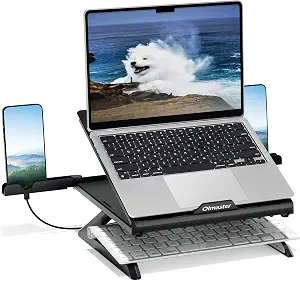 | Best Value All-Rounder | Compatibility: 10-15.6 inch notebooks | Adjustability: Multiple adjustable angles | Foldable: Yes | VIEW LATEST PRICE | See Our Full Breakdown |
| ergonomic laptop stands for student | Material | Compatibility | Color |
|---|---|---|---|
| Amazon Basics Sturdy and Porta | Lightweight, rust-resistant aluminum | — | — |
| MOKURU Aluminum Laptop Stand f | Aluminum alloy | 10-17.3 inch laptops | Silver |
| Laptop Stand for Desk | Aluminum alloy | 10-16 inch laptops and tablets | — |
| Besign LSX7 Laptop Stand with | Metal | 10-15.6 inch laptops | Black |
| LOXP Adjustable Laptop Stand w | Fiber metal | — | — |
| Besign LS03 Aluminum Laptop St | Aluminum alloy | 10-15.6 inch laptops | Silver |
| Lamicall Aluminum Laptop Stand | Aluminum alloy | 10" to 17.3" laptops including MacBook, Surface, Dell, HP, Chromebook | Silver |
| Laptop Stand for Desk | ABS, aluminum, silicone | — | — |
| Adjustable Laptop Stand for De | Metal | — | Black |
| Ergonomic Adjustable Laptop St | Aircraft-grade ABS, silicone pads | 10-17" laptops and tablets | — |
| Nulaxy Ergonomic Adjustable La | Metal | 10-16 inch laptops | Silver |
| Tonmom Adjustable Laptop Stand | — | 10-15.6 inch laptops | Black |
| LOXP Adjustable Laptop Stand f | Sturdy metal | 10-15.6 inch laptops, MacBook, Pixelbook, Dell XPS, HP, ASUS, ThinkPad, Acer, Chromebook, Surface | — |
| OImaster Laptop Stand for Desk | Metal construction | 10-15.6 inch notebooks | — |
More Details on Our Top Picks
Amazon Basics Sturdy and Portable Ergonomic Laptop Stand for Desk
Students shopping on a tight budget will find this the simplest entry point into laptop ergonomics. Compared with the MOKURU, which fixes your screen at a single 2.5-inch elevation, the height adjustment up to 7 inches lets you fine-tune the riser to your dorm desk and chair — the difference between ‘slightly better’ posture and actually getting the screen near eye level. The foldable aluminum build collapses flat enough to slide into a backpack, which matters for anyone moving between lecture hall, library, and home. The tradeoff is structural: it demands a flat, solid surface, and heavier gaming laptops can make the platform feel less planted than the rotating Besign LSX7. Ventilation is adequate rather than exceptional. Still, for the price, the adjustability on offer here is hard to beat, making this a sensible default for cost-conscious buyers.
Pros:- Adjustable height up to 7 inches for genuine posture customization
- Folds flat for backpack portability between classes
- Ventilated aluminum platform helps with heat dissipation
- Lightweight at 1.7 lbs, easy to carry daily
Cons:- Stability suffers on soft or uneven surfaces like beds
- Larger or heavier devices can make the riser feel wobbly
Best for: Budget-minded students who want real height adjustability without paying premium prices
Not ideal for: Owners of heavy 17-inch gaming laptops — the 15.6-inch limit and 11 lb capacity may feel marginal
- Height Adjustment:Up to 7 inches
- Supported Devices:Laptops and tablets 10-15.6 inches
- Material:Lightweight, rust-resistant aluminum
- Load Capacity:11 lbs (5 kg)
- Folded Size:10 x 8.7 x 1.8 inches
- Weight:1.7 lbs (0.77 kg)
Our verdict“The most sensible first stand for students who want adjustable ergonomics at the lowest possible cost.”
MOKURU Aluminum Laptop Stand for Desk
Not every student needs a stand that does everything. The MOKURU takes the opposite approach to the LOXP rotating model: one fixed elevation, a 17-degree keyboard tilt, and a triangular structure that trades flexibility for rock-solid stability. That rigidity is the real selling point — there is no hinge to loosen or swivel to wobble over a semester of daily use. It also accommodates laptops up to 17.3 inches, a range the Amazon Basics and LOXP stands can’t match, making it one of the few options here for students with larger machines. The tradeoff is obvious: if your desk setup changes, or your neck needs the screen higher than 2.5 inches, you’re out of luck. Assembly with four screws is minor but real friction compared with pull-out-of-the-box rivals. This pick makes the most sense for students with a permanent desk who value stability over adjustability.
Pros:- Supports larger laptops up to 17.3 inches
- Triangular structure delivers exceptional stability
- Ergonomic tilt reduces neck and wrist strain
- Open aluminum design provides strong ventilation
Cons:- No height adjustment beyond the fixed 2.5-inch elevation
- Requires screw-based assembly before first use
Best for: Students with 17-inch laptops and a fixed desk setup who prioritize stability over adjustability
Not ideal for: Anyone who wants to fine-tune screen height or frequently reposition their laptop — the elevation is preset
- Material:Aluminum alloy
- Height Adjustment:Raises screen by 2.5 inches (fixed)
- Keyboard Tilt:17 degrees
- Compatibility:10-17.3 inch laptops
- Color:Silver
- Installation:Simple, requires four screws
Our verdict“A stable, no-frills riser best suited to students with bigger laptops who have settled on one desk configuration.”
Laptop Stand for Desk (360° Rotating), Aluminum Laptop Riser
Group projects are where this stand separates itself. The 360° swivel base means you can spin your screen toward a study partner without lifting the laptop or knocking over your coffee — something the Amazon Basics stand, with its static platform, simply cannot do. Height range is the strongest in this batch at up to 11.81 inches, which matters for taller students who find most risers leave them craning downward anyway. The heavy base earns its keep by keeping taller configurations steady, though the payoff is a bulkier folded footprint than slimmer travel-focused options. The open design invites dust, so expect occasional cleaning if it lives on your desk permanently. Compared with the Besign LSX7, this model offers more height but caps out at 16-inch laptops, so 17-inch owners should look to the MOKURU instead. This pick makes the most sense for collaborative or shared-workspace students.
Pros:- 360° swivel base makes screen sharing effortless
- Tallest height range in this batch at 11.81 inches
- Heavy base keeps taller configurations stable
- Folds down for occasional travel
Cons:- Caps out at 16-inch laptops
- Open design collects dust over time
- Folded size is bulkier than travel-focused rivals
Best for: Students who regularly share their screen in group study sessions or shared workspaces
Not ideal for: Students with laptops over 16 inches, or minimalists who want the smallest possible folded footprint
- Material:Aluminum alloy
- Load Capacity:Up to 11 lbs
- Adjustable Height:Up to 11.81 inches
- Rotation:360°
- Compatibility:10-16 inch laptops and tablets
- Dimensions:10 x 2 x 2.7 inches
- Folded Size:9.45 x 9.45 x 1.25 inches
Our verdict“The go-to choice for students whose work revolves around collaboration and screen sharing.”
Besign LSX7 Laptop Stand with 360° Rotating Base
If I had to recommend one stand to a student who buys only once, this is it. The LSX7 combines adjustable height and angle with a 360° rotating base — matching the swivel of the taller rotating riser above while packing a 13 lb load capacity that beats both the Amazon Basics and that rival’s 11 lb ratings. That headroom means a gaming laptop or a laptop plus external accessories sit firmly without wobble, and the sturdy metal construction feels built to survive four years of dorm life. The tradeoffs are smaller but real: the 15.6-inch compatibility ceiling excludes larger machines (the MOKURU covers those), and it comes only in black, which won’t suit every desk aesthetic. There’s also no advertised non-slip base padding, so a smooth desk surface and an accidental nudge could send it sliding. Compared across the full lineup, though, its balance of stability, flexibility, and rotation is the strongest all-around package.
Pros:- Adjustable height and angle plus 360° rotation in one stand
- Highest load rating in this batch at 13 lbs
- Stable, wobble-free metal construction
- Open design promotes airflow and cooling
Cons:- Limited to 15.6-inch laptops
- Only available in black
- No advertised non-slip pads on the base
Best for: Students who want one durable, full-featured stand that balances adjustability, stability, and rotation
Not ideal for: Owners of laptops larger than 15.6 inches, or buyers who need confirmed non-slip base padding for a slick desk
- Compatibility:10-15.6 inch laptops
- Material:Metal
- Load Capacity:13 lbs
- Rotation:360°
- Adjustability:Height and angle adjustable
- Color:Black
Our verdict“The best-balanced pick for most students — flexible, sturdy, and rotation-equipped, as long as your laptop is 15.6 inches or smaller.”
LOXP Adjustable Laptop Stand with 360° Rotating Base
This stand targets the student who splits time between a dorm desk, the library, and a coffee shop — and still wants rotation everywhere. Unlike the Besign LSX7, which leans toward desk-dwelling sturdiness, the LOXP emphasizes a foldable, travel-ready build in fiber metal that shrinks down for a backpack. The 360° rotating base survives the folding process, which is rarer than it sounds, and the non-slip construction gives it an edge over the Besign on smooth surfaces — a genuinely practical detail for café tables. The compromises follow from the portability focus: it supports only up to 16-inch laptops, and the lighter frame means uneven outdoor surfaces can introduce wobble that heavier stands shrug off. Color choices are limited. For students whose stand moves as often as they do, though, this is the rotating option that actually travels well, where rivals like the LSX7 are better left at home.
Pros:- Folds down compactly for genuine travel portability
- 360° rotation survives the folding design
- Non-slip construction performs well on smooth tables
- Adjustable height and angle for ergonomic positioning
Cons:- Less stable on uneven or outdoor surfaces
- Limited to laptops up to 16 inches
- Few color options available
Best for: Mobile students who work from multiple locations and want rotation and adjustability on the go
Not ideal for: Students with a permanent desk setup on uneven surfaces, or anyone wanting color options
- Material:Fiber metal
- Rotation:360°
- Supported Laptop Size:10-16 inches
- Non-slip:Yes
- Foldability:Foldable and portable
- Adjustability:Height and angle adjustable
Our verdict“The best rotating stand for students whose workspace changes daily, trading some stability for portability.”
Besign LS03 Aluminum Laptop Stand, Ergonomic Detachable Computer Stand for 10-15.6″ Laptops, Silver
The Besign LS03 earns its place as the dorm-room default because it gets the fundamentals right without asking much of a student budget. Its full aluminum build feels more premium than the plastic-heavy B0B29BZGF2 riser later in this list, and the open-frame design keeps a fanless MacBook breathing during long study sessions. It also detaches for flat storage, which matters when a desk doubles as a dining table on weekends.
The tradeoff is fixed flexibility: unlike the Lamicall, which covers machines up to 17.3 inches, this stand stops at 15.6 — fine for most students, but gaming-laptop owners are out of luck. The 8.8 lb load limit is also the lowest in this batch, so stacked books or a chunky workstation replacement should live elsewhere.
Pros:- Solid aluminum construction that outlasts plastic alternatives
- Open design dissipates heat effectively
- Detachable and flat enough to stash in a drawer
- Elevates the screen enough to reduce neck strain at a desk
Cons:- 8.8 lb weight capacity is the lowest in this lineup
- No laptops larger than 15.6 inches fit the cradle
Best for: Students with standard 13-15 inch laptops who want a durable metal stand that stores flat in a cramped dorm
Not ideal for: Anyone with a heavy gaming laptop or 17-inch machine — the 8.8 lb limit and 15.6 inch cap rule them out
- Compatibility:10-15.6 inch laptops
- Material:Aluminum alloy
- Maximum Load:8.8 lbs
- Height Adjustment:Up to 14.5 cm / 5.7 inches
- Storage:Detachable, flat design
- Color:Silver
Our verdict“This is the pick for a student with a standard laptop who values metal durability and easy storage over size flexibility.”
Lamicall Aluminum Laptop Stand for Desk for MacBook Air Pro Neo 10-17.3”
When one stand has to survive four years of coursework, the Lamicall is the safest bet in this batch. Its 10 to 17.3 inch compatibility range is the widest here — it swallows everything from a compact tablet to a 16-inch MacBook Pro — while the Besign LS03 taps out at 15.6 inches. The large weighted base also keeps the laptop planted during frantic typing, something lighter folding risers struggle with.
It isn’t flawless. The height adjustment range is modest, so very tall students pairing it with an external keyboard may still crane their necks, and silver is the only finish on offer. Still, compared with the B0C7BKZ883’s foldable hinge wobble, the Lamicall trades a little portability for everyday stability — a trade most desk-bound students should take.
Pros:- Fits the widest device range in this roundup, up to 17.3 inches
- Stable, oversized base resists shaking while typing
- Aluminum construction aids heat dissipation
- Folds down enough for backpack travel
Cons:- Height adjustment range is limited for taller users
- Only available in silver
- May not accommodate unusually shaped or oversized laptops
Best for: Students who want one versatile stand that fits any laptop they’ll own through graduation, from ultrabooks to 17-inch machines
Not ideal for: Very tall users needing substantial elevation — the adjustment range is limited, so posture gains may fall short
- Compatibility:10″ to 17.3″ laptops including MacBook, Surface, Dell, HP, Chromebook
- Material:Aluminum alloy
- Dimensions:12 x 10 x 2 inches
- Mounting Type:Tabletop
- Features:Adjustable, ergonomic, foldable, portable
- Color:Silver
Our verdict“Buy this if you want a do-everything stand that fits nearly any laptop; skip it only if you need serious height elevation.”
Laptop Stand for Desk, Adjustable and Foldable Metal Riser
For students counting coins after textbook costs, this no-name riser delivers the core ergonomic benefit — elevated screen height and adjustability — at a price the Lamicall can’t touch. Its 17.6 lb load rating actually doubles the Besign LS03’s capacity, so heavier machines sit securely, and the ventilated platform plus anti-slip silicone pads cover the two things that matter daily: cooling and staying put.
Where the savings show is refinement. The mixed ABS-and-aluminum construction doesn’t feel as rigid as the Lamicall’s full metal frame, and there’s no brand-backed fit guarantee for odd-sized devices. Color choices are minimal too. But if the goal is a functional posture fix for a shared or secondary desk, this stand does the job without the premium price tag.
Pros:- 17.6 lb weight capacity doubles the Besign LS03’s limit
- Adjustable height and angle for posture improvement
- Anti-slip pads keep the laptop secure
- Folds flat for transport between home and campus
Cons:- Mixed plastic-and-metal construction feels less durable than full aluminum options
- Fit is unreliable for larger or unusually shaped devices
- Very limited color selection
Best for: Budget-conscious students who need a basic height-adjustable riser for a secondary desk or backup workstation
Not ideal for: Students wanting long-term build quality or a stand that looks polished on a visible desk — the materials feel cheaper than aluminum rivals
- Support Weight:17.6 lbs (8 kg)
- Material:ABS, aluminum, silicone
- Compatible Devices:Laptops 10-15.6 inches, tablets
- Features:Adjustable, foldable, portable
- Ventilation:Multiple ventilation holes
Our verdict“A sensible low-cost choice when price matters more than refinement, provided your laptop is 15.6 inches or smaller.”
Adjustable Laptop Stand for Desk, Metal Laptop Riser Holder
Weighing 780 g and folding into a slim bundle, this black metal riser is the one I’d point commuters toward. Unlike the Besign LS03, which is really a desk-bound fixture, this model is built around portability without going flimsy — its 17.6 lb rating matches the budget B0B29BZGF2 while adding genuine angle adjustment for switching between lecture-hall tables and a home desk.
The compromise is stability at the hinge. Fully extended, the folding mechanism introduces a slight wobble that the rigid Lamicall never exhibits, which matters if you type aggressively on the laptop keyboard rather than using an external one. The 15.6 inch ceiling also excludes larger machines. For students whose stand lives in a backpack rather than on a desk, though, those are acceptable costs.
Pros:- Light 780 g folded design built for daily transport
- 17.6 lb capacity handles heavier laptops
- Independent height and angle adjustment
- Ventilated metal platform keeps machines cool
Cons:- Folding mechanism feels less stable than one-piece stands like the Lamicall
- Caps out at 15.6 inch laptops
- Hinge wobble grows when fully extended
Best for: Students who carry their setup between library, lecture hall, and home and need a stand that folds small
Not ideal for: Heavy typists who work directly on the laptop keyboard — the folding hinge flexes more than fixed-frame stands
- Weight:780 g
- Supported Devices:Laptops 10-15.6 inches, tablets
- Material:Metal
- Maximum Support Weight:17.6 lbs (8 kg)
- Foldable:Yes
- Adjustable:Yes
- Color:Black
Our verdict“Choose this over desk-bound stands if your stand travels with you daily, not if it lives permanently on one surface.”
Ergonomic Adjustable Laptop Stand with Phone Holder, 360° Rotation, Foldable, Portable for 10-17″ Laptops and Tablets
This is the only stand in the batch that thinks like a student. The built-in phone holder keeps a second screen for messages or lecture recordings within view, and the 360° rotating base lets you swing the laptop toward a study group without lifting anything — a feature none of the Lamicall, Besign, or budget risers offer. At 0.6 inches folded, it’s also the flattest packing option here, sliding into a slim sleeve alongside the laptop.
The catch is structural: aircraft-grade ABS flexes under heavier machines in ways the Lamicall’s aluminum never will, so a 16-inch gaming laptop perched on it feels less secure. The 5.5-to-7 inch height range is also narrow, and the surface can scuff with heavy use. It’s the feature-rich choice, not the burly one.
Pros:- Integrated phone holder is unique in this lineup
- 360° rotation makes screen-sharing with study groups effortless
- Folds to just 0.6 inches thick for maximum portability
- Fits everything from 10 inch tablets to 17 inch laptops
Cons:- Plastic construction is less rigid than aluminum rivals like the Lamicall
- Narrow 5.5″-7″ height range limits posture tuning
- Surface may scratch and wear over time
Best for: Students who juggle video calls, note apps, and group study and want a phone mount plus rotation built in
Not ideal for: Owners of heavy gaming laptops — the ABS plastic build and modest weight handling don’t inspire confidence under big machines
- Height Adjustment:8 levels, 5.5″ to 7.0″
- Material:Aircraft-grade ABS, silicone pads
- Compatibility:10-17″ laptops and tablets
- Folded Thickness:0.6 inches
- Rotation:360°
- Extras:Built-in phone holder
Our verdict“Pick this for its multitasking extras and travel-friendly fold, but choose aluminum options if your laptop is heavy.”
Nulaxy Ergonomic Adjustable Laptop Stand for Desk
Among the fixed-footprint risers in this roundup, the Nulaxy stands out for its dual-rod stability system, which holds laptops up to 16 inches and 22 pounds without wobble — a clear step up from featherweights like the Tonmom below. For a student with a 16-inch MacBook Pro or a chunky gaming laptop, that extra headroom matters, since most budget stands here cap out at 15.6 inches. The heat-vent cutouts keep thermals in check during long study sessions, though you give up nothing on portability thanks to the folding design.
The tradeoff is weight: at 1.7 pounds it’s more of a desk-dweller than a backpack companion, and its height range is less generous than the Tonmom’s multi-position adjustments. Students prioritizing a rock-solid dorm-desk setup over daily commuting will find this the safest pick.
Pros:- 22 lb load capacity handles heavy 16-inch laptops
- Dual-rod design eliminates wobble while typing
- Heat-vent cutouts prevent thermal throttling
- Folds flat despite the sturdy build
Cons:- Heaviest stand in this batch at 1.7 pounds
- Height adjustment range is more limited than lighter competitors
Best for: Students with 16-inch or heavier laptops who want a wobble-free permanent desk setup
Not ideal for: Commuters and library hoppers — at 1.7 pounds it adds real weight to a daily carry
- Weight:1.7 pounds
- Dimensions:11.81 x 11.02 x 2.76 inches
- Material:Metal
- Compatibility:10-16 inch laptops
- Maximum Load:22 lbs (10 kg)
- Foldable:Yes
- Color:Silver
Our verdict“The pick for students who leave their stand on the desk and need serious stability for a big laptop.”
Tonmom Adjustable Laptop Stand for Desk, Black
At 0.53 pounds, the Tonmom is the lightest stand in this entire roundup, and that changes how you use it. Unlike the Nulaxy, which earns its keep on a desk, this one slips into a laptop sleeve and essentially disappears — the folded profile of 10.5 x 1.96 x 0.68 inches is thinner than most textbooks. The 2.78 to 6.5 inch height range is genuinely useful for posture, letting taller students get the screen closer to eye level without stacking books underneath.
Compromises are predictable at this price and weight. The open triangle structure can’t match the Nulaxy’s rigid dual-rod platform for heavier machines, and there’s no active cooling beyond passive airflow. But for a student carrying a 13-14 inch laptop between lectures all day, portability trumps everything else, and this delivers it for very little money.
Pros:- Featherweight at just over half a pound
- Sips into any bag at under 0.7 inches thick folded
- Triangle support with anti-slip pads stays planted on smooth desks
- Real height range for posture correction
Cons:- Limited to laptops up to 15.6 inches
- Open frame offers minimal protection and no enhanced cooling structure
Best for: Students who commute daily and want a near-weightless stand for a 13-14 inch laptop
Not ideal for: Owners of 16-inch or gaming laptops — the size cap and light frame won’t inspire confidence
- Height Adjustment:2.78″ to 6.5″
- Weight:0.53 pounds
- Folded Size:10.5″ x 1.96″ x 0.68″
- Compatibility:10-15.6 inch laptops
- Color:Black
- Foldable:Yes
Our verdict“The cheapest way to bring ergonomic relief on a daily commute, as long as your laptop is modest in size.”
LOXP Adjustable Laptop Stand for Desk, Portable Airflow Riser
Where the Tonmom treats airflow as an afterthought, the LOXP builds its identity around it. The ventilated metal frame is positioned specifically to dissipate heat during marathon sessions, which matters for students running simulations, editing video, or just grinding through finals week with a laptop that throttles when warm. Combined with independent height and angle adjustment, it offers more ergonomic fine-tuning than the fixed-geometry Amazon Basics riser elsewhere in this roundup.
It lands in the middle of the pack on portability — lighter than the Nulaxy but noticeably heftier than the Tonmom — and the 15.4 pound load rating means large gaming laptops are off the menu. Build quality is solid metal rather than plastic, which helps longevity but adds grams. This model makes the most sense for the student whose laptop works hard and runs hot.
Pros:- Ventilated metal design keeps hot laptops running at full speed
- Height and angle adjust independently for precise positioning
- Broad compatibility from Chromebooks to XPS and ThinkPads
- Folds down for travel despite sturdy construction
Cons:- 15.4 lb maximum load is the lowest capacity in this batch
- Heavier than the ultralight Tonmom for everyday carrying
Best for: Students with heat-prone laptops who study for hours and need adjustable ergonomics plus airflow
Not ideal for: Owners of heavy 16-inch machines — the 15.4 lb load ceiling is the lowest safety margin here
- Maximum Load:15.4 pounds (7 kg)
- Supported Laptop Size:up to 15.6 inches
- Material:Sturdy metal
- Foldable:Yes
- Compatibility:10-15.6 inch laptops, MacBook, Pixelbook, Dell XPS, HP, ASUS, ThinkPad, Acer, Chromebook, Surface
- Adjustability:Customizable height and angle
Our verdict“The choice when thermal performance during long sessions matters as much as posture.”
OImaster Laptop Stand for Desk, Adjustable & Foldable Riser
The OImaster doesn’t win any single category, and that’s precisely its strength. It covers the fundamentals — multiple adjustable angles, an open heat-vent design, and a foldable frame — at a price that undercuts the Lamicall and Besign LS03 single-piece aluminum stands in this roundup, while offering more flexibility than either since those are largely fixed-height designs. For a student buying their first stand and unsure what angle they’ll prefer, the ability to experiment is worth more than premium materials.
Realistically, it’s outclassed in specifics: the Nulaxy is more stable for big laptops, and the Tonmom is lighter for commuting. But for the budget-limited student outfitting a desk at home, this hits the ergonomic basics without asking much in return. Just don’t expect refinement — the adjustment mechanism feels every bit as inexpensive as the price suggests.
Pros:- Multiple adjustable angles let you dial in your preferred viewing position
- Open heat-vent design supports passive cooling
- Undercuts aluminum one-piece stands on price while adding adjustability
- Folds flat for storage or occasional travel
Cons:- Materials and adjustment mechanism feel budget-grade
- No support for laptops above 15.6 inches
Best for: First-time buyers on a tight budget who want adjustable ergonomics for a 10-15.6 inch laptop
Not ideal for: Students who want a single premium purchase — the build quality won’t match aluminum one-piece stands
- Compatibility:10-15.6 inch notebooks
- Adjustability:Multiple adjustable angles
- Foldable:Yes
- Heat Vent:Open heat-vent design
- Weight:Lightweight
- Material:Metal construction
Our verdict“A sensible entry point that trades polish for flexibility at the lowest possible cost.”

How We Picked
I evaluated each stand through a student-specific lens rather than generic office criteria. The four factors that drove ranking were ergonomic adjustability (can it actually lift a laptop screen close to eye level for typical dorm-chair setups?), portability (folded size and weight relative to a loaded backpack), stability under real typing pressure (wobble at full extension), and value for a student budget under roughly $50. Ventilation cutouts and laptop size compatibility acted as secondary filters, since most modern stands pass those basics anyway.
The ranking logic favors versatility over specialization. Students rarely use one workspace for four years, so stands that fold, rotate, and adjust across a wide height range scored higher than sturdier but fixed alternatives — even when the fixed stands felt more solid. Price played a tiebreaker role: when two stands performed similarly, the cheaper one ranked higher. That’s why budget picks like the Amazon Basics riser and OImaster appear high for their tier, while premium-feeling but one-dimensional stands sit lower despite better materials.
Factors to Consider When Choosing Ergonomic Laptop Stands For Students
Choosing between these stands comes down to how and where you actually study. Before picking, think through these factors — they matter more than brand or price tag.Where Will You Actually Use It?
The biggest mistake students make is buying one stand for two different lives. A heavy, fully adjustable riser that feels great on a dorm desk becomes dead weight in a backpack hauled across campus five days a week. If you study in one place, weight barely matters and stability should dominate your decision — fixed Z-style stands win there. If you move between lecture halls, the library, and coffee shops, prioritize folded thickness under an inch and weight under 1.5 pounds, accepting some wobble in exchange. Be honest about your habits: the stand left in a drawer because it’s annoying to carry provides zero ergonomic benefit.
Height Range and Your Actual Body
Manufacturers advertise maximum heights, but the number that matters is how close the screen’s top edge gets to your eyes when seated in your real chair at your real desk. Many budget risers lift a laptop only 3–4 inches, which helps neck strain but rarely reaches true eye level — students over 5’10” often end up stacking books under the stand anyway, defeating the purchase. Look for stands offering six or more height levels spanning at least 6 inches. Also check where the adjustment happens: front-edge lifters change typing angle but not screen height much, while leg-extension designs raise the whole machine. If you’ll add an external keyboard and mouse, maximum height becomes even more important since you no longer need the laptop keyboard accessible.
Laptop Size and Weight Capacity
Compatibility ranges like “10–17.3 inches” tell you the stand fits the footprint, but not whether it holds your machine steadily at full extension. Heavier gaming laptops and 16-inch models stress lightweight folding joints, producing the front-edge bounce that makes typing miserable and can eventually crack plastic hooks. If your laptop weighs over 4 pounds, favor aluminum stands with wide leg spans and rubber contact points at the base, not just on the laptop tray. Ultrabook and tablet users have the opposite problem: most stands work fine, so there’s no reason to pay extra for heavy-duty ratings you’ll never approach. Students planning to upgrade to a bigger machine later should buy capacity now rather than replace the stand in two years.
The 360° Swivel Question
Rotating bases appear throughout this price range, and they look like an obvious upgrade — but they add cost and one more failure point for a feature many students never use. The swivel genuinely earns its price if you regularly turn your screen toward a classmate for group projects, tutoring sessions, or shared study guides. If you study alone, a fixed base delivers identical ergonomics for less money and typically less wobble, since rotating mechanisms introduce a small amount of play. There’s also a durability angle: the rotation ring is usually the first part to loosen on cheaper stands. Treat the swivel as a workflow feature, not a quality indicator — a fixed premium stand beats a wobbly rotating budget one every time.
Ventilation, Heat, and Long Study Sessions
Exam-season marathons push laptops thermally, and a stand that blocks the bottom intake makes fans scream and performance drop. Open-frame and ventilated designs allow airflow that can shave several degrees off internal temps, which matters for sustained performance on older machines. That said, ventilation is the most over-weighted spec in this category — nearly every stand reviewed here has cutouts or an open structure, so it should rarely decide between two finalists. The real thermal question is your laptop’s intake location: machines that pull air from the keyboard deck benefit less from riser airflow than bottom-intake designs. Prioritize ergonomics and stability first, and treat cooling as a confirmation checkbox.
Budget Realism and When to Pay More
In this category, the $20–35 band hits a genuine quality plateau where extra money buys specific features rather than overall better stands. Below $20 you’ll find thinner aluminum, fewer height settings, and rubber pads that peel within a semester — acceptable for a first-year stopgap, not a four-year purchase. Between $25 and $40 you get the sweet spot: solid construction, six-plus height levels, and usually folding legs. Above that, pay only for something concrete you’ll use, like the rotating base on the Besign LSX7 or the dual-hinge articulation on premium models. Avoid paying premium prices for stands whose only advantage is aesthetics — the silver finish that matches your laptop contributes nothing to your posture.
Frequently Asked Questions
Do I need an external keyboard and mouse if I use a laptop stand?
Yes, in almost every case. Once a stand raises your screen to eye level, the built-in keyboard sits too high for comfortable typing, forcing your shoulders into a permanent shrug — which trades neck strain for shoulder and wrist strain. A basic external keyboard and mouse can cost less than the stand itself and completes the ergonomic setup the stand starts. If buying both isn’t realistic right now, choose a stand with a lower height setting and tilt the laptop back slightly, which is a compromise rather than a solution. Students who only use the laptop for reading and video lectures can skip the peripherals, since typing is what creates the problem.
Are rotating stands worth the extra money for students?
Only if you regularly show your screen to other people. The 360° base shines during group projects, study sessions, and tutoring, where passing your laptop across a table would otherwise mean lifting the whole stand. If your studying is mostly solo, the swivel mechanism adds cost and a small amount of rotational play without improving your posture at all. In this lineup, the price gap between swivel and fixed versions of similar stands ran about $5–10 — modest, but better spent on an external keyboard if you don’t have one. One middle path: stands like the LOXP rotating models fold nearly flat anyway, so you’re not sacrificing portability by choosing the swivel version.
Will a stand like this work with a heavy gaming laptop?
It depends on the stand’s frame more than its advertised weight rating. Gaming laptops weighing 4–6 pounds put real stress on folding joints and can bounce the front edge with every keystroke at maximum height, which is both annoying and hard on the hardware over time. Fixed Z-style aluminum stands like the Besign LS03 and Lamicall handle heavy machines best because their one-piece geometry has no hinges to flex. If you need portability too, choose a folding stand with wide splayed legs and rubber feet, and avoid extending it to its top setting. Also check that the support hooks clear your laptop’s front edge ports — a common annoyance on thicker gaming chassis.
How high should a laptop stand actually raise my screen?
The goal is getting the top of your screen at or slightly below eye level when you’re sitting upright, which for most students at a standard desk means lifting the laptop 5 to 7 inches. Many budget risers only manage 3–4 inches, which improves a hunched neck posture but doesn’t fully correct it — fine as an improvement, short of ideal. Taller users often need the higher settings on adjustable stands plus a monitor-style setup to truly hit eye level. One practical test before buying: stack books under your laptop until the screen height feels right, measure the stack, and compare it to the stand’s maximum height. That number tells you immediately which stands in any lineup will work for your body.
Can one stand serve both dorm-desk and backpack duty?
Yes, and that versatility is exactly why foldable adjustable models topped this ranking — but know the compromise going in. A folding stand that extends high will always flex a little more than a rigid one, so typing feel at maximum height won’t match a fixed desk stand. The best all-rounders, like the Besign LSX7 and Nulaxy dual-hinge models, fold flat enough for a laptop sleeve’s side pocket while still offering six-plus height levels. If you’re sensitive to keyboard bounce, run a folding stand one or two settings below maximum. Students who genuinely split time 50/50 between desk and travel should accept this compromise; those at 90% desk time should just buy a rigid stand and leave it set up.
Conclusion
The right pick here depends less on specs and more on how you study. For the best overall choice, I’d point most students to the Besign LSX7: its combination of height adjustability, a rotating base for group work, and a foldable frame covers nearly every scenario a semester throws at you. For the best value, the Amazon Basics riser delivers solid fixed-height ergonomics at the lowest price in the lineup — ideal for a student with one desk and a tight budget. Students willing to pay more for premium refinement should look at the Lamicall aluminum stand, whose rigid build and finish outclass everything else for a permanent desk setup.
For beginners making a first ergonomic upgrade, the OImaster or MOKURU stands keep things simple with straightforward height settings and no mechanisms to figure out. For specific needs: backpack commuters should choose the Nulaxy dual-foldable or LOXP portable riser for weight savings, group-project students benefit from any of the 360° rotating models, and heavy-gaming-laptop owners get the most stable platform from the Besign LS03. Whatever you choose, pair it with an external keyboard — that $15 addition does as much for your posture as the stand itself.
Halloween Picks
halloween
As an affiliate, we earn on qualifying purchases.